
A commercial 60cm UV DTF printer is built for shops that need more than occasional sticker-style decoration. The 60cm format gives a wider production path for UV DTF transfers, allowing businesses to print more designs per roll, handle larger graphics, support small-batch customization, and serve customers who want hard-surface decoration without direct-to-object setup for every product.
This guide explains how a 60cm UV DTF printer fits a commercial workflow: film, ink, varnish, laminating, foil options, maintenance, product compatibility, pricing, and the buying checks that matter before choosing a machine. It is written for print shops, promotional product suppliers, gifting businesses, packaging teams, and entrepreneurs comparing UV DTF against direct UV printing, regular DTF, labels, and sublimation.
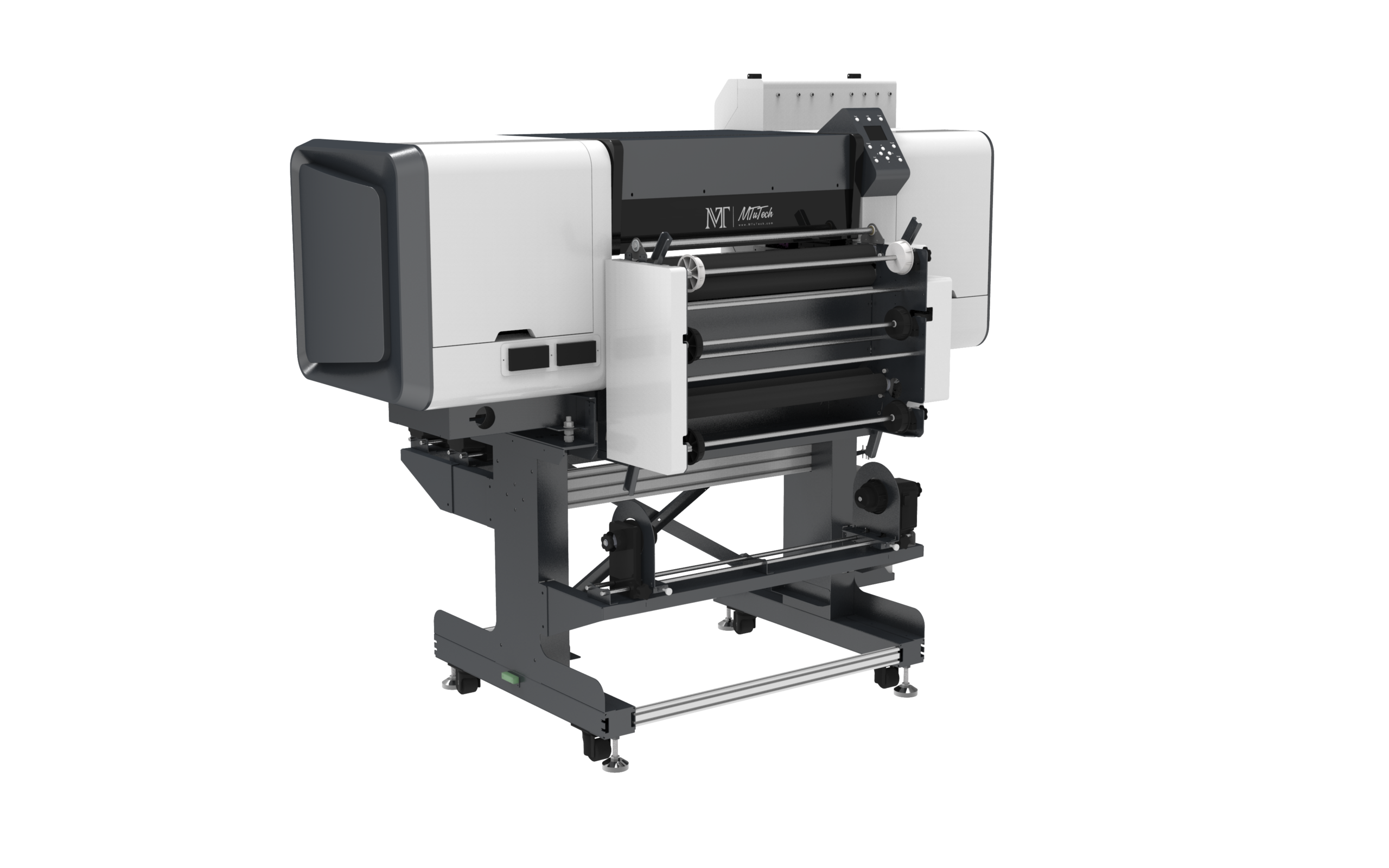
What Is a 60cm UV DTF Printer?
A 60cm UV DTF printer prints UV ink onto special transfer film, usually with white ink and varnish layers, then laminates the printed film so the design can be transferred to a hard surface. The process is different from regular garment DTF. UV DTF is mainly used for hard goods: bottles, boxes, acrylic, glass, metal, plastic, phone cases, promotional items, cosmetic packaging, and many small merchandise products.
The 60cm width matters because it supports a more commercial layout. Instead of printing one small design at a time, operators can gang multiple logos, labels, names, and product graphics across the film. This helps reduce wasted space and improves production planning for repeat orders.
Who Should Consider a Commercial 60cm UV DTF Printer?
A commercial 60cm UV DTF printer makes sense when the business wants flexible hard-surface decoration without building a jig for every product. It is useful when the product mix changes frequently, when orders are small to medium volume, or when designs need to be produced first and applied later.
Good-fit businesses include:
- Promotional product suppliers printing logos for many object types.
- Gift shops selling personalized drinkware, boxes, phone cases, and decor.
- Packaging sample teams that need short-run labels and prototypes.
- Small factories decorating branded parts or seasonal packaging.
- Print shops that already sell UV printing and want a transfer option.
- Ecommerce sellers that need flexible custom designs without large inventory.
If your work is mostly direct printing on flat rigid products, start with the main UV printer category. If you mainly decorate bottles and tumblers with direct print, compare a tumbler printer or 360 rotary UV printer. If your product mix is varied and transfer flexibility matters, the UV DTF printer route is worth serious attention.
How the Commercial UV DTF Workflow Works
The workflow is straightforward, but every step affects quality. A weak file, poor film handling, wrong lamination pressure, or inconsistent curing can create transfer problems later.
- Prepare artwork. Arrange designs for efficient film use and include bleed or spacing where needed.
- Print on A film. The printer lays down color, white ink, and varnish depending on the file setup.
- Laminate with B film. The printed layer is covered so the design can be transferred cleanly.
- Cut or trim designs. Jobs may be sheeted, rolled, or separated by customer/order.
- Apply to product. The operator presses the transfer onto the hard surface and peels according to film behavior.
- Check adhesion and finish. The finished product should be inspected before packing or shipping.
Because the workflow is film-based, shops can print ahead for repeat designs or apply transfers on demand. That flexibility is one reason UV DTF is attractive for custom product businesses.
Why 60cm Width Matters
Width affects layout efficiency. A small-format printer may be fine for samples or occasional jobs, but a 60cm UV DTF printer gives more room to gang work across the film. This can reduce film waste and make the operator more productive. If a shop runs many small logos, names, packaging decals, and promotional graphics, the wider format can make scheduling easier.
The 60cm format also helps when customers order larger graphics for boxes, panels, drinkware wraps, or branded displays. It does not mean every job must be large. It means the shop has more layout flexibility and can batch multiple orders in one run.
Film, Ink, and Varnish Costs
Commercial buyers should understand consumables before buying. UV DTF cost includes A film, B film, ink, varnish, cleaning supplies, waste during setup, test prints, and occasional maintenance parts. If foil stamping is used, foil material and process time must also be included in the quote to the customer.
Track each job by square area, not just by piece count. A small logo and a full bottle wrap do not use the same film or ink. A sheet with many small graphics may have excellent material efficiency, while a poorly nested layout can waste film. Build pricing around real usage so profit does not disappear into consumables.
White Ink and Varnish Control
White ink is important because UV DTF transfers are often applied to dark, transparent, metallic, or colored products. Varnish helps create the transfer structure and can add gloss or raised feel. The machine should manage white ink reliably, because white ink settling can create nozzle and density problems.
Ask about circulation, maintenance routines, and daily nozzle checks. The UV DTF printer maintenance schedule is useful for building operator habits around cleaning, film handling, nozzle care, and production checks.
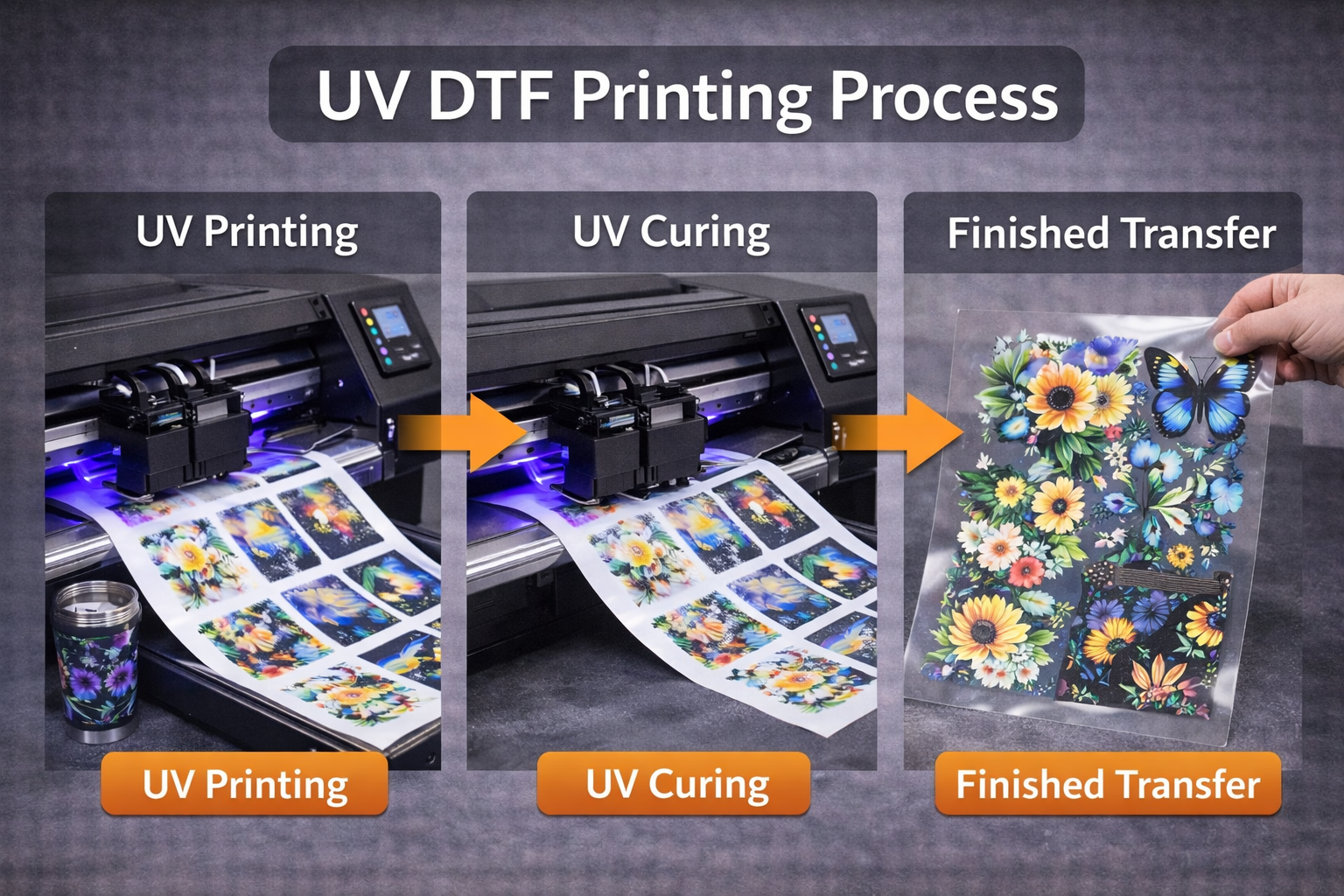
Foil Stamping and Premium Effects
Some commercial UV DTF workflows support foil effects for premium packaging, gift items, labels, and decorative products. Foil can increase perceived value, but it also adds process control. The operator must understand compatible materials, film behavior, heat or pressure requirements if applicable, and customer expectations.
If foil is part of the sales plan, compare machines and workflows using the UV DTF printer with foil stamping workflow. Do not price foil jobs like ordinary transfer jobs. Include material, setup, testing, and slower handling in the selling price.
Best Products for a 60cm UV DTF Printer
UV DTF works best when the product surface is suitable for transfer adhesion and the design benefits from flexible placement. It is especially helpful for products that are difficult to fixture directly in a printer or where many small designs need to be produced together.
- Cosmetic bottles, jars, and personal-care packaging.
- Glass cups, tumblers, and hard drinkware surfaces.
- Acrylic signs, nameplates, and gift items.
- Phone cases, electronics accessories, and small plastic products.
- Metal tags, promotional tools, and branded parts.
- Gift boxes, packaging prototypes, and seasonal merchandise.
For round drinkware, compare UV DTF with direct print before choosing. The UV DTF vs regular DTF article explains transfer differences, while the 360 rotary UV printer page helps when direct full-wrap printing is the main requirement.
Commercial 60cm UV DTF Printer vs Direct UV Printing
| Workflow | Best Use | Main Advantage |
|---|---|---|
| 60cm UV DTF printer | Mixed hard goods, labels, decals, packaging, custom transfer work | Flexible placement and batch film production |
| Flatbed UV printer | Rigid flat products like acrylic, signs, panels, phone cases, and gifts | Direct print quality and stable bed setup |
| Rotary UV printer | Bottles, tumblers, cups, tubes, and cylindrical products | Direct wrap printing on round objects |
| Regular DTF printer | Garments and textile transfers | Soft fabric transfer workflow |
The best shops do not treat these workflows as enemies. They use the method that fits the product. A direct flatbed print may be best for acrylic awards. Rotary UV may be best for premium drinkware. UV DTF may be best for mixed product batches and hard-to-fixture objects.
Production Planning for Commercial Orders
Commercial UV DTF production should be organized around batching. Group jobs by film type, finish, customer deadline, and application surface. Keep artwork spacing consistent. Label printed sections clearly so the application team does not waste time finding the right transfer for each order.
Shops that handle many custom orders should create naming rules for files and job sheets. Include customer name, design size, quantity, material, film type, and application notes. This reduces mistakes when several small orders are printed on one roll.
Quality Checks Before Delivery
Every commercial workflow needs a quality gate. For UV DTF, check print clarity, white ink coverage, varnish consistency, film lamination, edge cleanliness, transfer adhesion, and final surface appearance. The product should not be packed just because the design transferred. It should pass handling expectations for that product category.
Test adhesion on your actual product materials. Glass, coated metal, plastic, acrylic, and painted surfaces can behave differently. Some products may need cleaning before application. Others may not be suitable for the transfer at all. A good sales process sets these limits before the customer places a large order.
Pricing UV DTF Transfer Jobs
Price should include film area, ink, varnish, waste, setup, artwork time, application labor, packaging, and profit. Do not price only by the number of pieces. Ten tiny logos are not the same as ten large bottle wraps. A rush order also has different value from a flexible-deadline job.
A simple pricing model can include:
- Base setup fee for artwork and layout.
- Film and ink cost by printed area.
- Application labor per product.
- Extra charge for foil or premium effects.
- Waste allowance for testing and rejects.
- Margin for packing, customer service, and overhead.
If the business is still choosing between transfer and direct decoration, review the best UV DTF printer for small business guide along with the direct UV product pages.
Buyer Checklist for a 60cm UV DTF Printer
- Confirm actual print width and media compatibility.
- Ask whether A film and B film are easy to source.
- Review white ink circulation and nozzle maintenance.
- Check varnish quality and transfer finish.
- Ask for samples on your real product materials.
- Confirm RIP software, training, and workflow support.
- Understand lamination setup and film tension control.
- Ask for spare parts and maintenance consumables list.
- Calculate material cost by area before setting prices.
Common Mistakes to Avoid
Buying Only for Width
60cm width is useful, but it is not the only requirement. Ink stability, film handling, lamination, support, and maintenance matter just as much.
Skipping Product Tests
UV DTF adhesion depends on the surface. Test glass, plastic, coated metal, acrylic, and painted products before selling large batches.
Ignoring Film Waste
Poor layout can waste expensive film. Group designs carefully and track real usage.
Underpricing Application Labor
Applying transfers takes time. Include cleaning, alignment, peeling, inspection, and packing in the final price.
Film Storage and Production Environment
UV DTF film should be stored carefully. Dust, humidity, fingerprints, and poor handling can affect print quality and transfer performance. Keep rolls sealed when not in use, avoid touching the printable area, and store film away from excessive heat or moisture. A clean production table matters because small debris can show up as a visible defect after transfer.
The printer area should also be organized for repeat work. Keep A film, B film, cleaning tools, test products, packing material, and job sheets close to the operator. Commercial production becomes easier when the workflow has a clear left-to-right movement: artwork, print, laminate, trim, apply, inspect, pack.
60cm Layout Strategy for Better Profit
The advantage of 60cm width is lost if artwork is placed randomly. Build a layout strategy for common job types. Group small logos together, place repeat designs in rows, and leave enough spacing for trimming. If customers reorder frequently, save template files so the same product can be produced again without rebuilding the sheet.
For mixed orders, label each design clearly in the file or on the job sheet. A roll with many customer logos can create confusion if the application team cannot identify each transfer quickly. Good layout saves film, but good labeling saves labor.
Maintenance Habits for Commercial 60cm UV DTF
Daily maintenance should be treated as production insurance. Check nozzles before running paid work, keep the print area clean, inspect film tracking, monitor white ink, and confirm lamination behavior before long batches. Weekly checks should include deeper cleaning, checking rollers, reviewing waste ink, and confirming that the printer is still producing consistent density.
For teams new to this process, create a printed checklist near the machine. The goal is not to make operation complicated. The goal is to make quality repeatable even when different people run the printer.
When UV DTF Is Not the Best Choice
UV DTF is flexible, but it is not perfect for every job. If the customer needs a direct printed premium finish on flat acrylic, a flatbed UV printer may be better. If the customer needs full-wrap bottle production at higher volume, direct rotary UV may be more efficient. If the product is soft textile, regular DTF is the more natural workflow.
This is why buyers should compare by application instead of trying to force one machine to do everything. The right workflow protects quality and profit. The wrong workflow creates slow production, weak adhesion, and customer complaints.
Questions to Ask Before Buying
- What film brands or specifications does the machine support?
- What is the real printable width after margins?
- How does the printer manage white ink circulation?
- What lamination settings are recommended for commercial batches?
- Can the supplier print samples on my exact products?
- What daily and weekly maintenance is required?
- Which spare parts should be stocked for uptime?
- How is training handled after delivery?
FAQ
Is a 60cm UV DTF printer better than a smaller machine?
It is better for commercial batching, larger graphics, and layout efficiency. A smaller machine may be enough for samples or very low-volume work.
Can UV DTF replace a flatbed UV printer?
Not completely. UV DTF is flexible for transfers, while flatbed UV is stronger for direct printing on rigid flat products. Many businesses use both workflows for different jobs.
What products should I test first?
Test your most profitable products first: bottles, boxes, acrylic, phone cases, coated metal, glass, or the exact hard goods your customers already request.
Does foil stamping make UV DTF more profitable?
It can, if customers pay for the premium effect. Price foil jobs separately because they require extra material and process control.
How to Start With the First Five Products
For clean reporting, track every order by film length, application time, product type, and reject reason. After two weeks, those notes will show which products deserve more marketing and which products need better testing.
Also decide which orders should be printed as transfers and which should be sent to direct UV printing. This simple rule helps sales staff quote faster and prevents operators from forcing unsuitable jobs through the wrong process.
When the printer arrives, choose five products that are easy to sell and easy to repeat. For example, start with cosmetic labels, bottle logos, acrylic gifts, phone case graphics, and small packaging decals. Build templates for those first, test adhesion, record pricing, and only then expand into more unusual objects. A focused launch prevents the team from wasting the first month trying every possible product without mastering any profitable workflow.
Bottom line: a commercial 60cm UV DTF printer is valuable when the shop has a clear product mix, good film management, reliable white ink maintenance, and pricing that reflects real material and labor cost. Buy the workflow, not just the machine width.