
Quick answer: A UV DTF printer with foil stamping helps shops produce premium hard-surface transfers for packaging, cups, glass, plastic, metal, acrylic, and promotional products without printing directly on every object. The workflow depends on clean film handling, correct ink and varnish balance, controlled lamination, and quality checks before the transfer reaches the customer.
This guide is for small print businesses, label producers, custom gift shops, and product decorators comparing standard UV DTF transfers with foil-stamped premium output. If you are evaluating equipment, start with the MTuTech UV DTF Printer and use this article as the workflow checklist.
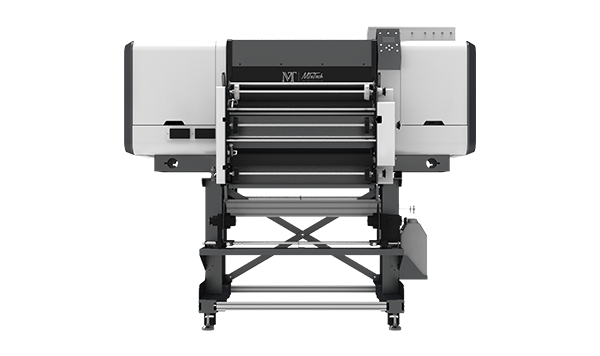
What makes UV DTF different from direct UV printing
Direct UV printing places ink directly on the product surface. UV DTF printing creates a transfer first, then applies that transfer to the product. This difference changes the business model. Direct UV printing is excellent when the shop controls the object, fixture, placement, and production run. UV DTF is excellent when the shop wants to produce graphics that can be applied later to many hard surfaces.
A UV DTF printer prints onto a release film, adds adhesive and protective layers through the workflow, and creates a peel-and-stick style transfer. The customer or production team can apply that transfer to glass bottles, plastic packaging, metal tins, acrylic items, phone cases, promotional products, candles, jars, and many other smooth surfaces.
Foil stamping adds a premium visual effect. It can make logos, names, borders, and decorative details look more expensive. The goal is not to use foil everywhere. The goal is to place foil where it increases perceived value and supports the price of the finished product.
Best products for UV DTF foil transfers
UV DTF with foil stamping works best on products where a premium label or decorative element changes the customer’s impression immediately. The transfer should feel intentional, not like a sticker added as an afterthought.
Cosmetic and skincare packaging
Small cosmetic brands often need short-run premium packaging before they commit to large manufacturing volume. Foil UV DTF transfers can help them test logo placement, color, and finish on jars, bottles, lids, and display samples.
Candle jars and gift packaging
Candle labels sell through visual appeal. A foil logo, scent name, or border can make a small-batch candle look retail-ready. UV DTF is helpful because the same transfer workflow can support multiple jar shapes without changing the printing machine setup.
Drinkware and promotional products
For drinkware, UV DTF can support short campaigns, event merchandise, and personalized branding. For full-wrap production on bottles and tumblers, compare the workflow with the 360 Rotary UV Printer or a dedicated tumbler printer. UV DTF is strongest when the transfer approach fits the order size and application style.
Electronics, accessories, and acrylic products
Phone cases, chargers, small electronics accessories, acrylic tags, and display pieces can all use UV DTF transfers. The workflow is especially useful when the product shape makes direct loading slow or when the buyer wants the same logo across several object types.
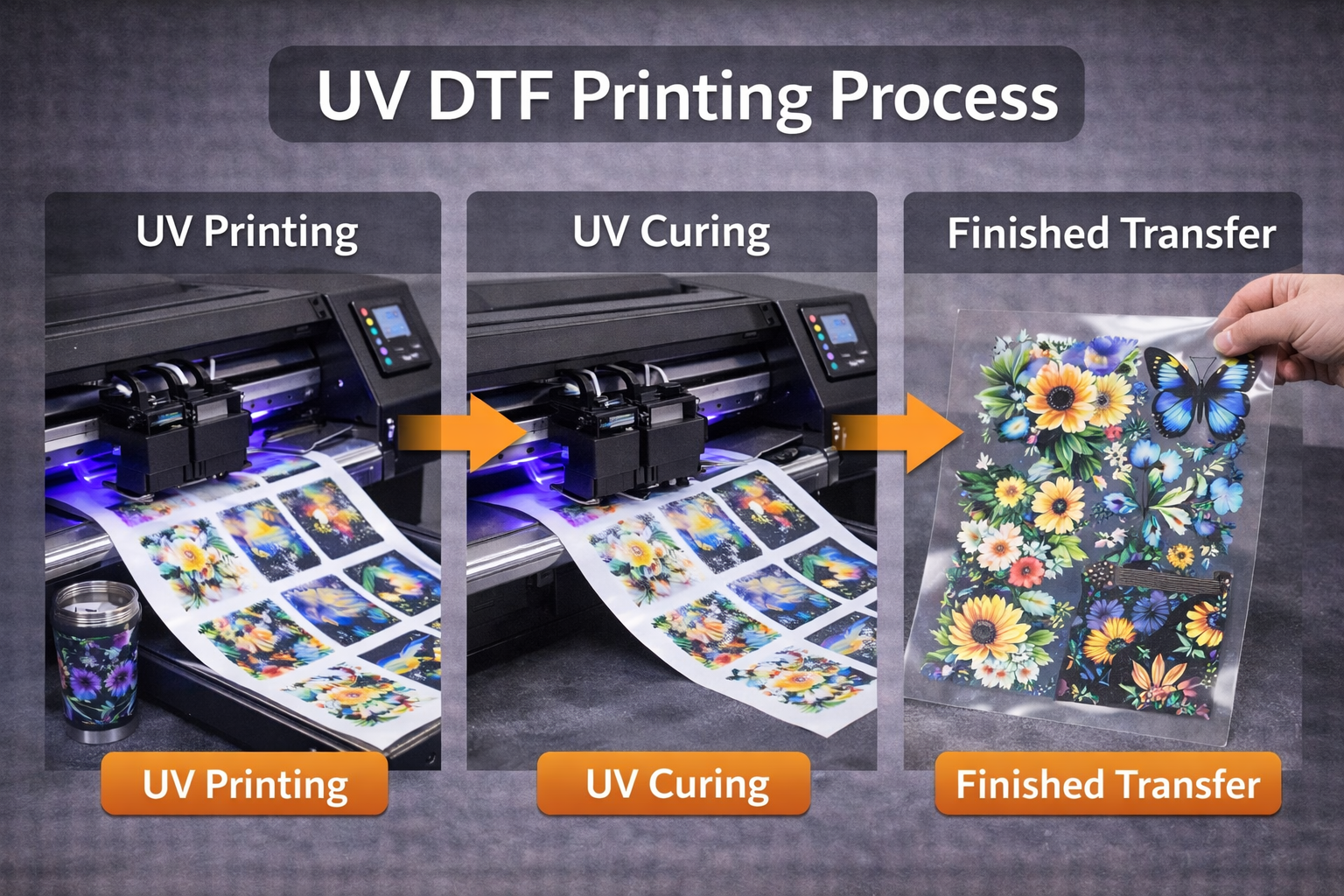
The UV DTF foil stamping workflow
A clean workflow matters more than a dramatic sample. Many shops can make one impressive transfer. Fewer shops can repeat the same finish across a full order without dust, wrinkles, edge lift, poor adhesion, or inconsistent foil. Use the following structure as a production checklist.
Step 1: Prepare artwork for transfer production
Artwork should be sized for the final product, not simply exported from a logo file. Keep fine lines thick enough to transfer cleanly. Avoid placing tiny foil details where the customer will rub the product often. Separate color, white, varnish, and foil elements clearly. If the file includes transparent gaps, preview how the final object color will show through.
For brand work, save the approved file with the customer’s product name, transfer size, film type, and production date. Repeat orders become much easier when the file naming is disciplined.
Step 2: Choose the correct film
Film quality affects release, clarity, edge behavior, and final application feel. Poor film can make a good printer look inconsistent. Store film away from dust, heat, moisture, and fingerprints. Handle it with clean hands or gloves when possible.
Step 3: Control ink, white, and varnish balance
UV DTF transfers need enough ink and white support to look strong, but too much material can create thickness, cracking, or poor application feel. White ink helps color stand out on dark or transparent products. Varnish can protect the print and support gloss, but it must match the transfer and foil plan.
Step 4: Add foil where it increases value
Foil should be treated as a premium accent. Use it on logos, borders, icons, limited-edition marks, initials, and high-visibility details. Avoid covering large areas with foil unless the product design truly needs it. Large foil zones can increase cost and make defects easier to notice.
Step 5: Laminate with even pressure
Lamination is where many UV DTF jobs succeed or fail. Uneven pressure, dust, or trapped air can create visible defects after application. Keep the lamination path clean and inspect the first section before running the full batch.
Step 6: Cure and inspect before cutting
UV curing should be complete enough for handling and application. After curing, inspect the transfer under normal lighting and angled light. Look for pinholes, weak white areas, foil gaps, scratches, and edge contamination.
Step 7: Apply to a test object
Before shipping or selling a batch, apply one transfer to the real product material. Glass, coated plastic, powder-coated metal, acrylic, and painted surfaces can behave differently. A small adhesion test protects the order.
Material compatibility and surface prep
UV DTF transfers work best on clean, smooth, and stable surfaces. The transfer may not perform well on rough, oily, textured, dusty, flexible, or heavily curved surfaces. Surface prep is still part of the job even though the printer does not touch the product directly.
- Clean glass and acrylic before application to remove fingerprints and dust.
- Test coated metals because some coatings resist adhesion.
- Avoid applying transfers to wet, cold, or contaminated surfaces.
- Press from the center outward to reduce trapped air.
- Let the transfer settle before aggressive rubbing or packaging.
For direct printing on rigid products, compare UV DTF with a flatbed solution such as the UV Printer 9060 or a larger industrial UV printer. The right choice depends on order size, object handling, and whether the shop wants transfers or direct-to-object output.
How to price UV DTF foil transfers
Pricing should include more than ink. Include film, adhesive or transfer materials, foil, lamination waste, test prints, operator time, cutting, packing, failed transfers, and the value of the premium finish. A foil-stamped transfer should not be priced like a basic sticker because it solves a different customer problem.
Use product value as a pricing signal
A luxury candle jar, boutique cosmetic bottle, or limited-edition gift box can support a higher transfer price than a low-cost giveaway item. The transfer is part of the product presentation. If it helps the customer charge more, the print shop should not price it as a commodity.
Separate setup from unit cost
Short runs need a setup charge. File preparation, sample approval, foil testing, and surface testing all take time even if the order is small. A clear setup fee protects profit on custom work.
Offer good, better, and premium finish levels
A simple menu can improve sales. Offer a standard UV DTF transfer, a white-supported premium transfer, and a foil-accent transfer. Customers can choose based on budget and product positioning.
Common UV DTF production mistakes
Mistake 1: Using foil on too much of the design
Foil is strongest as an accent. When everything is foil, nothing feels special. Large foil areas also increase the chance that a small defect becomes visible.
Mistake 2: Ignoring surface testing
Even a beautiful transfer can fail on the wrong surface. Always test the actual product material before accepting a repeat order or promising durability.
Mistake 3: Skipping file cleanup
Thin lines, rough logo edges, and low-resolution art show up quickly in premium finishes. Clean artwork before production instead of hoping the printer hides the problem.
Mistake 4: Pricing only by square inch
Area matters, but complexity matters too. Foil setup, customer proofing, small-batch handling, and packaging all affect cost.
Where UV DTF fits with other MTuTech machines
Use a UV DTF printer when transfers are the product or when customers need graphics that can be applied later. Use a visual positioning UV printer when the shop needs accurate direct printing on irregular flat objects. Use a cylinder UV printer or 360 rotary UV printer when the job requires direct printing around bottles, cups, and jars. Use a hybrid UV printer when the production mix includes rigid and roll media.
This internal equipment path keeps each page’s keyword role clear. The UV DTF article supports transfer intent. The rotary and cylinder pages support direct curved-object printing. The flatbed and visual-positioning pages support direct object and sheet printing. Clear internal links help both users and search engines understand which page answers which buying question.
Buying checklist for a UV DTF printer with foil stamping
- Confirm maximum print width and daily transfer volume.
- Check whether the workflow supports white ink, varnish, lamination, and foil effects.
- Ask for sample transfers on the same materials your customers use.
- Review film storage, maintenance, and cleaning requirements.
- Calculate setup time, waste rate, and premium pricing before quoting jobs.
- Make sure operators understand artwork prep, test application, and quality control.
Durability checks before selling UV DTF transfers
Durability should be tested on the actual product, not only on a clean sample card. The same transfer can behave differently on glass, coated plastic, powder-coated metal, painted packaging, and acrylic. Customers care about what happens after handling, packing, shipping, washing, wiping, and shelf display.
Basic adhesion test
Apply the transfer to the real product material. Let it settle, then check edge lift and surface bond. Use a simple rub test and visual inspection before approving the order. If the product will be handled often, test more aggressively before promising long-term performance.
Packaging and shipping test
Some transfers look good until products touch each other during packing. Test how the decorated product behaves with tissue, boxes, dividers, foam, and shipping movement. A transfer that scratches during fulfillment can create customer complaints even if the print was technically correct.
Cleaning test
If the product is a jar, bottle, tumbler, or cosmetic container, customers may wipe it. Test with the cleaning method the buyer expects. Do not promise dishwasher durability unless the exact product, transfer, and application method have been tested for that use case.
Customer education improves profit
UV DTF shops should educate customers before the first order. Explain which surfaces are best, how transfers should be applied, where foil works well, and what care instructions are realistic. This reduces revisions and makes premium pricing easier to defend.
A simple proof sheet can help. Include transfer size, quantity, finish level, product material, placement notes, application instructions, and care notes. When customers approve that sheet, the production team has a clear reference and fewer open questions.
Offer application guidance
If customers apply the transfers themselves, include clear application instructions. Tell them to clean the surface, align before pressing, press from the center outward, avoid touching the adhesive side, and wait before aggressive rubbing. Better application produces better reviews.
Use samples to upsell premium finishes
Foil stamping is easier to sell when customers can see it. Keep a sample kit with standard, white-supported, varnish, and foil-accent transfers on real products. Physical samples help customers understand why the premium option costs more.
Production SOP for repeat orders
Repeat orders should not depend on memory. Save the artwork, film type, ink settings, foil details, transfer size, test result, and customer approval notes. Label finished transfers by customer and SKU. If the customer returns three months later, the shop should be able to reproduce the same look without starting from zero.
This SOP also supports search performance indirectly. When the shop can deliver consistent results, it can photograph real work, build case studies, and add stronger examples to product pages. Better examples increase trust for the UV DTF printer buyer journey.
UV DTF vs direct UV printing for premium product decoration
The choice between UV DTF and direct UV printing should be based on order flow. UV DTF is strong when graphics need to be produced first and applied later, or when the same artwork must work across several object types. Direct UV printing is stronger when the shop controls the object, fixture, and placement and wants the ink printed directly on the product surface.
| Need | Better option | Reason |
|---|---|---|
| Small premium labels for many hard surfaces | UV DTF printer | Transfers can be produced in batches and applied later |
| Accurate placement on flat objects | Visual positioning UV printer | Camera alignment helps with direct object printing |
| Full-wrap bottles and tumblers | 360 rotary UV printer | Rotary handling supports cylindrical direct printing |
| Large rigid boards and panels | Industrial UV printer | Flatbed production handles sheet materials efficiently |
This comparison prevents the most common buying mistake: expecting one machine to be perfect for every job. UV DTF is powerful, but it should be sold and scheduled as a transfer workflow. When the customer needs exact direct placement on the object, one of the direct UV printer paths may be more appropriate.
When Foil Stamping Should Not Be Used
Foil can make a UV DTF transfer look premium, but it should not be added to every design. If the product surface is heavily textured, the artwork is too small, or the buyer expects a low-cost promotional finish, foil may create extra cost without increasing perceived value. The best use cases are cosmetics, boutique packaging, gift products, premium labels, glass items, acrylic accessories, and branded launch kits where the customer will pay for a luxury finish.
For SEO routing, this article should support the main UV DTF printer page first. If a buyer wants direct product printing instead of transfer decoration, send them to UV printer, visual positioning UV printer, or 360 rotary UV printer pages based on the product shape.
FAQ
Is UV DTF printing the same as sticker printing?
No. UV DTF transfers are created for hard-surface decoration and can include white ink, varnish, and premium effects. They are usually positioned as product decoration, not basic paper stickers.
Can UV DTF transfers be used on tumblers?
They can be used on some drinkware applications, but direct full-wrap production is usually better handled by a tumbler printer or 360 rotary UV printer.
Does foil stamping make UV DTF transfers more profitable?
It can, if priced correctly and used on products where premium appearance matters. Foil adds material and setup cost, so it should support a higher selling price.
What is the best machine to compare first?
Start with the MTuTech UV DTF Printer. Then compare direct flatbed, visual positioning, or cylinder UV options if your work is better suited to direct printing.