
What Materials Can You Print On With a UV Printer?
Complete guide to UV printer compatible materials: glass, metal, wood, plastic, ceramic, leather, and more. Learn which surfaces work best and tips for optimal results.
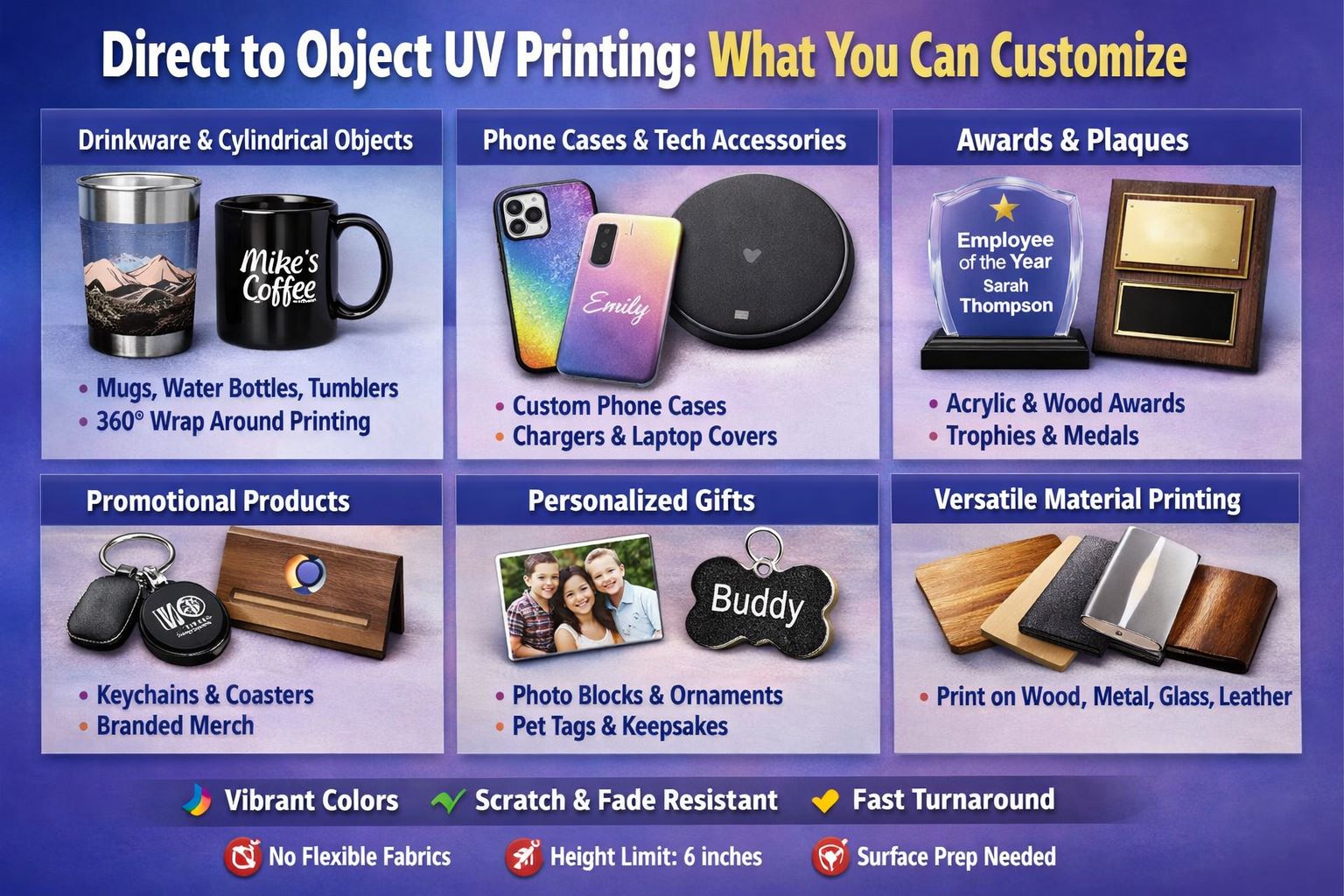
Quick Answer: UV printers can print on virtually any flat or cylindrical surface including glass, metal, wood, plastic, acrylic, ceramic, leather, PVC, stone, cardboard, and coated materials. The UV ink cures instantly on contact, bonding to both porous and non-porous surfaces without soaking in.
One of the biggest advantages of UV printing technology is its remarkable material versatility. Unlike inkjet printers limited to paper or DTG printers designed for fabric, UV printers work on almost any substrate you can fit on the print bed.
This guide covers every major material category, what products you can create, and tips for getting the best print results on each surface.
UV Printer Materials: Quick Reference
| Material | Pre-Treatment | Popular Products |
| Glass | Recommended | Awards, photo prints, drinkware, vases |
| Metal | Optional | Signs, tumblers, nameplates, jewelry |
| Wood | Not required | Wall art, signs, cutting boards, gifts |
| Acrylic | Not required | Keychains, signs, displays, awards |
| Plastic | Some types | Phone cases, packaging, promotional items |
| Ceramic | Recommended | Mugs, tiles, plates, decorative items |
| Leather | Not required | Wallets, bags, belts, journals |
| Stone/Marble | Recommended | Coasters, tiles, decorative pieces |
Printing on Glass
Glass is one of the most popular UV printing substrates. The smooth surface allows for exceptionally sharp, vibrant prints. However, glass is non-porous, so proper surface preparation improves ink adhesion.
Best Products
- Photo prints and wall art on glass panels
- Wine glasses, champagne flutes, and drinkware
- Awards, trophies, and recognition plaques
- Decorative vases and home décor
- Mirrors with printed designs
Pro Tip: Use a pre-coating liquid on glazed glass for better adhesion. Clean the surface with alcohol before printing to remove oils and dust.
Printing on Metal
Metal surfaces produce durable, scratch-resistant prints ideal for outdoor signage and industrial applications. Aluminum, stainless steel, and coated metals all work well with UV printing.
Best Products
- Business signs and nameplates
- Stainless steel tumblers and water bottles
- Dog tags and ID badges
- Promotional items (pens, keychains)
- Control panels and industrial labels
Pro Tip: Brushed aluminum creates stunning results. For items exposed to weather or temperature changes, consider a pre-coat for maximum durability.
Printing on Wood
Wood is excellent for UV printing because the natural grain shows through, creating unique rustic aesthetics. Both raw and finished wood surfaces accept UV ink well.
Best Products
- Wooden signs and wall art
- Cutting boards and kitchen items
- Photo prints on wood panels
- Wine boxes and gift packaging
- Furniture panels and tabletops
Pro Tip: Sand the wood smooth before printing for cleaner results. For white ink designs, use white ink as a base layer to make colors pop against dark wood.
Printing on Plastic & Acryli
MTuTech production notes for UV pr
How to use this guide before choosing a machine
A buyer should use this UV material compatibility guide as a practical filter before comparing machine price. The first decision is not the brand name or the advertised speed. It is whether the printer can hold the material steady, keep the print head at the correct working distance, cure the ink properly, and repeat the same result across a production batch.
Questions to answer before requesting a quote
- What is the largest product size, and does the job need flatbed, rotary, or hybrid handling?
- Will the product require white ink, varnish, primer, textured layers, or a special fixture?
- How many pieces must be produced per day, and how much setup time is acceptable?
- Will operators need camera alignment, repeatable jigs, or RIP templates to reduce mistakes?
- What is the expected durability requirement: indoor display, packaging, drinkware, outdoor signage, or industrial labeling?
For MTuTech, this is also where internal comparison matters. A small sample shop may start with a compact UV printer, but a production business should compare printable area, gantry stability, ink configuration, curing strength, and after-sales support. When the job includes mixed products, compare the relevant product pages before making a final shortlist.
Helpful MTuTech comparison pages
Contact MTuTechinting applications
For buyers comparing UV printing applications options, the strongest ranking signal is not only the definition of the process. The page should also explain machine fit, production limits, material behavior, ink or fixture requirements, and the next page a buyer should read before requesting a quote.
Best machine fit
Use this guide together with UV Printer when the job requires stable UV output, repeatable setup, and production-ready print quality. If the work involves different shapes, materials, or order sizes, compare it with Flatbed UV Printer 2513 before choosing the final printer.
Production checklist
- Confirm the printable area, part height, and fixture or rotary requirements before quoting the job.
- Match ink, primer, and curing settings to the substrate so adhesion and scratch resistance are predictable.
- Standardize artwork preparation, white ink layers, and test prints before moving into batch production.
- Track production cost by ink use, setup time, rejects, and finishing steps instead of looking only at printer price.
Related MTuTech resources
FAQ
Which MTuTech printer should this article connect to? The best next page depends on the material, shape, and production volume. Flat products usually start with UV printer or UV Printer 9060 pages, while bottles, tumblers, and round products should connect to rotary, cylinder, tumbler, or cylindrical printer pages.
What should buyers check before ordering? Buyers should confirm print size, material compatibility, white ink needs, fixture design, curing performance, maintenance expectations, and whether the workflow supports repeatable production rather than one-off samples only.c
Most plastics work well with UV printing, including ABS, PVC, polycarbonate, and acrylic. Some plastics like polyethylene (PE) and polypropylene (PP) may require flame treatment or primers for optimal adhesion.
Best Products
- Phone cases (huge market)
- Acrylic keychains and standees
- PVC signs and display boards
- Packaging and containers
- Promotional products and toys
Pro Tip: Thin acrylic (1mm) can warp from UV lamp heat. Use an adhesive board to keep it flat during printing.
Printing on Ceramic
Ceramic surfaces produce vibrant, glossy prints perfect for personalized gifts and home décor. The ink bonds well to glazed ceramic surfaces.
Best Products
- Custom coffee mugs
- Decorative tiles and coasters
- Plates and serving dishes
- Flower pots and vases
Printing on Leather
Leather accepts UV ink beautifully, creating luxurious custom products. Both genuine and faux leather work well. The texture adds character to printed designs.
Best Products
- Wallets and cardholders
- Handbags and purses
- Belts and watch bands
- Journals and notebooks
- Luggage tags and keychains
Materials to Avoid or Use Caution
While UV printers are incredibly versatile, some materials present challenges:
- Fabric/textiles: UV printing isn’t ideal for clothing — use DTG or DTF instead
- Polyethylene (PE) / Polypropylene (PP): Require flame treatment or special primers
- Silicone: Poor adhesion without specialized treatment
- Teflon/PTFE: Non-stick surfaces don’t hold UV ink
Start Printing on Any Surface
The material versatility of UV printing is what makes it such a powerful business tool. From glass and metal to wood and leather, you can create custom products across virtually every category.
Ready to explore what you can create? Check out our UV printer collection to find the right machine for your material needs.
Frequently Asked Questions
Can UV printers print on fabric?
UV printing isn’t recommended for clothing or soft textiles. For fabric, use DTG (direct-to-garment) or DTF (direct-to-film) printing instead. However, UV printers work well on leather, canvas, and rigid textile-covered items.
Do I need primer for every material?
Not always. Wood, most plastics, acrylic, and leather typically don’t need pre-treatment. Glass, glazed ceramics, and some metals benefit from primers for better adhesion and durability.
What’s the maximum thickness UV printers can handle?
Most flatbed UV printers handle materials up to 2 inches (50mm) thick. The exact capacity depends on your printer model — always check your machine’s specifications.
How durable are UV prints on different materials?
How to qualify materials before production
A UV printer can print on many materials, but a profitable shop still needs a qualification process. The same design may behave differently on acrylic, coated metal, untreated glass, flexible PVC, leather, ceramic, wood, or powder-coated parts. Surface energy, texture, oil, coating, and storage conditions all affect adhesion.
For repeat orders, build a material library. Record the substrate brand, cleaning method, primer use, print mode, lamp setting, and final durability result. This makes pricing more reliable and reduces the chance of a customer approving a sample that cannot be repeated in production.
If a product is irregular, curved, or hard to fixture, the material decision must be made together with the machine decision. A flat product may only need a flatbed UV printer, while cups, bottles, or tubes need rotary tooling or a dedicated cylindrical workflow.
- Test adhesion after cleaning and after 24 hours, not only immediately after printing.
- Use primer only where it improves adhesion without damaging appearance.
- Keep separate profiles for dark, clear, glossy, textured, and coated materials.
- Confirm customer handling conditions before promising outdoor or wash resistance.
Useful next pages: UV Printer, UV Printer 9060, Cylindrical Printer, Contact MTuTech.UV-cured prints are scratch-resistant, waterproof, and fade-resistant across all materials. With proper surface preparation, prints can last years even in outdoor conditions.
Commercial Buyer Notes for materials for UV printing
This topic matters because buyers identifying which substrates a UV printer can handle before choosing a machine. A post can rank for an informational keyword and still support a commercial page when it answers the practical questions a buyer asks before requesting a quote. For MTuTechPrinter.com, this article should guide readers toward the right production path instead of competing with the main product page.
The best audience for this page is commercial decorators, packaging studios, product sellers, and manufacturers with mixed material requirements. These visitors are usually not looking for a basic definition only. They want to know whether the workflow fits their products, whether the machine can handle the job repeatedly, and what problems they should avoid before investing in equipment.
Best-fit buyer scenarios
- Acrylic signs where buyers care about repeatability, realistic cost per job, and a production process that does not collapse once order volume increases.
- Wood gifts where buyers care about repeatability, realistic cost per job, and a production process that does not collapse once order volume increases.
- Metal plates where buyers care about repeatability, realistic cost per job, and a production process that does not collapse once order volume increases.
- Plastic cases where buyers care about repeatability, realistic cost per job, and a production process that does not collapse once order volume increases.
- Glass and ceramic products where buyers care about repeatability, realistic cost per job, and a production process that does not collapse once order volume increases.
Production checks before choosing a printer
- Surface energy should be tested on the same materials, blanks, inks, and finishing conditions the shop will use for paid orders.
- Primer need should be tested on the same materials, blanks, inks, and finishing conditions the shop will use for paid orders.
- Print height should be tested on the same materials, blanks, inks, and finishing conditions the shop will use for paid orders.
- Fixture method should be tested on the same materials, blanks, inks, and finishing conditions the shop will use for paid orders.
- Scratch testing after cure should be tested on the same materials, blanks, inks, and finishing conditions the shop will use for paid orders.
How This Article Supports the Main Product Pages
The primary commercial path from this article should lead to UV printer. Readers who are comparing related workflows can also review UV printer 9060, cylindrical printer, UV printer applications. This keeps the blog post useful as an educational asset while passing topical relevance to the commercial pages that should rank for buyer-intent terms.
For search engines, this creates a cleaner hierarchy: the blog post handles long-tail questions, application details, mistakes, workflow checks, and comparison language; the product page remains the main destination for machine specifications, inquiry intent, and conversion. That structure helps reduce keyword overlap and gives Google clearer signals about which page should own the commercial keyword.
Internal linking recommendation
When this article is referenced from future content, use natural anchors such as “materials for UV printing”, “commercial materials for UV printing workflow”, and “buyer guide for materials for UV printing”. Reserve exact commercial anchors for the product page, especially when building external guest posts or high-authority references.
Decision Table for Commercial Use
| Use case | Key check | Why it matters |
|---|---|---|
| acrylic signs | surface energy | Use this as a buying signal before choosing the final printer workflow. |
| wood gifts | primer need | Use this as a buying signal before choosing the final printer workflow. |
| metal plates | print height | Use this as a buying signal before choosing the final printer workflow. |
| plastic cases | fixture method | Use this as a buying signal before choosing the final printer workflow. |
What Makes This Topic Easier to Rank
The easiest ranking angle is not to repeat broad product-page copy. The stronger approach is to answer specific buyer questions around setup, mistakes, material fit, cost control, workflow, and production risk. Those long-tail topics usually create impressions earlier than broad head terms, especially in the United States where buyers compare several suppliers before contacting a manufacturer.
This article should therefore be used as a support asset: keep the language practical, connect it to real production decisions, and link clearly to the right MTuTech Printer page. Over time, impressions from these long-tail phrases can help the site build topical authority and send more qualified visitors toward the pages that matter commercially.
Common Mistakes That Reduce ROI
One common mistake is judging a machine only by the sample print shown in a demo. A sample proves the printer can produce an attractive result once. A business needs repeatability across many jobs, blanks, operators, and customer artwork files. For materials for UV printing, that means the buyer should test the workflow under realistic shop conditions before assuming the same result will hold at production volume.
A second mistake is ignoring finishing, handling, and packaging. Many print problems appear after the print leaves the bed or fixture: scratches during packing, poor adhesion after cleaning, alignment drift across repeated items, or color mismatch when the same job is repeated later. These are not only technical issues; they affect refunds, customer satisfaction, and the confidence needed to sell higher-value jobs.
The final mistake is buying without a clear product plan. A printer is easier to profit from when the shop already knows the first 5 to 10 products it wants to sell. That product list should determine bed size, rotary needs, white ink use, fixture strategy, software workflow, and the kind of support expected from the supplier.
Simple pre-purchase checklist
- Choose three real products and test materials for UV printing on each one before scaling.
- Compare setup time, print time, curing quality, and post-print handling.
- Check whether the machine supports the exact material size and shape the business will sell.
- Confirm training, maintenance, spare parts, and workflow support before purchase.
- Keep one commercial page as the main quote path and use support articles to answer detailed questions.