
Vision System UV Printer: How AI-Powered Printing Works in Modern Digital Printing
The digital printing industry is evolving at a rapid pace, and one of the most transformative innovations in recent years is the Vision System UV Printer, also known as a Visual Positioning UV Printer. This advanced printing technology combines artificial intelligence (AI), machine vision, and UV curing to deliver unmatched accuracy, speed, and flexibility across industrial printing applications.
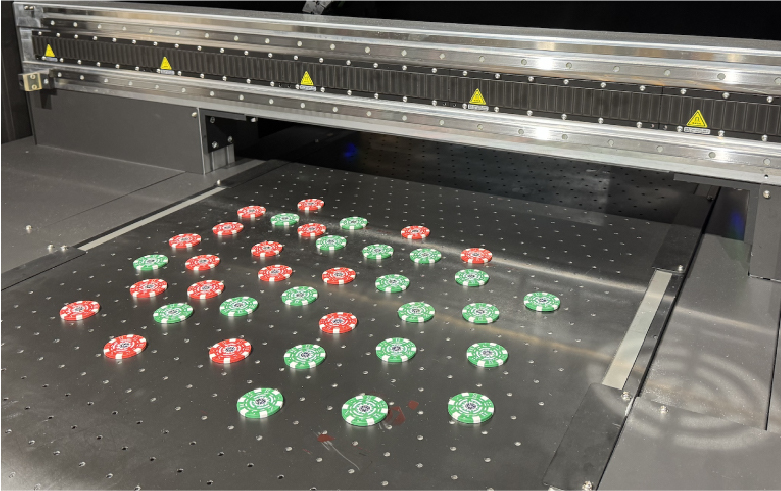
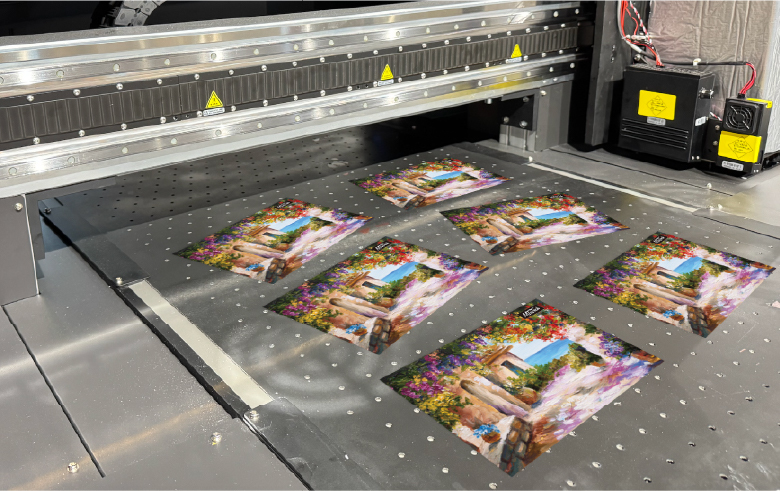
Unlike traditional UV printers that rely on manual alignment or fixed templates, a vision system UV printer uses real-time camera scanning and intelligent software algorithms to detect object positions, shapes, and orientations before printing. This allows businesses to print perfectly aligned graphics on irregular, pre-shaped, or randomly placed objects — without jigs, fixtures, or human intervention.
In this in-depth guide, we’ll explore how visual positioning works, why it is becoming essential for smart manufacturing, and how it compares with other popular industrial printers like UV printers, UV DTF printers, cylinder UV printers, and single pass printers.
What Is a Vision System UV Printer?
A Vision System UV Printer is a next-generation flatbed printer that uses AI-powered cameras to automatically recognize objects placed on the print bed and adjust print positioning in real time. Instead of manually aligning substrates, the system scans everything and prints exactly where needed.
This technology is commercially available as the Visual Positioning UV Printer from MTuTech, designed specifically for industrial-level accuracy and automation.
How AI-Powered Visual Positioning Works
1. Intelligent Camera Scanning
Industrial cameras scan the entire surface area of the printer bed and capture high-resolution images of all objects placed randomly.
2. Real-Time Object Recognition
AI algorithms identify the edges, contours, height differences, and orientation of every object.
3. Dynamic Print Mapping
The software automatically generates a dynamic print layout for each item.
4. Precision UV Printing
The print heads follow the AI-generated path and cure ink instantly using UV light.
This makes vision systems far more advanced than traditional flatbed UV printers or even popular models like the UV printer 9060, which still require manual positioning.
Why Vision System UV Printing Is a Game Changer
Zero Manual Alignment
You no longer need jigs, templates, or fixed fixtures.
Extreme Production Speed
You can print hundreds of items per hour without stopping for alignment.
Perfect for Irregular Objects
Phone covers, cosmetic caps, USB drives, keychains, bottles, electronic housings — all printed flawlessly.
Mass Customization
Each object can have different artwork, QR codes, serial numbers, or names.
Lower Labour Cost
One operator can manage full production, unlike manual workflows.
Vision System UV vs Traditional UV Printer
| Feature | Traditional UV Printer | Vision System UV Printer |
|---|---|---|
| Alignment | Manual | Automatic |
| Object Shapes | Fixed | Any |
| Production Speed | Medium | High |
| Waste | Higher | Near zero |
| Customization | Limited | Unlimited |
Even when compared with specialized machines like cylinder UV printers or 360 rotary UV printers, vision systems still dominate for mixed-shape production.
Key Industries Using Vision System UV Printers
Promotional Products
Logos on pens, mugs, bottles, power banks, and USB drives.
Packaging Industry
Cosmetic boxes, perfume caps, pharmaceutical packaging.
Electronics
Switch plates, control panels, plastic housings.
Signage & Branding
Acrylic letters, custom badges, signage plates.
Textile & Fashion
Often combined with DTF printers, DTG printers, and direct to fabric printers for full branding solutions.
Vision System UV vs UV DTF Printing
Many manufacturers compare visual positioning with UV DTF printing.
| Aspect | Vision System UV | UV DTF |
|---|---|---|
| Direct Printing | Yes MTuTech production notes for UV printer For buyers comparing UV printer options, the strongest ranking signal is not only the definition of the process. The page should also explain machine fit, production limits, material behavior, ink or fixture requirements, and the next page a buyer should read before requesting a quote. Best machine fit Use this guide together with UV Printer when the job requires stable UV output, repeatable setup, and production-ready print quality. If the work involves different shapes, materials, or order sizes, compare it with UV Printer 9060 before choosing the final printer. Production checklist Confirm the printable area, part height, and fixture or rotary requirements before quoting the job. Match ink, primer, and curing settings to the substrate so adhesion and scratch resistance are predictable. Standardize artwork preparation, white ink layers, a 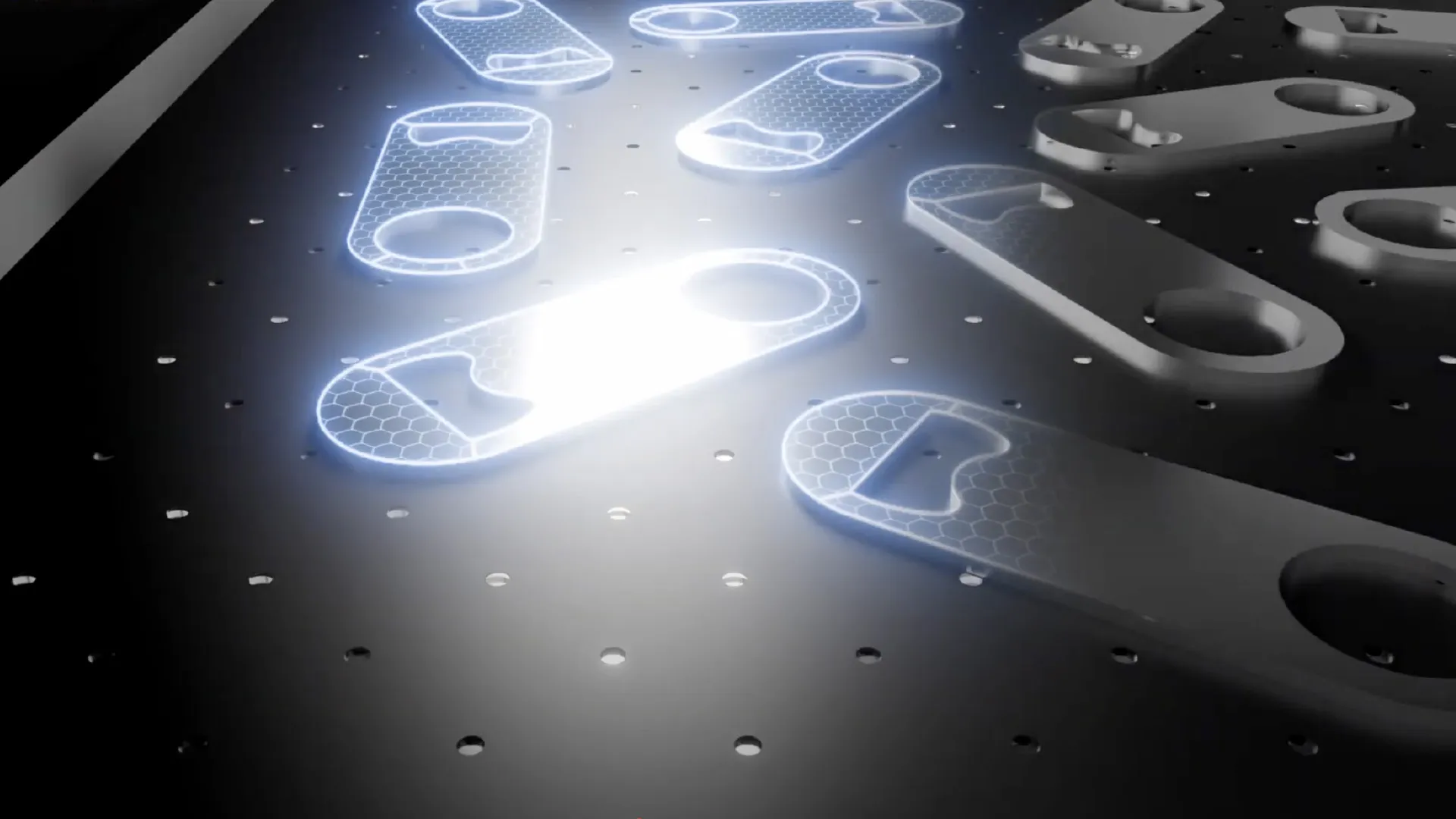 Vision System UV Printer: Camera Alignment and Jigless Printing Guide production reference image for printer selection, workflow planning, and application fit.nd test prints before moving into batch production. Vision System UV Printer: Camera Alignment and Jigless Printing Guide production reference image for printer selection, workflow planning, and application fit.nd test prints before moving into batch production.Track production cost by ink use, setup time, rejects, and finishing steps instead of looking only at printer price. Related MTuTech resources UV Printer UV Printer 9060 Applications Machine Comparison FAQ Which MTuTech printer should this article connect to? The best next page depends on the material, shape, and production volume. Flat products usually start with UV printer or UV Printer 9060 pages, while bottles, tumblers, and round products should connect to rotary, cylinder, tumbler, or cylindrical printer pages. What should buyers check before ordering? Buyers should confirm print size, material compatibility, white ink needs, fixture design, curing performance, maintenance expectations, and whether the workflow supports repeatable production rather than one-off samples only. |
No |
| Transfer Film | Not required | Required |
| Speed | Faster | Slower |
| Durability | Very high | Medium |
| Automation | Fully automated | Semi-automated |
For serious industrial branding, vision system UV printers are more scalable than UV DTF solutions.
Integration with Industry 4.0
Vision-based printers are a key component of smart factories and Industry 4.0 ecosystems.
They integrate perfectly with:
- Single pass printers for mass production
- Hybrid UV printers for mixed rigid & flexible materials
- ERP and MES systems for automation
- Robotic arms for pick-and-place printing
Why MTuTech’s Visual Positioning UV Printer Stands Out
MTuTech’s solution is built specifically for industrial automation:
- Dual industrial cameras
- Sub-millimeter print accuracy
- AI-driven object recognition
- Automatic collision detection
- Supports CMYK + White + Varnish
- Works on glass, metal, plastic, wood, acrylic
This makes it one of the most advanced vision system UV printers available today.
When Should You Choose a Vision System UV Printer?
Choose this technology if:
- You print irregular or random-shaped objects daily
- You run mass customization businesses
- You want minimal waste and high ROI
- You want automation, not manual labour
If your main focus is cylindrical items only, then a cylinder UV printer or 360 rotary UV printer might be better.
For apparel:
- DTF printer for transfers
- DTG printer for direct garments
For textiles:
- Direct to fabric printer
- Dye sublimation printer
Future of Vision-Based Printing
In the coming years, vision systems will:
- Replace manual print setups
- Enable robotic print farms
- Integrate with AI design tools
- Predict maintenance using machine learning
- Support zero-touch manufacturing
Vision System UV printing is not just a feature — it is the future operating system of industrial printing.
Final Verdict: Is Vision System UV Worth It?
If your business depends on:
- Speed
- Accuracy
- Customization
- Automation
- Scalability
Then investing in a Visual Positioning UV Printer is one of the smartest decisions you can make.
It doesn’t just improve printing — it redefines how manufacturing works.
Vision System UV Printer Buying Matrix
A vision system UV printer is not automatically better than a standard flatbed. It is better when product placement changes frequently, jobs are short-run, and the operator loses too much time measuring or building jigs. If a shop prints the same product for months, a fixed jig may still be faster. If the shop handles phone cases, badges, acrylic shapes, plaques, labels, packaging samples, or irregular flat goods, visual positioning UV printer workflow can become a real production advantage.
| Workflow condition | Best choice | Reason |
|---|---|---|
| Same product repeats with the same artwork position | Standard UV flatbed with jig | A fixed fixture can be faster once the setup is stable. |
| Mixed short-run objects change every day | Vision system UV printer | Camera alignment reduces manual measurement and setup delay. |
| Small products need accurate placement in batches | Visual positioning workflow | The operator can place several items and align artwork from the bed image. |
| Buyer also needs a mid-size flatbed | UV Printer 9060 plus camera option review | Bed size and alignment workflow should be evaluated together. |
Camera Alignment Proof Before Purchase
A buyer should test camera alignment with real products, not perfect demo blanks. The test should include irregular shapes, dark products, clear products, repeat pieces, and mixed artwork positions. The goal is to see whether the system helps the operator move faster while maintaining acceptable placement accuracy.
The supplier discussion should cover lighting, safe zones, white ink setup, artwork boundaries, surface preparation, and how operators approve the preview before printing. This guide should route buyers to the visual positioning UV printer commercial page, the UV Printer 9060 page, and broader applications when they are comparing products rather than only camera features.
Vision System UV Printer Workflow Checklist
The workflow should be tested from artwork preparation through finished product, not only from the camera preview. A good camera scan is useful, but the finished print still depends on surface prep, head height, white ink, curing, and whether the artwork has enough safe margin. Buyers should check the whole workflow before deciding that visual positioning will solve every alignment problem.
- Prepare artwork with clear safe zones and separate white ink or varnish layers.
- Place mixed products on the bed with enough spacing for camera recognition.
- Confirm the preview and adjust artwork before printing.
- Inspect the first finished product for edge alignment, color, curing, and adhesion.
- Save sample photos and settings for repeat orders.
How Vision System Content Supports the Money Pages
The phrase vision system UV printer can create confusion because buyers may also search for camera UV printer, visual positioning UV printer, jigless UV printer, or AI UV printer. This article should collect those informational searches and pass authority to the commercial visual positioning UV printer page. It should also connect to UV printer, UV Printer 9060, and machine comparison for buyers who still need to choose a machine size.
That internal routing matters because the older term vision system UV printer can rank as a support query, while visual positioning UV printer is the stronger commercial target. Keeping both pages linked properly lets MTuTech capture more search language without splitting authority across disconnected content.
Buyer Proof for Camera-Assisted UV Printing
Vision-system claims should be proved with real production samples. The buyer should ask for a mixed-bed demo with multiple shapes, different artwork positions, and at least one dark or reflective product. The test should show how quickly the camera reads the bed, how the operator adjusts the preview, and how close the finished print lands to the intended position. This is more convincing than a generic feature list.
The best demo also compares camera alignment against a simple jig. If the camera workflow saves setup time and prevents rejects, it has a clear ROI argument. If a jig is faster for a repeated product, the buyer may still choose a standard flatbed workflow. Honest comparison builds trust and helps MTuTech recommend the right machine instead of forcing one solution.
Common Mistakes With Vision System UV Printers
The biggest mistake is assuming the camera replaces production discipline. It does not. The camera helps locate objects, but the operator still needs clean artwork, correct head height, stable material placement, proper white ink settings, and controlled curing. If the surface is dirty, reflective, curved, or poorly prepared, the camera alone will not guarantee a perfect result.
The second mistake is buying visual positioning for the wrong production mix. A shop printing one repeated item every day may be better served by a simple jig and a standard flatbed UV printer. A shop printing many short-run shapes can benefit far more from a visual positioning UV printer. This is why MTuTech should position the technology as a workflow solution, not just a feature.
The third mistake is failing to train operators to read the preview carefully. Camera alignment gives the operator more control, but that control only matters if the preview is checked before printing. Training should include safe zones, object spacing, artwork scaling, and when to reject a setup before ink touches the product. That practical training is what turns the feature into measurable production value for buyers.
Related MTuTech visual positioning pages
This article should support visual-positioning search intent and send commercial buyers to the strongest machine page. The product page should own the high-intent keyword, while this guide explains workflow and camera-alignment use cases.
- Visual Positioning UV Printer for the main machine and commercial inquiry path.
- UV Printer 9060 for buyers comparing mid-size flatbed production.
- UV Printer for the broader flatbed UV printer hub.
- Client file preparation for UV printing for artwork and prepress workflow support.
- Vision system UV printer buying signals
- A vision system UV printer is most useful when product placement changes from job to job. If operators print phone cases, nameplates, promotional items, packaging samples, small boards, badges, or irregular objects, camera-assisted positioning can reduce jig preparation time and operator error. This is different from a standard flatbed workflow where every product must be placed in a fixed jig or aligned manually.
- Where camera positioning improves production
- Short-run custom product batches where every layout changes.
- Multiple small objects placed on the bed at the same time.
- Jobs where manual alignment causes scrap or slow setup.
- Sampling departments that need fast changeover between materials.
- For buyers, the decision should be based on setup time saved, not only print speed. A faster printer does not help if operators lose time aligning every item. The Visual Positioning UV Printer page should be the main evaluation path when camera alignment is a core requirement.
- Final recommendation for vision system buyers
- Choose a vision system UV printer when alignment time is a real production bottleneck. The strongest use cases are short-run custom products, mixed-object batches, small promotional items, phone cases, packaging samples, and jobs where operators would otherwise spend too much time building jigs. If the shop mostly prints identical objects in large batches, a standard fixture workflow may be enough. If job layouts change every day, camera-assisted positioning can create a clear production advantage.
- For commercial evaluation, route buyers to the Visual Positioning UV Printer page first, then compare with the broader UV Printer hub or the UV Printer 9060 model page when bed size and flatbed capacity are the main decision points.
- Vision system UV printer qualification test
- A vision system should be tested with the same product variety the shop expects to print. Use pre-cut acrylic, phone cases, plaques, packaging samples, and irregular blanks to check how well the camera recognizes placement. The goal is not only alignment accuracy, but reduced setup time and fewer rejected pieces.
- For purchasing, compare the camera workflow against the cost of making jigs. If products change often, visual positioning can save time every day. If one product repeats for months, a fixed jig on a standard flatbed may still be the better production route.