
A UV printer for acrylic signs is one of the most practical investments for shops that sell retail displays, office signs, awards, wayfinding panels, branded decor, exhibition graphics, menu boards, product displays, and short-run custom signage. Acrylic is clean, modern, easy to source, and valuable enough that customers will pay for a premium printed finish. The catch is simple: acrylic also exposes weak workflow. Dust, static, poor white ink setup, wrong curing, bad file prep, and rushed handling show immediately on a glossy panel.
This guide is written for sign shops, promotional product suppliers, interior decor producers, display manufacturers, and small production teams comparing direct acrylic printing. It explains material selection, white ink, reverse printing, bed setup, artwork preparation, cost control, finishing, quality checks, and how acrylic sign content supports the broader UV printer commercial page on MTuTechPrinter.

Why Acrylic Signs Are a Strong UV Printing Niche
Acrylic signs work well because they sit in the middle of several profitable markets. A single printer can support reception signs, wall logos, small retail signs, trade show graphics, product display panels, branded plaques, awards, point-of-sale boards, nameplates, sample kits, and decorative panels. These are not low-margin commodity jobs when the finish looks professional and the sales package is clear.
Traditional sign production often depends on vinyl application, screen printing, outsourced routing, or larger minimum quantities. Direct UV printing makes smaller orders easier because the artwork can change from one panel to the next. That matters for office suites, franchise locations, personalized awards, event signage, and short-run retail campaigns. A customer may only need 20 signs today, but they often need the same style again when a new location opens.
Best Acrylic Sign Products to Sell First
The easiest way to make acrylic printing profitable is to start with products that are repeatable. Many shops make the mistake of accepting every unusual request before they have a stable core menu. A focused product menu helps sales quote faster and helps operators print with fewer surprises.
- Reception signs with printed logos and white ink backing.
- Retail shelf talkers, counter displays, and product feature panels.
- Acrylic awards, certificates, desk signs, and donor plaques.
- Wayfinding signs for offices, clinics, schools, hotels, and showrooms.
- Menu boards and QR-code panels for restaurants and cafes.
- Backlit and edge-lit display panels where reverse printing can create a premium look.
- Small promotional acrylic pieces such as keychains, badges, and sample chips.
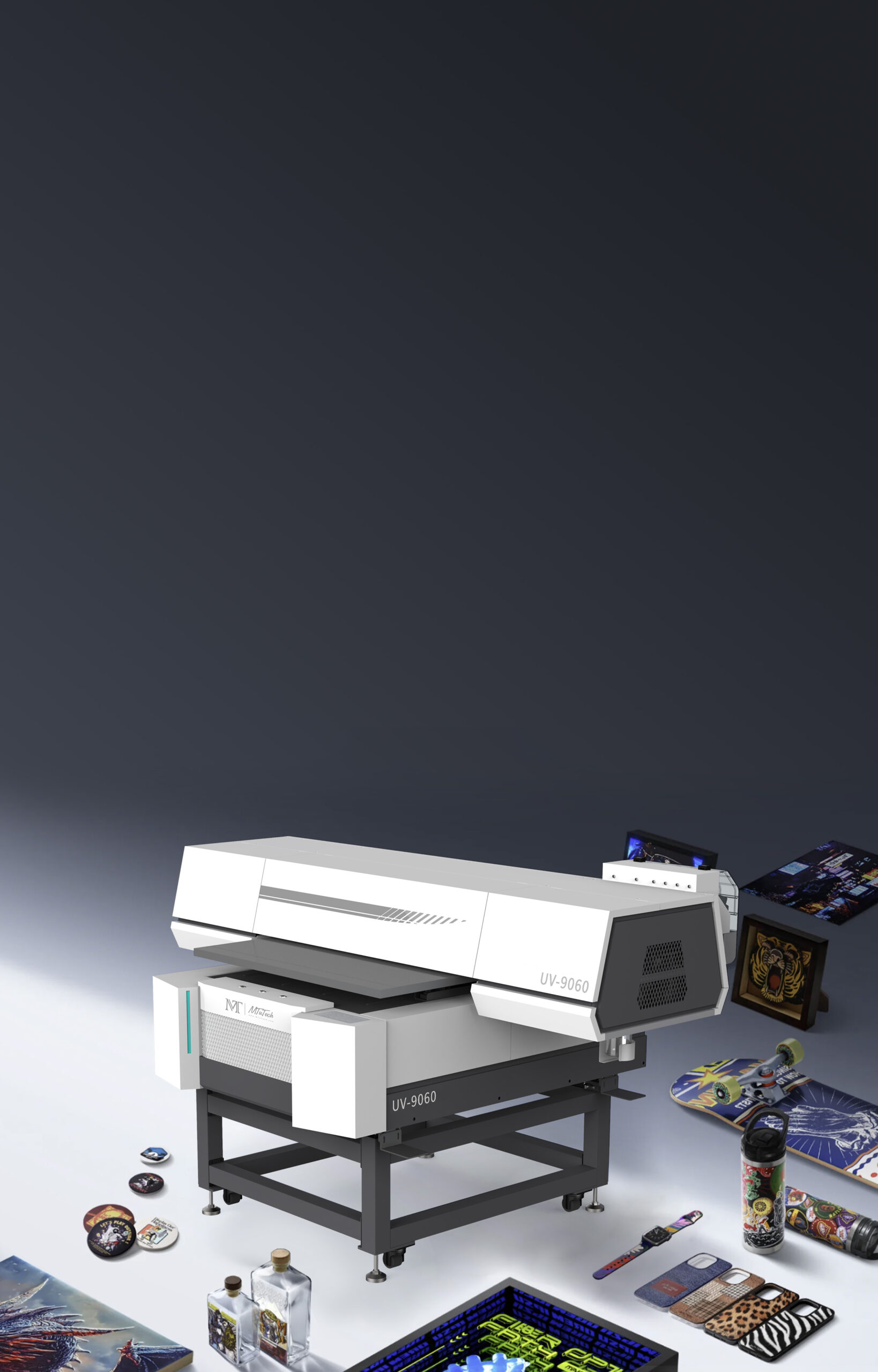
For flat acrylic work, compare the main UV printer category and the mid-size UV Printer 9060 page. If your work mix also includes larger boards, roll media, and flexible display graphics, the hybrid UV printer page is worth reviewing as a second option.
Choosing the Right Acrylic Material
Not all acrylic behaves the same. Cast acrylic usually prints more predictably for premium display work because it has better optical clarity and more stable surfaces. Extruded acrylic can be less expensive, but it may show more stress, edge variation, or handling sensitivity. For everyday signage, both can work if the shop tests the exact sheet brand and thickness.
Clear, frosted, white, black, colored, mirrored, and textured acrylic each need a different file and ink strategy. Clear acrylic usually needs white ink behind the color. Black acrylic may need a heavier white base. Frosted acrylic can look excellent with softer graphics, but small text may need more contrast. Mirrored acrylic is premium, but it can show fingerprints and dust brutally, so handling discipline matters.
| Acrylic type | Best use | Production note |
|---|---|---|
| Clear acrylic | Premium office signs, awards, backlit panels | Use white ink backing or reverse print for color density. |
| White acrylic | Retail signs, QR panels, informational boards | Often needs less white ink but still needs dust control. |
| Black acrylic | Luxury plaques, brand signs, display pieces | Requires strong white underbase for bright colors. |
| Frosted acrylic | Interior decor, privacy panels, soft branded signs | Avoid tiny low-contrast text. |
| Mirrored acrylic | Premium awards and decorative signage | Handle with gloves and test adhesion carefully. |
Surface Prep: Dust and Static Decide the First Impression
Acrylic attracts dust and static, especially in dry rooms. That is why cleaning cannot be treated as a quick wipe before printing. The operator should remove protective film only when the sheet is ready, clean the surface with the correct method, control static, and avoid touching the printable area. One fingerprint under a high-gloss logo can ruin the panel.
A clean workflow usually includes an anti-static brush, lint-free cloths, suitable cleaning fluid, gloves, and a staging area where prepared sheets do not sit exposed for long. If the shop prints many panels per day, a simple checklist near the machine helps operators repeat the process rather than relying on memory.
White Ink Strategy for Acrylic Signs
White ink is what turns acrylic from a basic printed surface into a premium sign product. On clear acrylic, color-only printing can look weak because light passes through the panel. A white underbase gives the color something to sit on. For reverse printing, the image is printed from the back side so the front surface protects the print and creates depth.
The decision is not always full white behind everything. Selective white can preserve transparent effects, metallic backgrounds, or see-through design areas. A logo may need white backing while a decorative pattern remains translucent. Operators should create white layers intentionally, not simply print white everywhere because the file looks safer that way.
Shops that sell clear acrylic, dark acrylic, layered effects, or premium plaques should review the existing white ink in UV printers guide. White ink maintenance, circulation, opacity, nozzle checks, and file setup all affect acrylic sign quality.
Direct Printing vs Vinyl on Acrylic
Vinyl can still be useful for some sign shops, but direct UV printing has clear advantages for short-run artwork, small text, full-color graphics, variable designs, and textured or layered effects. Vinyl requires cutting, weeding, alignment, transfer, and application. Direct UV reduces those steps, especially when each sign has a different name, room number, QR code, or graphic.
The tradeoff is that direct UV printing demands better machine setup and material testing. Vinyl can sometimes hide surface issues because it is a separate film. UV ink must bond directly to the acrylic or to the coating. That means cleaning, curing, and adhesion checks are part of the job.
Bed Size and Machine Choice
Acrylic sign buyers should choose bed size by product mix, not by ego. A large industrial flatbed makes sense when the shop prints big panels, multiple boards, and larger retail display components. A mid-size machine is often enough for desk signs, plaques, awards, wall logos, small directional signs, samples, and acrylic promotional products.
The UV Printer 9060 is useful for many acrylic sign shops because it can batch smaller panels without requiring very large floor space. Larger shops may prefer the broader UV printer range for more bed area and heavier daily output. Buyers comparing multiple workflows can also use the machine comparison page to match signs, packaging, rotary items, and hybrid production needs.
Artwork Setup for Acrylic Sign Printing
Acrylic sign artwork should be built around the viewing side. Front-side printing, second-surface printing, clear areas, white ink, varnish, cut lines, and mounting holes all affect file prep. The designer should know whether the sign will be seen through the acrylic or printed directly on the face.
- Use vector logos for sharp edges and clean brand marks.
- Create a separate white ink layer when printing on clear, dark, or colored acrylic.
- Leave safe space for mounting holes, polished edges, standoffs, or frames.
- Mirror artwork correctly for second-surface printing.
- Check QR codes at the final printed size before running a batch.
- Keep small text large enough for the sign’s viewing distance.
- Save repeat templates for common panel sizes and customer packages.
Acrylic sign workflows also depend on RIP control. The RIP software page is relevant because white ink, varnish, color profiles, print modes, and repeat templates should not be guessed manually on every job.
Curing, Adhesion, and Durability
Good curing is essential on acrylic. Under-cured ink can feel tacky or scratch too easily. Over-aggressive curing may create heat stress or edge problems on thinner sheets. The goal is a cured layer that bonds well, handles cleanly, and survives packing, installation, and daily cleaning.
For new acrylic suppliers, run a basic adhesion test before selling a large job. Print a small test graphic, let it cure, then check scratch resistance and tape pull. If the panel will be cleaned often, test gentle cleaning methods too. Some shops only discover a problem after the customer wipes the sign at installation. That is an expensive moment to learn material behavior.
Sample Testing Before Offering Acrylic Signs
Acrylic samples should be treated like a sales and production tool. Print one clear panel, one white panel, one dark panel, and one reverse-printed sample before building a public offer. Each sample should show a logo, small text, a solid color block, a gradient, a QR code, and at least one white ink area. This tells the operator how the material behaves and gives the sales team real proof for customers.
Label each sample with material thickness, print side, white ink strategy, print mode, curing setting, and finishing method. When a client asks whether their office logo will look better on clear or frosted acrylic, the team can show the difference instead of guessing. This kind of sample discipline also makes future blog photos, case studies, and product pages more convincing.
Finishing and Installation Planning
The printed panel is only part of the sign. Acrylic signs may need polished edges, drilled holes, standoffs, wall tape, frames, backlighting, packaging, or installation notes. The printer workflow should leave room for those finishing steps. For example, mounting holes should be included in the safe area before printing, not discovered after the design is approved.
If signs will be shipped, protect the printed surface from rubbing. Use protective film only if it will not pull ink or leave residue. Add separators between panels and label the viewing side. Premium acrylic work is judged by the first unboxing impression as much as the print itself.
How Acrylic Sign Content Helps Lead Quality
Acrylic sign buyers usually know what they want to display, but they may not know which printer format fits the job. That makes application content valuable. A visitor searching for acrylic sign printing is often closer to a purchase than someone searching only for general printing ideas. They may be comparing in-house production, outsourcing, or buying a machine to add signage as a service.
The page should therefore answer commercial questions directly: what materials work, what size printer is needed, whether white ink is required, how durable the finish is, and what a shop can sell with the machine. This is why acrylic sign content is useful for SEO and sales at the same time. It catches a specific use case and points the buyer toward the right MTuTech printer page.
Pricing Acrylic Sign Jobs
Pricing should include acrylic sheet cost, cutting or finishing, setup, design cleanup, white ink, printing time, curing, inspection, packaging, expected waste, and margin. A clear acrylic sign with reverse print and white ink should not be priced like a simple one-color flat panel. Variable-data signs with many names or room numbers need a separate setup logic.
Shops should create price tiers by size and finish. A practical menu may include standard office signs, premium clear acrylic signs, retail display panels, QR/menu panels, awards, and custom display prototypes. White ink, second-surface printing, rush work, file cleanup, drilling, standoffs, and custom packing should be priced clearly.
Common Mistakes That Reduce Profit
Printing Before Dust Control Is Ready
Dust looks small before printing and huge after curing. Build cleaning into the job ticket.
Forgetting White Ink on Clear Acrylic
Color can look washed out without a white backing layer. Decide white ink before proofing.
Using One Setting for Every Acrylic Sheet
Different acrylic brands and colors need testing. Save settings after each successful job.
Ignoring Finishing Requirements
Mounting holes, edges, standoffs, and installation method should influence the design layout.
How This Blog Supports MTuTechPrinter's Ranking System
This article supports the main UV printer page by targeting a more specific commercial use case: acrylic signage. It also links to UV Printer 9060, hybrid UV printer, flatbed UV printer applications, white ink guidance, and RIP software so visitors can move from application research to machine comparison.
That internal structure helps the site build topical authority instead of publishing isolated articles. A buyer who starts with acrylic signs can naturally discover the right MTuTech printer category, compare workflows, and contact the team with a clearer product brief.
FAQ
Can a UV printer print directly on acrylic signs?
Yes. A flatbed UV printer can print directly on acrylic signs, panels, plaques, awards, and display pieces. Clear or dark acrylic usually needs white ink for strong color.
Do acrylic signs need primer before UV printing?
Some acrylic sheets print well after cleaning, while others need pretreatment or adhesion testing. Always test the exact material before a production order.
Is reverse printing better for clear acrylic?
Reverse printing can create a premium look because the artwork is viewed through the acrylic. It also protects the print surface, but the artwork and white ink layers must be prepared correctly.
Which MTuTech machine should acrylic sign buyers compare?
Start with the UV printer page, compare the UV Printer 9060 for mid-size sign work, and review hybrid UV printer options if roll media is also part of the business.
Bottom line: acrylic sign printing is a strong, rankable UV printer topic because it connects real buyer intent with a profitable production use case. The machine matters, but the workflow around material prep, white ink, curing, finishing, and pricing is what makes the niche sustainable.