
Print accuracy on curved objects depends mostly on nozzle distance and UV ink curing timing, not just resolution specs. We’ve worked with clients who struggled because their machines couldn’t maintain consistent spacing as surface radius changed. The printhead must stay the same distance from every curve point or dot gain control fails completely. When curing timing matches ink flow, colors stay sharp without bleeding or smearing during movement.
Most people think higher DPI solves everything, but that’s only half the story here. Curved printing needs real time distance sensors that adjust height instantly as objects rotate under UV lamps. We recommend testing with different radius sizes before running full batches to avoid wasted materials. Good calibration prevents ink pooling in valleys or drying too fast on peaks of curved objects.
What Techniques Enable UV Printing on Curved Surfaces?
How Rotary Attachments Enable Cylindrical UV Printing
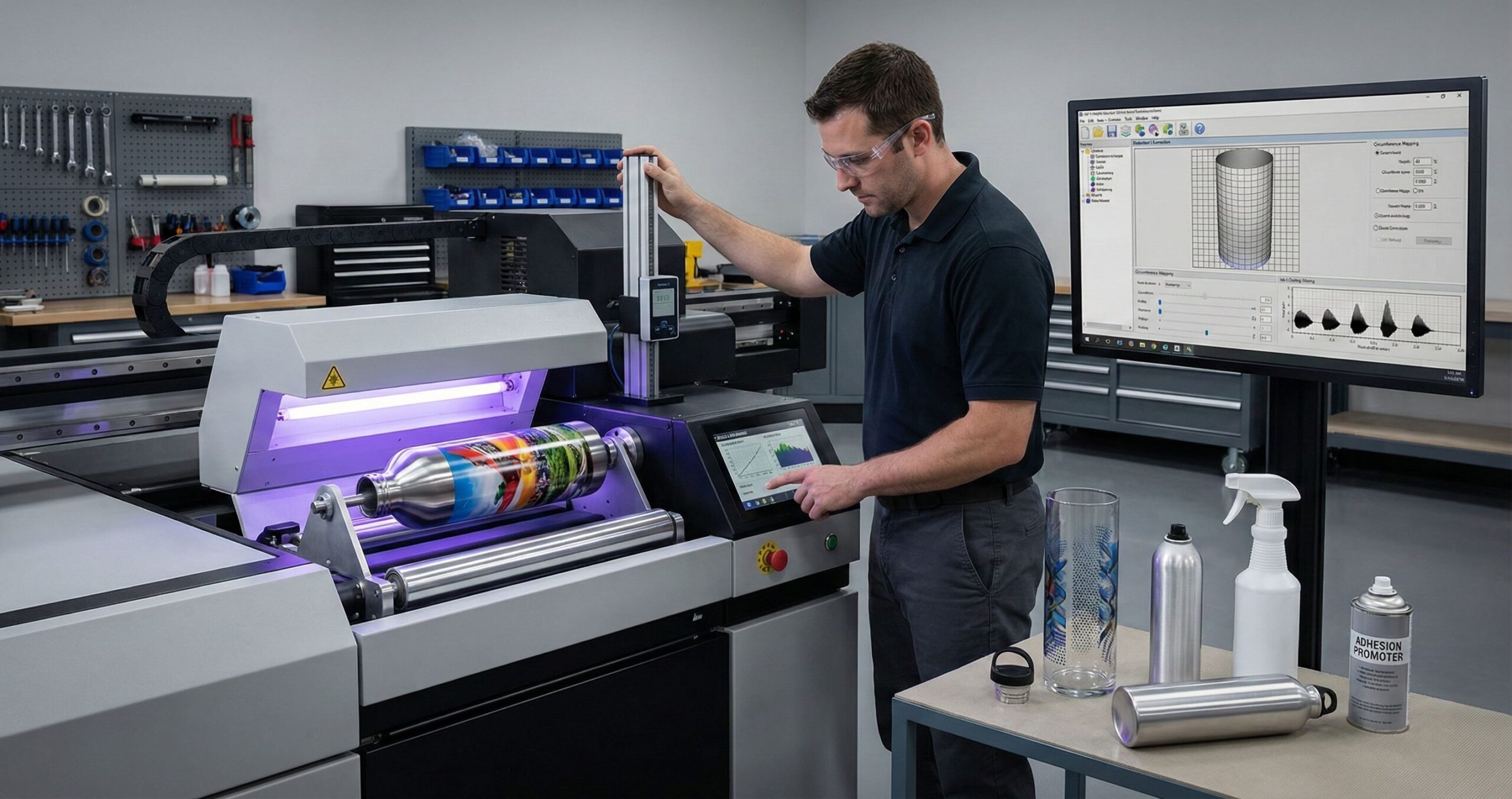
Bottles and tubes spin unevenly under printheads without a rotary attachment that matches speed perfectly. We’ve tested dozens of cylindrical printing setups where stepper motor control failed because 360 degree rotation wasn’t synced with ink droplet timing. The curved surface printing techniques work only when angular movement aligns exactly with printhead firing rates. Motion synchronization prevents streaks that ruin entire batches during production runs.
UV printing methods fail on round objects when rotation pauses even microseconds too long during passes. We always calibrate motor speed against print resolution before starting jobs with curved items. Timing errors create overlapping dots or gaps that customers notice immediately after delivery.
How Design Stabilizes Non Uniform Curved Objects
Oddly shaped items wobble during printing unless printing jigs provide exact object centering every single time. Mechanical stabilization needs custom fixtures built around each product’s unique shape and weight distribution. We’ve designed where fixture tolerance stays under 0.5mm to guarantee consistent results across hundreds of irregular curved objects. Repeatability matters more than clamping strength when running batch orders for clients.
Discover : how UV printing transforms wood
How Surface Control Systems Improve Curved UV Printing
How Vacuum Tables Hold Curved Materials During Printing
Thin substrates lift during printing when negative pressure spreads unevenly across vacuum tables designed for flat work. We’ve noticed print stability drops fast when pressure distribution misses contact points on bent surfaces. Material fixation needs zones that apply different suction levels based on surface contour shape and thickness. Surface control systems become the main factor affecting final image quality when vibration reduction can’t compensate for lifting edges. Z-axis control adjusts printhead clearance automatically as each curved section passes underneath during operation.
How Adjustable Print Height Supports Curved Geometry
Adjustable print height changes ink droplet trajectory accuracy by controlling distance between nozzles and peaks or valleys. We measure curved geometry before every job because even small height errors create blurred edges or color shifts.
How Curved Surface Calibration Prevents Image Distortion
Logos stretch or compress on rounded items when artwork mapping treats curves like flat planes during file preparation. Image distortion correction solves a mathematical projection problem where straight lines must wrap around changing radiuses without warping. We’ve handled jobs where designers blamed printer settings when the real issue was missing curved surface calibration data. RIP software calculates how pixel rows need adjustment based on object diameter and rotation speed measurements.
Circles become ovals and text looks wavy without proper compensation formulas built into the print workflow. We always run test prints on sample curves before processing client orders to verify distortion levels. Smart curved surface calibration turns a cylinder’s actual measurements into adjusted digital files that print perfectly when wrapped. This step happens before ink touches any surface during the setup phase.
Which Materials Support UV Printing on Curved Surfaces?
Curved substrates with low surface energy cause ink to peel within hours after printing without pretreatment steps. We rank UV printable materials by how reliably in
MTuTech production notes for cylinder UV printer
For buyers comparing cylinder UV printer options, the strongest ranking signal is not only the definition of the process. The page should also explain machine fit, production limits, material behavior, ink or fixture requirements, and the next page a buyer should read before requesting a quote.
Best machine fit
Use this guide together with Cylinder UV Printer when the job requires stable UV output, repeatable setup, and production-ready print quality. If the work involves different shapes, materials, or order sizes, compare it with 360 Rotary UV Printer before choosing the final printer.
Production checklist
- Confirm the printable area, part height, and fixture or rotary requirements before quoting the job.
- Match ink, primer, and curing settings to the substrate so adhesion and scratch resistance are predictable.
- Standardize artwork preparation, white ink layers, and test prints before moving into batch production.
- Track production cost by ink use, setup time, rejects, and finishing steps instead of looking only at printer price.
Related MTuTech resources
FAQ
Which MTuTech printer should this article connect to? The best next page depends on the material, shape, and production volume. Flat products usually start with UV printer or UV Printer 9060 pages, while bottles, tumblers, and round products should connect to rotary, cylinder, tumbler, or cylindrical printer pages.
What should buyers check before ordering? Buyers should confirm print size, material compatibility, white ink needs, fixture design, curing performance, maintenance expectations, and whether the workflow supports repeatable production rather than one-off samples only.k bonds during stress tests instead of popularity rankings. Plastics like polypropylene and polyethylene need adhesion promoters applied before any UV exposure because their molecular structure repels liquid coatings naturally. Uv printing on Glass and treated metals hold ink much better than untreated polymers during handling or shipping.
Surface energy below 38 dynes per centimeter means ink beads up instead of spreading evenly across curved substrates during application. We always test material samples with dyne pens before committing to full production runs with client orders. Adhesion promoters change the chemical bonding at microscopic levels so UV printable materials accept ink layers permanently after curing completes.
Why Choose UV Printing for Curved Surface Applications?
Traditional industrial printing methods fail on curves because drying time causes smudging when items rotate during handling. UV printing advantages include instant curing that locks ink in place before any movement happens during production. We’ve seen clients reduce defect rates by 70% after switching to Mtutech Printer systems for curved work. Production efficiency jumps because operators don’t wait for air drying between print passes or coating layers.
Durability becomes predictable with UV technology since chemical bonds form completely within seconds under lamps. Scratch resistance and fade protection stay consistent across entire batches when curing conditions remain stable throughout runs. We treat UV as risk reduction for curved jobs because it removes variables that cause failures. Industrial printing demands on curved items get met reliably when instant hardening prevents handling damage during multi step workflows.
FAQs
What curved objects can UV printers print on?
We print on bottles, tubes, golf balls, and metal cylinders. Rotary attachments spin round items for even coverage. Any curved object with consistent diameter works perfectly.
Does UV ink crack on curved surfaces?
UV ink stays flexible when cured correctly. Cracking happens from over curing or wrong settings. We adjust the curing depth for each curve. Your prints stay smooth and durable.
Is rotary UV printing slower than flatbed printing?
Yes, rotary printing runs slower than flatbed modes. We trade speed for perfect geometric precision. Curved surfaces need careful rotation. The final quality makes extra time worthwhile.
Do curved materials need surface preparation?
Some curved items need primers or plasma treatment. We prepare surfaces to ensure strong ink adhesion. Preparation acts like insurance for lasting prints. Smooth finishes always bond better.
Can UV printers print full wrap designs?
We create 360 degree seamless wrap designs easily. Full wraps need proper circumference calibration first. We measure each item for perfect alignment. Your graphics wrap around without visible seams.
View Metal Printing Solutions
Rotary setup notes for curved-surface UV printing
Curved-surface UV printing depends on mechanical control as much as print quality. The product must rotate smoothly, the printhead distance must stay consistent, and the artwork must be prepared for the true printable circumference. Small mistakes in diameter measurement or fixture pressure can show up as seam gaps, stretched graphics, or soft edges.
For bottles and tumblers, the best workflow is to test one product family at a time. Record diameter, printable length, coating behavior, white ink settings, rotation speed, and curing strength. Keep separate presets for straight cylinders, tapered cups, handled mugs, and objects with raised rims or uneven bases.
When a business plans to sell drinkware at scale, it should compare a rotary add-on with a dedicated cylinder or tumbler printer. A dedicated machine can reduce setup time and make repeat orders easier when the product mix is mostly round.
- Measure diameter and printable circumference before setting artwork width.
- Use jigs or supports that prevent wobble without marking the product.
- Run seam and color tests before committing to a batch order.
- Choose a dedicated rotary workflow when round-product demand is steady.
Useful next pages: 360 Rotary UV Printer, Cylinder UV Printer, Tumbler Printer, Contact MTuTech.Aluminum printing on tight curves under 2 inch radius needs different industrial UV printers than flat sheet work requires. We match metal UV printing equipment based on curvature measurements and metal type rather than generic product categories. Stainless steel printing demands higher wattage lamps because the surface reflects more UV light away during curing cycles. Mtutech Printer models handle various metal
thicknesses and bend angles when operators select correct fixture attachments for each job. Curved aluminum printing finishes faster than stainless steel printing because heat dissipation differs between these two metal types during production.
Commercial Buyer Notes for UV printing on curved surfaces
This topic matters because buyers learning how rotary UV printing handles bottles, tumblers, tubes, and cylindrical products. A post can rank for an informational keyword and still support a commercial page when it answers the practical questions a buyer asks before requesting a quote. For MTuTechPrinter.com, this article should guide readers toward the right production path instead of competing with the main product page.
The best audience for this page is drinkware sellers, cosmetics packaging brands, bottle decorators, and promotional product teams. These visitors are usually not looking for a basic definition only. They want to know whether the workflow fits their products, whether the machine can handle the job repeatedly, and what problems they should avoid before investing in equipment.
Best-fit buyer scenarios
- Stainless tumblers where buyers care about repeatability, realistic cost per job, and a production process that does not collapse once order volume increases.
- Cosmetic bottles where buyers care about repeatability, realistic cost per job, and a production process that does not collapse once order volume increases.
- Sports bottles where buyers care about repeatability, realistic cost per job, and a production process that does not collapse once order volume increases.
- Small cylindrical packaging where buyers care about repeatability, realistic cost per job, and a production process that does not collapse once order volume increases.
Production checks before choosing a printer
- Diameter range should be tested on the same materials, blanks, inks, and finishing conditions the shop will use for paid orders.
- Rotary fixture grip should be tested on the same materials, blanks, inks, and finishing conditions the shop will use for paid orders.
- Seam alignment should be tested on the same materials, blanks, inks, and finishing conditions the shop will use for paid orders.
- Print gap control should be tested on the same materials, blanks, inks, and finishing conditions the shop will use for paid orders.
- Curing on curved surfaces should be tested on the same materials, blanks, inks, and finishing conditions the shop will use for paid orders.
How This Article Supports the Main Product Pages
The primary commercial path from this article should lead to 360 rotary UV printer. Readers who are comparing related workflows can also review tumbler printer, cylindrical printer, cylinder UV printer. This keeps the blog post useful as an educational asset while passing topical relevance to the commercial pages that should rank for buyer-intent terms.
For search engines, this creates a cleaner hierarchy: the blog post handles long-tail questions, application details, mistakes, workflow checks, and comparison language; the product page remains the main destination for machine specifications, inquiry intent, and conversion. That structure helps reduce keyword overlap and gives Google clearer signals about which page should own the commercial keyword.
Internal linking recommendation
When this article is referenced from future content, use natural anchors such as “UV printing on curved surfaces”, “commercial UV printing on curved surfaces workflow”, and “buyer guide for UV printing on curved surfaces”. Reserve exact commercial anchors for the product page, especially when building external guest posts or high-authority references.
Decision Table for Commercial Use
| Use case | Key check | Why it matters |
|---|---|---|
| stainless tumblers | diameter range | Use this as a buying signal before choosing the final printer workflow. |
| cosmetic bottles | rotary fixture grip | Use this as a buying signal before choosing the final printer workflow. |
| sports bottles | seam alignment | Use this as a buying signal before choosing the final printer workflow. |
| small cylindrical packaging | print gap control | Use this as a buying signal before choosing the final printer workflow. |
What Makes This Topic Easier to Rank
The easiest ranking angle is not to repeat broad product-page copy. The stronger approach is to answer specific buyer questions around setup, mistakes, material fit, cost control, workflow, and production risk. Those long-tail topics usually create impressions earlier than broad head terms, especially in the United States where buyers compare several suppliers before contacting a manufacturer.
This article should therefore be used as a support asset: keep the language practical, connect it to real production decisions, and link clearly to the right MTuTech Printer page. Over time, impressions from these long-tail phrases can help the site build topical authority and send more qualified visitors toward the pages that matter commercially.
Common Mistakes That Reduce ROI
One common mistake is judging a machine only by the sample print shown in a demo. A sample proves the printer can produce an attractive result once. A business needs repeatability across many jobs, blanks, operators, and customer artwork files. For UV printing on curved surfaces, that means the buyer should test the workflow under realistic shop conditions before assuming the same result will hold at production volume.
A second mistake is ignoring finishing, handling, and packaging. Many print problems appear after the print leaves the bed or fixture: scratches during packing, poor adhesion after cleaning, alignment drift across repeated items, or color mismatch when the same job is repeated later. These are not only technical issues; they affect refunds, customer satisfaction, and the confidence needed to sell higher-value jobs.
The final mistake is buying without a clear product plan. A printer is easier to profit from when the shop already knows the first 5 to 10 products it wants to sell. That product list should determine bed size, rotary needs, white ink use, fixture strategy, software workflow, and the kind of support expected from the supplier.
Simple pre-purchase checklist
- Choose three real products and test UV printing on curved surfaces on each one before scaling.
- Compare setup time, print time, curing quality, and post-print handling.
- Check whether the machine supports the exact material size and shape the business will sell.
- Confirm training, maintenance, spare parts, and workflow support before purchase.
- Keep one commercial page as the main quote path and use support articles to answer detailed questions.