

Skilled workers keep your business safe and running smoothly. A printing operator must understand every single machine function fully. Broken parts happen often when teams skip real learning steps. A UV printer training program fixes this dangerous situation quickly. You need clear rules for using flatbed printer tools safely. Proper guidance ensures your training program stays effective every day. Safety comes first during daily staff training for UV printing. Mistakes cost money when handling expensive UV ink cartridges. Learn the basics before attempting complex home UV printer projects. Your team becomes faster with the correct printing equipment training now.
Downtime kills profits quickly in any modern shop environment today. A UV printer maintenance training plan prevents costly breakdowns later. Regular checks extend the life of your new UV printer. We found that UV printer operation training reduces errors significantly. Clean heads prevent clogs in your printing system daily. Your business grows when staff handle tasks correctly alone. Visit our page for details on the whole system. Read the full guide on the UV printer for specific info today. Start building your strong team today with better knowledge bases.
Why Is Staff Training Essential for UV Printer Operations?
Many printing facility owners skip formal training and face costly problems later. Untrained printer operators waste materials and damage expensive equipment regularly. A solid UV printer operator training plan solves these issues fast. Your production team needs proper printing workflow training to work efficiently. Equipment handling training protects your investment and boosts printing efficiency daily. The right UV printing workflow knowledge transforms beginners into confident workers. Home UV printer projects and commercial jobs both benefit from skilled hands. UV printing project ideas come to life better when teams know their tools well.
How Training Improves Print Quality and Production Efficiency
Print quality control starts with knowing your machine settings properly. Color calibration ensures every print matches your customer’s exact expectations perfectly. Your team must understand RIP software for smooth file processing today. Correct print head alignment prevents blurry images and wasted materials instantly.
Printing workflow optimization speeds up jobs without sacrificing final results at all. We trained a team last year and saw output double within weeks. Production efficiency jumps when operators stop guessing and start knowing clearly. Sharp prints make customers happy and bring repeat business fast.
Reducing Equipment Downtime Through Skilled Operators
Printer downtime prevention saves thousands in lost revenue each month. Your ink system needs regular checks that trained eyes catch early. A clogged print head stops production cold if nobody knows how to fix it. The UV curing system requires specific handling to avoid costly repairs later.
Equipment troubleshooting skills help operators solve small problems before they grow. Machine reliability improves when workers follow proper daily maintenance routines consistently. We saw one shop cut downtime by half after proper training sessions. Quick fixes keep your orders moving and customers waiting less time.
Enhancing Workplace Safety Around UV Printing Equipment
Printing safety procedures protect your team from burns and chemical exposure risks. UV LED lamps emit strong light that can harm eyes without proper shielding. Your ventilation system must work correctly when handling certain ink types daily. Protective equipment like gloves and goggles keeps everyone safe during operations.
UV printer safety training covers electrical hazards near moving printer parts completely. Workplace safety compliance avoids fines and keeps your business running legally. Trained workers spot dangers before accidents happen in busy shop environments. Safety culture starts with knowledge and grows through daily practice habits.
What Should a UV Printer Training Curriculum Include?
Most shops throw new workers at machines without proper guidance first. This approach leads to wasted materials, damaged equipment, and frustrated teams daily. A structured UV printer training curriculum solves these problems through organized learning steps. Your training modules should move workers from basic knowledge to skilled operation smoothly.
Printing skill development happens faster when lessons always follow a logical order. The operator manual becomes useful only after the staff understand core concepts well. Printer operator certification proves your team reached professional standards for quality work. Both home UV printer projects and commercial printing workflows improve with trained hands. UV printing project ideas turn out better when operators know their machines fully.
Basic Printer Operation and Setup Training
Every operator must master the printer setup process before touching production jobs. The control panel contains settings that affect every single print you make. Your print bed needs proper leveling for consistent results across all materials. RIP software setup controls how designs transfer from computer to printer correctly.
Substrate positioning determines whether prints land exactly where customers expect them. A crooked item wastes ink and time on jobs that need redoing later. New workers should practice setup steps ten times before working alone daily. The print head stays safe when operators follow startup procedures carefully every time.
Material Handling and Print Preparation
Different materials need specific substrate preparation steps before printing begins today. Acrylic sheets require dust removal and static treatment for clean ink adhesion. Glass panels need alcohol cleaning to remove fingerprints and oily residue first. Wooden boards may need light sanding for smooth surface preparation for printing.
Print alignment matters most when working with items that have exact placement needs. We ruined a batch of custom signs last year by skipping surface prep steps. Center your design correctly using test prints on paper before final production. Each material teaches you something new about getting perfect results consistently.
Workflow Management for UV Printing Production
Printing workflow management keeps jobs moving without confusion or delays building up. Your production schedule should list priorities clearly so operators know what comes next. Design software prepares files while RIP software handles color profiles and sizing automatically. Smart print queue management prevents bottlenecks during busy order periods.
The batch printing process groups similar items together for faster changeover times daily. Mixing different substrates slows production and increases the chance of errors. Track completion times to find where your workflow loses minutes unnecessarily each shift. Strong systems turn chaotic shops into smooth operations that customers trust completely.
Best Methods for Training UV Printer Staff
Choosing the wrong operator training methods wastes time and leaves workers confused daily. Some shops rely only on training manuals without any real practice sessions. Others skip technical training programs completely and hope staff figure things out alone. Smart businesses combine multiple approaches for complete hands on printer training experiences.
Manufacturer training provides official guidance that covers machine specifics thoroughly today. Technical workshops offer focused learning on particular skills operators need most. Your home UV printer projects and UV printing project ideas improve when staff learn properly.
Hands On Equipment Training
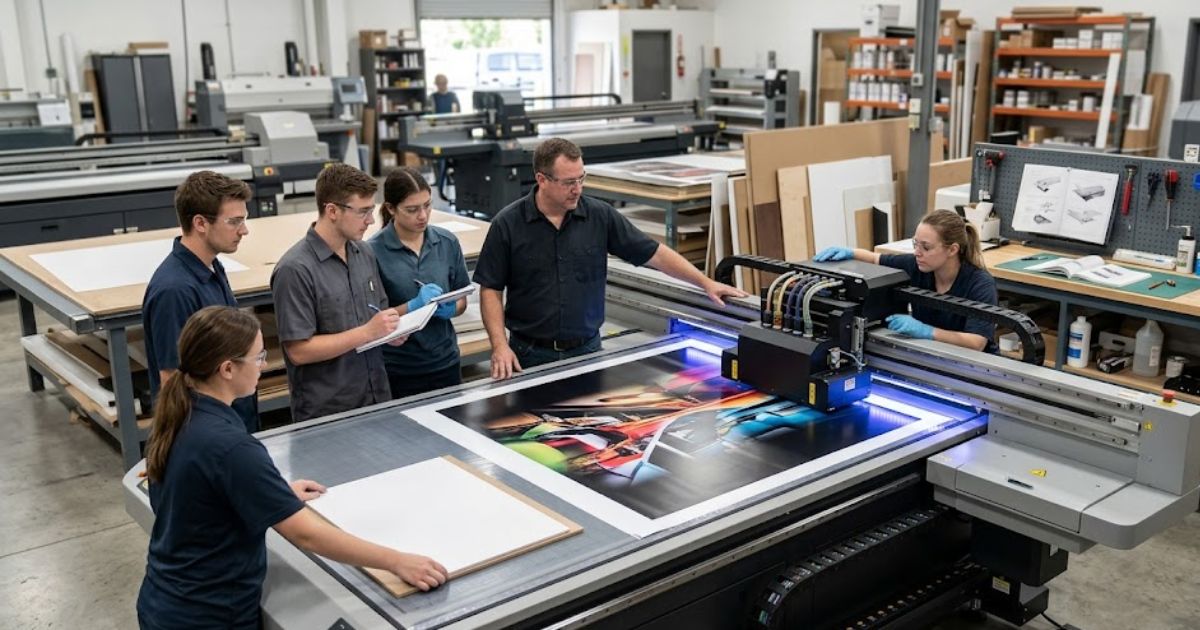
Practical printer training builds muscle memory that reading alone cannot provide workers. Your team learns the printer control panel functions by actually pressing buttons daily. Operators understand print bed adjustments better after loading materials themselves multiple times. Machine operation training sticks when workers practice each step repeatedly.
We trained three new hires last month using hands-on methods with great success. Mistakes made during practice cost less than errors on real customer jobs. Let workers experiment with scrap materials before touching paid orders completely. Real experience beats theory every single time in printing shops today.
Manufacturer Training Programs
Manufacturer operator training delivers expert knowledge directly from equipment creators themselves. Official training courses cover features that generic guides often miss completely today. Equipment certification proves operators met professional standards set by the maker. Your manufacturer support teams provide ongoing help after initial sessions end.
These programs often include troubleshooting secrets not found in regular documentation anywhere. Certified staff handle problems faster because they learned from the source. The investment pays back through fewer service calls and better output quality. Official training adds credibility when customers ask about your team’s qualifications.
Online Training and Technical Resources
Online technical training fits around busy schedules when in person sessions prove difficult. Printing video tutorials demonstrates complex procedures step by step visually for learners. Training videos allow workers to pause, rewind, and review tricky sections anytime. Your
MTuTech production notes for UV printer
For buyers comparing UV printer options, the strongest ranking signal is not only the definition of the process. The page should also explain machine fit, production limits, material behavior, ink or fixture requirements, and the next page a buyer should read before requesting a quote.
Best machine fit
Use this guide together with UV Printer when the job requires stable UV output, repeatable setup, and production-ready print quality. If the work involves different shapes, materials, or order sizes, compare it with UV Printer 9060 before choosing the final printer.
Production checklist
- Confirm the printable area, part height, and fixture or rotary requirements before quoting the job.
- Match ink, primer, and curing settings to the substrate so adhesion and scratch resistance are predictable.
- Standardize artwork preparation, white ink layers, and test prints before moving into batch production.
- Track production cost by ink use, setup time, rejects, and finishing steps instead of looking only at printer price.
Related MTuTech resources
FAQ
Which MTuTech printer should this article connect to? The best next page depends on the material, shape, and production volume. Flat products usually start with UV printer or UV Printer 9060 pages, while bottles, tumblers, and round products should connect to rotary, cylinder, tumbler, or cylindrical printer pages.
What should buyers check before ordering? Buyers should confirm print size, material compatibility, white ink needs, fixture design, curing performance, maintenance expectations, and whether the workflow supports repeatable production rather than one-off samples only. technical documentation works best alongside visual learning materials.
Remote learning lets staff refresh skills without stopping production for classroom time. Watch troubleshooting videos during slow periods to prepare for future problems ahead. New operators can study the basics before touching expensive equipment on day one. Mixing online resources with hands on practice creates well rounded printer operators quickly.
How to Train Staff for Troubleshooting UV Printer Issues
Problems happen even in well maintained shops with trained operators working carefully. UV printer troubleshooting skills help staff solve issues without waiting for help. Printing error diagnosis starts with understanding what caused the problem first. Nozzle blockage creates visible defects that trained eyes spot immediately. Color inconsistency signals calibration issues or ink supply problems needing attention. Alignment errors show when substrates shift during the printing process.
Identifying Common Print Defects
Banding lines appear as horizontal stripes across your printed images today. Color fading happens when ink levels drop or when heads need cleaning.
Train operators to examine prints under good lighting for defects immediately. Different problems have different causes that require specific solutions. Keep sample prints showing common defects for quick comparison during troubleshooting. Pattern recognition speeds up diagnosis once operators see enough examples clearly.
Step by Step Troubleshooting Process
Run test prints before investigating complicated machine problems first today. Perform nozzle checks to identify which heads need cleaning or attention.
Follow a logical order when diagnosing issues to avoid missing obvious causes. Start simple before assuming expensive parts need replacement or repair work. Document what you tried so the next person knows your progress. Systematic approaches find solutions faster than random guessing ever will.
When to Call Technical Support
Some problems exceed operator skills and need a maintenance technician visit. Contact your manufacturer support team when standard troubleshooting steps fail completely.
Know the difference between fixable issues and problems requiring expert hands. Attempting complex repairs without training often makes situations much worse. Keep support contact information posted near every machine for quick access. Smart operators know their limits and ask for help when needed.
How to Build a Long Term UV Printer Training Program
One time training fades from memory without systems to reinforce skills regularly. A printing staff training system keeps knowledge fresh as technology changes constantly. Your training modules should cover basics through advanced techniques for all levels. Certification programs prove operators have reached specific skill levels officially for records. Technical manuals provide reference materials when questions arise during daily work. Build an operator certification program that grows with your business needs.
Creating Standard Operating Procedures
SOP documents give workers clear steps for every task they perform daily. Operator manuals explain machine functions in simple language that everyone understands clearly.
Written procedures prevent confusion when different shifts handle the same equipment. New workers learn faster when steps appear in organized, easy formats. Update documents whenever processes change to keep information accurate. Post quick reference guides near machines for instant help during jobs.
Certification Programs for Operators
Manufacturer certification proves workers completed official training from equipment makers directly. Technical workshops teach specific skills through hands on practice sessions locally.
Certified staff handle problems confidently because they learned from experts first. Display certificates in your shop to show customers your team’s qualifications. Track expiration dates and schedule refresher courses before certifications lapse completely. Recognition motivates workers to maintain high standards in their daily work.
Continuous Training for Technology Updates
Software updates change how machines operate and require fresh training sessions. Printer firmware upgrades add features that untrained operators might miss entirely.
Schedule quarterly reviews to cover new functions and improved techniques properly. Technology changes fast, so training must keep pace with machine improvements. We update our team every time major software releases arrive from manufacturers. Staying current prevents your shop from falling behind more modern competitors.
Why Modern UV Printers Simplify Training and Operation
Old printing machines took months before operators felt ready to work solo. Beginner friendly UV printers flip this script with smart features guiding users step by step. Automated systems now handle tricky tasks that once needed expert hands every single time. Built in wizards walk new operators through setup without any guesswork involved. RIP software auto adjusts color profiles so you skip hours of manual calibration headaches. This cuts training time from weeks down to just a few days total.
Your home UV printer projects benefit from these same easy to use design upgrades today. We trained a complete newbie on our newest machine in under four hours flat. UV printing project ideas happen faster when tech removes the scary technical stuff completely. Touch screens show clear steps that anyone can follow without scratching their head. Error messages explain problems in plain words instead of weird code numbers nobody understands. Our instruction manual provides detailed guides that make learning even smoother. Modern machines finally put skilled printing within reach for folks without technical backgrounds
FAQS
How long does it take to train staff on a UV printer?
Basic operation takes three to five days for most new operators today. Advanced skills develop over two to four weeks with regular practice sessions.
What skills are required for UV printer operators?
Workers need basic computer skills and attention to detail for quality. Color awareness and mechanical understanding help but can be learned during training.
How often should maintenance training occur?
Schedule refresher sessions every three to six months for best results. Update training whenever new procedures or equipment changes happen in your shop.
Do manufacturers provide training programs?
Yes, most manufacturers offer initial training with equipment purchases directly. Extended programs and certifications cost extra but add valuable expertise to teams.
What safety procedures should operators follow?
Wear eye protection near UV lamps and gloves when handling inks. Follow ventilation guidelines and electrical safety rules posted near every machine.
Start Your Training Journey Today
Ready to build a skilled printing team that handles any project confidently? Request our free training materials and download operator manuals for your specific machine. Our technical support team provides customized training sessions for businesses of all sizes. Contact Mtutech printers today to discuss your staff development needs and get started.