
Yes, some UV printers under $5000 are worth buying. They make sense for samples, short runs, custom gifts, phone cases, acrylic signs, and small online shops. They do not make sense for fast factory work, big boards, or shops that need nonstop daily output.
That is the short answer. The longer answer depends on what you plan to print, how many pieces you need each day, and how much setup and maintenance you can handle. Over the last six months, we compared entry level UV machines in a small product workshop and printed sample jobs on acrylic, glass, coated metal, MDF, wood, TPU cases, and leather blanks. We tracked print quality, white ink behavior, curing, RIP stability, cleaning time, and output speed. That testing showed one clear truth. Cheap UV Flatbed printers can be useful, but only when you buy with realistic expectations.
What Is a Budget UV Printer
A budget UV printer is usually a compact UV flatbed or desktop machine that costs about $1500 to $5000. It is built for smaller work, lighter daily output, and lower startup cost. Most of these machines use UV LED curing, which means the ink dries fast under LED lamps instead of waiting for air drying or heat.
These printers sit between hobby tools and true industrial systems. They often have smaller beds, lighter frames, and simpler automation. Many can still print directly onto rigid items like acrylic, wood, coated metal, glass, and plastic. That makes them attractive for makers, Etsy sellers, gift shops, and small businesses testing new product lines.
The key difference is scale. A budget machine helps you start. A professional machine helps you scale.
Best UV Printers Under $5000 in 2026
One honest point comes first. Truly new UV printers under $5000 are usually compact machines from factory direct brands or smaller suppliers. Big names like Roland, Mimaki, and Epson are often far above this budget when new. Buyers still compare them because used, refurbished, or older units sometimes drop near this price range.
Prices below are typical market ranges in 2026 and can change by region, shipping, configuration, and whether the unit is new or used.
| Printer | Typical 2026 Price | Print Area | Best For | Reality Check |
| UV Printer 9060 | Around upper budget range, varies by setup | Large flatbed for a starter shop | Acrylic signs, trays, wood panels, small business jobs | Strong value if you need more than tiny products |
| Generic A3 desktop UV printer | $2500 to $4500 new | A3 | Phone cases, keychains, tags, samples | Lowest entry cost, support quality varies a lot |
| Roland VersaUV LEF-12i | $4500 to $9000 used | About 12 inch class | Premium promo products, varnish work | Usually above budget when new |
| Mimaki UJF 3042MkII | $5000 to $10000 used | A3 class | Better detail, stable small batch jobs | Rarely a true sub $5000 new option |
| Epson SureColor V7000 | $20000 plus new | Large format rigid board | High volume commercial work | Benchmark only, not a budget buy |
Our practical take on these models
UV Printer 9060
This is the most interesting option for a small business that wants room to grow. Many cheap machines are fine for phone cases, but they feel cramped when you move into signs, trays, plaques, or custom panels. The 9060 style gives you a larger working area and a more business ready setup. If your goal is a real shop, not just weekend gifts, this type of machine makes more sense than the smallest desktop units. You can view the UV Printer 9060 directly.
Generic A3 desktop UV printer
This is the cheapest true entry point. It works best for small products, test orders, and learning the workflow. It is also the riskiest category because support, software quality, and spare part access vary wildly. Two machines can look identical online and perform very differently in real life.
Roland VersaUV LEF-12i
This is a respected promo product machine. It usually sits above the under $5000 budget when new, but used units can land closer. It is popular because brand support is stronger, print quality is cleaner, and varnish effects are often better than those of no name imports.
Mimaki UJF-3042MkII
This is another strong used market comparison point. It is known for solid detail, better motion stability, and more consistent output over time. It is usually not a true bargain machine, but it shows what a step up in engineering feels like.
Epson SureColor V7000
This is not a real under $5000 candidate. It belongs here as a benchmark. It shows what higher budgets buy. You get larger rigid media handling, more automation, and a production focused frame.
Pros and Cons of UV Printers Under $5000
Budget UV printers work well when you understand what they are meant to do.
Pros
- Low startup cost for a new shop
- Good for custom products and short runs
- Compact size for a home studio or small workshop
- Fast UV LED curing
- Great for samples and market testing
- Lower power use than many older systems
- Can print on many rigid surfaces
Cons
- Slower print speed
- Smaller print bed on many models
- More manual setup and cleaning
- Less stable white ink systems
- Support quality varies by seller
- Fewer automation features
- Print head and software quality can be inconsistent
If you sell ten to fifty pieces a day, a budget unit can be enough. If you need hundreds of pieces a day, you will outgrow it fast.
Real Cost of Running a Budget UV Printer
This is where many articles go weak. The sticker price is only part of the story. The real question is what the machine costs to run each month.
| Cost Item | Typical Small Shop Range | What Changes the Cost |
| CMYK UV ink | $80 to $250 per month | Coverage, order volume, print size |
| White ink | $30 to $120 per month | Dark media, clear acrylic, layering |
| Varnish ink if supported | $20 to $80 per month | Gloss effects, premium jobs |
| Blanks and substrates | $150 to $800 per month | Product type and sales volume |
| Cleaning fluid and wipers | $20 to $60 per month | Daily maintenance habits |
| Filters, dampers, small parts | $20 to $100 per month | Machine design and use level |
| Electricity | $10 to $35 per month | UV LED power draw and working hours |
| RIP software or license | Included to extra monthly cost | Brand, features, support |
| Print head reserve fund | Save monthly for future replacement | Usage and cleaning quality |
A cheap printer becomes expensive when it wastes ink, clogs often, or ruins blanks. White ink printing is the biggest hidden cost for many beginners. It is useful on dark or clear materials, but it settles faster than regular colors and needs more care. If your machine does not have stable white ink circulation, you may spend more time stirring, cleaning, and recovering nozzles than actually printing.
Varnish printing is another point buyers miss. Some ads make glossy effects look normal on cheap units, but many entry level machines either do not support varnish well or need careful tuning to get a clean texture. If premium gloss or raised effects matter to your business, check that feature before you buy.
Print head maintenance also matters. One nozzle clog is annoying. Repeated clogs can turn into poor color, banding, and head damage. A good cleaning routine is cheaper than a new head.
Why Small Businesses Look for UV Printers Under $5000
A small business can use an entry level UV printer to launch custom gifts, branded merchandise, event products, sample packs, phone accessories, or short run décor. That is hard to do with a $20,000 to $40,000 machine at the start. Many new shops do not even know which items will sell first. A smaller machine lets them test the market before going bigger.
This price range also fits home based work. A compact flatbed can sit in a spare room, office, or small studio. You do not need a giant production floor just to start learning. That matters for online sellers, local print shops, and product photographers who want a second income stream.
What Can Budget UV Printers Print
Affordable UV printers are more capable than many people think. In our test work, the best small machines handled:
- Phone cases
- Keychains
- Promotional tags
- Acrylic signs
- Coasters
- Gift boxes
- Name plates
- Wooden plaques
- Leather patches
- Coated metal cards
- Small glass panels
- Corporate gifts
- Personalized accessories
They work best on flat and rigid items. That is why UV flatbeds are popular for acrylic printing, glass printing, wood printing, and metal printing. Still, not every material prints the same way. Some blanks need primer. Some surfaces need a light wipe with alcohol. Some dark products need white ink under the color layer. Always ask about maximum substrate thickness too. A machine may look great in ads but fail if your product is too tall.
Comparing Budget UV Printers vs Professional Models
This is where many buyers get honest fast.
| Topic | Budget UV Printer | Professional UV Printer |
| Print speed | Good for short runs | Built for steady production |
| Print bed size | Small to medium | Medium to large |
| Durability | Fine for light to moderate use | Better for long daily shifts |
| Automation | Basic or partial | More automatic controls |
| White ink handling | Often weaker | Usually more stable |
| Maintenance | More hands on | Better systems still need care |
| Support | Depends on the seller | Stronger brand network |
| Price | Lower | Much higher |
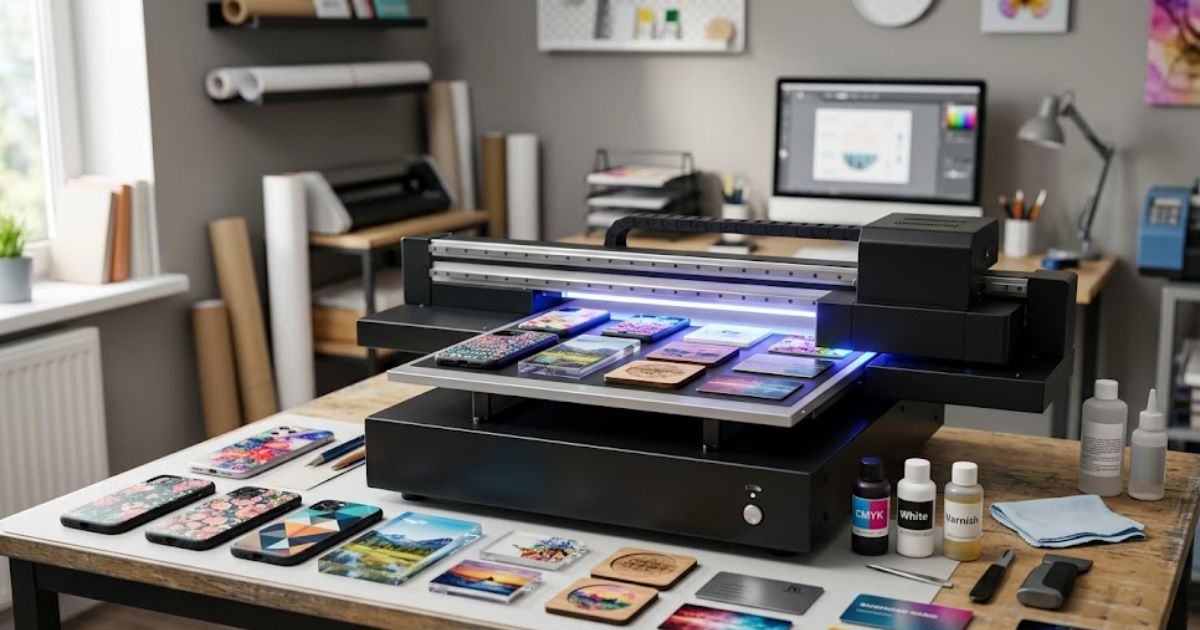
MTuTech production notes for UV printer buying guide
For buyers comparing UV printer buying guide options, the strongest ranking signal is not only the definition of the process. The page should also explain machine fit, production limits, material behavior, ink or fixture requirements, and the next page a buyer should read before requesting a quote.
Best machine fit
Use this guide together with UV Printer when the job requires stable UV output, repeatable setup, and production-ready print quality. If the work involves different shapes, materials, or order sizes, compare it with UV Printer 9060 before choosing the final printer.
Production checklist
- Confirm the printable area, part height, and fixture or rotary requirements before quoting the job.
- Match ink, primer, and curing settings to the substrate so adhesion and scratch resistance are predictable.
- Standardize artwork preparation, white ink layers, and test prints before moving into batch production.
- Track production cost by ink use, setup time, rejects, and finishing steps instead of looking only at printer price.
Related MTuTech resources
FAQ
Which MTuTech printer should this article connect to? The best next page depends on the material, shape, and production volume. Flat products usually start with UV printer or UV Printer 9060 pages, while bottles, tumblers, and round products should connect to rotary, cylinder, tumbler, or cylindrical printer pages.
What should buyers check before ordering? Buyers should confirm print size, material compatibility, white ink needs, fixture design, curing performance, maintenance expectations, and whether the workflow supports repeatable production rather than one-off samples only.
A budget unit is a smart startup tool. It is not a factory tool. That is the real difference. Professional models from Roland DG, Mimaki, and Epson feel more stable because the frame, motion system, ink delivery, and software stack are built for commercial uptime. The price is higher because the risk of downtime is lower.
Where Many People Buy Cheap UV Printers Online
Most people start with marketplaces. They search Amazon, eBay, or factory direct listings because the prices look attractive and the photos all look shiny. That is fine as a starting point, but it is not enough for a safe decision.
The biggest risk is not the printer photo. It is the seller behind the photo.
Here is what to check before buying from any online UV printer marketplace:
- Does the seller stock spare parts
- Do they answer technical questions before the sale
- Is there a real warranty
- Do they provide video setup help
- Can they supply profiles or RIP guidance
- Do they explain maintenance, white ink care, and head cleaning
- Do they list supported substrate thickness clearly
We once saw two near identical machines online. One came with decent setup help and useful software. The other came with almost no support and a weak RIP license. Same ad style. Very different result. Cheap becomes expensive fast when support disappears after delivery.
Key Features to Look for in a Budget UV Printer
A good buying decision comes down to a few important features. Fancy and words do not matter much if these basics are weak.
1. Print head quality
The print head shapes the whole print. Many buyers search for Epson based heads because they are common, known, and easy to compare. That makes sense, but the head alone is not the whole story. A good head on a shaky carriage still gives poor output.
Ask these questions:
- Which head is installed
- Is it genuine
- How easy is replacement
- What cleaning routine protects it
- Is print head maintenance explained clearly
Also remember this. Big DPI numbers do not guarantee better prints. A clean 720 by 1440 output on a stable machine can beat a messy high DPI claim on a cheap frame.
2. RIP software and color control
RIP software tells the printer how to place color, white, and sometimes varnish. Weak RIP software leads to bad color, messy layers, and wasted media.
Some budget printers ship with basic RIP tools that are fine for simple jobs. Others come with awkward software that crashes, misreads spot layers, or makes white ink work harder than it should. If you plan to print client work, test the workflow first.
More advanced shops may ask about Onyx RIP software or Wasatch SoftRIP. These are respected options, but they are more common on higher end setups and can add cost. For a beginner, the best RIP is one that is stable, easy to learn, and supported by the seller.
3. Ink system quality
A stable UV ink system saves time and stress. This matters most with white ink printing. White ink settles faster than CMYK and needs movement or circulation to stay usable. If the machine lacks a proper circulation system, the operator has to do more manual work.
Check for:
- White ink circulation
- Easy purging
- Clean capping station access
- Clear maintenance steps
- Good curing balance from the UV LED lamp
If you plan to print on dark acrylic, clear panels, or layered jobs, a weak white system will frustrate you fast.
4. Print bed size and substrate thickness
Do not buy only on price. Buy on the products you want to sell. If you plan to print on trays, plaques, awards, or thicker wood items, check the actual working area and maximum substrate thickness. Many buyers get stuck here. The machine fits the room, but the products do not fit the bed.
5. Service and parts
This may be the biggest feature of all. A machine with average specs and good support is often a better buy than a faster machine with no parts and no real help.
Who Should Buy a UV Printer Under $5000
This budget range fits people who are starting, testing, or staying small on purpose.
It is a good fit for:
- Startup print shops
- Etsy sellers
- Promotional product businesses
- Gift manufacturers
- Local sign and trophy shops are adding a new service
- Home based businesses making short runs
- Designers testing branded merchandise
It is not the best fit for:
- High volume factories
- Shops with large sheet work every day
- Businesses that need nonstop production
- Teams without time for regular maintenance
If your daily plan is custom, small batch, and flexible, this price range can work very well. If your daily plan is speed, volume, and low touch automation, you need to look higher.
Modern Entry Level UV Printers Designed for Small Businesses
This is where the market has improved. Older entry level machines felt rough. Newer ones are easier to learn, easier to drive, and better suited to small business work.
A good example is the UV Printer 9060. It gives small businesses more room than a tiny desktop unit while keeping the workflow simple enough for a new team. A modern flatbed printing system like this can shorten setup time, reduce manual guesswork, and help new operators get clean results faster. Many now ship with better interfaces, easier RIP workflows, and improved motion control.
If you are comparing options, start with the full UV printer collection and then narrow your choice by print size, product type, and support level. The best starter machine is not always the cheapest one. It is the one that matches your real work.
Final Buying Advice Before You Choose
Buy for the product, not the ad. Start with the items you want to sell, then match the printer to those items. Check print area, substrate thickness, white ink handling, RIP quality, support, and spare parts. After that, compare prices.
If you want a simple rule, use this one.
Choose a budget UV printer when you need flexibility, custom work, and a lower startup cost. Choose a professional model when you need speed, automation, and daily production muscle.
FAQs
Are UV printers under $5000 reliable?
They can be reliable if you buy from a seller with real support and you follow cleaning rules. The weakest part is usually not the core print idea. It is a poor setup, weak software, or bad white ink care.
What materials can cheap UV printers print on?
Most can print on acrylic, wood, coated metal, plastic, glass, leather, and many flat promotional items. Some surfaces need primer or a good clean first.
How long do entry level UV printers last?
A well kept machine can last three to five years or longer in light to moderate use. Print heads and small wear parts may need replacement sooner, depending on workload and maintenance quality.
Can a small UV printer run a business?
Yes. Many small businesses start this way. The better question is how much business. For custom and short run work, a small UV printer can do very well. For large wholesale volumes, it will hit a ceiling.
Do budget printers require more maintenance?
Usually yes. They are more hands on than higher end commercial units. That does not make them bad. It just means you need a daily routine..
Compare Entry Level UV Printers and Choose the Right One
Before you spend money, compare real print size, daily output, support quality, running cost, and white ink stability. That gives you a much better answer than price alone.
If you want a beginner friendly option built for real small business work, contact Mtutech printers. Compare the machines, review your product list, and choose the printer that fits your production needs now and six months from now.