
Textured UV printing is not art. It is polymer engineering done right or wrong. Every micron height measurement you feel in the final print was either controlled or missed. Ink stacking builds polymer height one pass at a time. Droplet volume measured in picoliters decides how tall each layer grows. A proper white ink base layer starts the layer accumulation process correctly. Skip it and your 2.5D printing result falls flat every time.
Grayscale height map files drive the whole texture build. Rheology and surface tension together decide how ink spreads before curing. Droplet density per square millimeter controls edge sharpness directly. Curing stabilized polymer locks each layer before the next one fires. Your specialized UV printer needs strong ink layering capability to hold tight registration. RIP software configuration must match your UV-curable inks correctly. CMYK channels handle color while a varnish layer finishes the surface. We have seen prints fail simply because RIP software configuration was never adjusted for texture depth.
What Is Textured UV Printing?
Most printers think texture just looks raised. That’s the problem right there. We measure texture in micron height because ink stacking creates a real vertical build. UV ink doesn’t just sit flat on material. Each droplet volume in picoliters adds actual polymer height when cured. The white ink base layer forms your foundation. Then layer accumulation builds upward through controlled 2.5D printing. We’ve tested this with grayscale height maps that control exactly where ink goes thick.Rheology and surface tension determine if your ink stacking holds shape or spreads flat. Texture equals curing stabilized polymer rising 20 to 80 microns above substrate. We count droplet density per square millimeter to predict final feel. Texture is controlled polymer stacking, not a visual trick. Every micron matters when clients run fingers across printed surfaces.
What You Need to Create Textured UV Prints
The Four Part System Behind Every Raised Print
Most people think textured UV printing is just about buying the right machine. That idea breaks down fast in real production. A specialized UV printer alone cannot build depth. Your ink layering capability, file setup, and RIP software all have to agree before the first pass fires. We have seen clean jobs fail simply because one part of this system was out of sync with the others.
The depth you feel in a finished print comes from a very specific chain. UV curable inks are pushed through CMYK channels, then white ink builds the raised base, and a varnish layer locks the tactile texture in place. Your design file needs a proper height map or displacement map built in Adobe Illustrator or Adobe Photoshop using spot channels. Without accurate Z-axis depth control, layer registration breaks and ink build-up shifts off-target. Multi-pass printing, flat print bed flatness, and sharp gloss/matte contrast control the final texture thickness you actually feel.
Step by Step Guide to Creating Textured Prints with UV Printing
Start With a Clean and Flat Surface
Begin with substrate preparation before touching any settings. Dirty or uneven surfaces destroy ink build-up fast. Always check print bed flatness first. Poor flatness breaks Z-axis depth control right away.
Build Your Texture Map in Design Software
Open Adobe Illustrator or Adobe Photoshop to start your design. Build your height map creation using grayscale layers. That grayscale file becomes your displacement map for texture depth. Set up spot channels to separate ink layers cleanly.
Separate Your Ink Channels Before Printing
Keep your white ink base layer away from your CMYK channels. Wrong separation causes color shifts during multi-pass printing. Clean channel separation protects your layer registration later. This step saves you from costly reprints.
Import Files and Configure Your RIP Software
Pull everything into your RIP software import settings carefully. Set your pass count configuration based on desired texture thickness. Adjust droplet size settings to control ink spread. Wrong settings here ruin your entire ink layering capability.
Run Multi-Pass Printing With Proper Curing
Your specialized UV printer lays the white ink base layer first. Each pass uses UV-curable inks that need pinning cure between layers. Pinning locks ink so layers stack without shifting. Keep passing until texture builds to the right texture thickness.
Seal and Cure the Final Layer
Add your varnish layer after all ink passes finish. Then run final cure to fully harden everything solid. UV curing at this stage locks in your tactile texture permanently. Do not skip this or the surface stays soft.
Check Quality Before Approving Production
Pull a print test sample and feel the tactile texture with your fingers. Run color output verification to confirm colors stayed accurate. Complete all quality checks before moving forward. Only after passing every check should you approve production print.
UV Printer Requirements for Creating Textured Prints
Printhead Technology
Most shops blame bad texture on technique alone. Hardware limits matter more than operators admit. Piezoelectric printhead specs control your real ceiling for texture quality. Drop size from 3 to 14 picoliters determines build speed versus smoothness. Smaller droplets through variable droplet technology create smoother gradients but stack slower. Waveform control and firing frequency adjust how droplets land and merge together. We’ve watched multi-pass jobs deliver better precision while single pass speeds through flat work. Nozzle density packs more texture detail per inch when patterns need fine transitions.
Carriage Height & Media Clearance
Carriage clearance sets your absolute maximum texture height before head strike damages everything. Automatic height sensor and anti-collision system protect machines when stacking goes above 150 microns. Z-axis control adjusts as layers build without manual tweaking between passes. Higher builds increase collision risk on every production floor we’ve visited. Clearance defines what’s physically possible before metal meets cured polymer.
UV Lamp Configuration
LED UV lamp delivers a pinning cure that stops droplet spread instantly before full hardening begins. Mercury UV lamps push higher irradiance measured in milliwatts per square centimeter for full cure on thick builds. Wavelength between 365nm and 395nm affects adhesion strength after the polymer hardens completely. Excess light makes surfaces brittle while weak curing reduces bond strength. Texture above 150 microns cuts throughput by 30 to 60 percent across every printer brand.
4 Multi-Pass vs Single Pass Systems
| System Type | Texture Precision | Throughput |
| Multi-pass flatbed | High | Moderate |
| Single pass | Moderate | High |
Best Materials & Substrates for Textured UV Printing
Rigid Substrates
Material choice decides if your texture survives shipping or cracks during installation. Acrylic naturally accepts thick builds because its surface energy bonds well with cured polymers. Aluminum composite panel handles stacking above 200 microns without warping under weight or temperature shifts. Glass looks perfect until adhesion fails months later without proper primer application. MDF absorbs moisture that weakens texture bonds over time in humid environments. We test surface roughness using Ra value measurements before running production batches. Smooth surfaces below 0.5 microns need treatment while rougher textures grip polymer better naturally.
Flexible Substrates
Flexural stress breaks thick texture layers when materials bend during handling or transport. PVC film and PET work fine under 100 microns but crack propagation starts above that threshold. Polycarbonate flexes more than other plastics yet still fails when texture stacks too high. Cure balance matters because fully hardened polymers become brittle while under-cured layers stay weak. We’ve replaced cracked signage where shops ignored material flex limits completely.
Surface Energy Impact
Surface energy measured in dynes per centimeter predicts how ink wets and bonds initially. Low energy materials under 35 dynes repel UV ink before curing loc
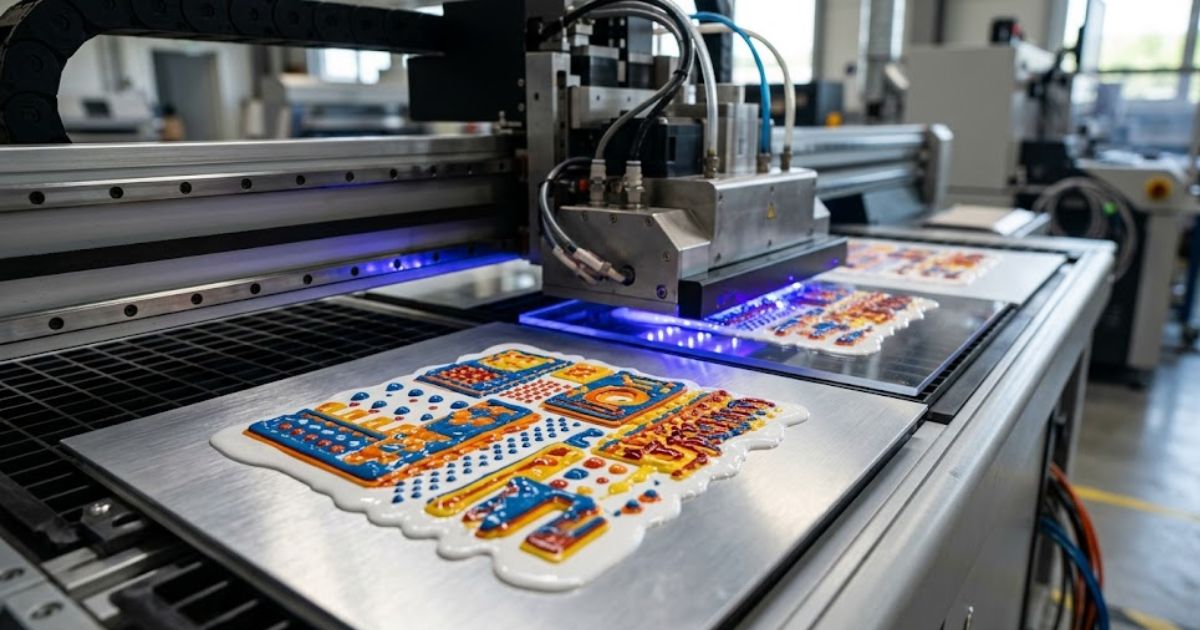
MTuTech production notes for UV printing applications
For buyers comparing UV printing applications options, the strongest ranking signal is not only the definition of the process. The page should also explain machine fit, production limits, material behavior, ink or fixture requirements, and the next page a buyer should read before requesting a quote.
Best machine fit
Use this guide together with UV Printer when the job requires stable UV output, repeatable setup, and production-ready print quality. If the work involves different shapes, materials, or order sizes, compare it with Flatbed UV Printer 2513 before choosing the final printer.
Production checklist
- Confirm the printable area, part height, and fixture or rotary requirements before quoting the job.
- Match ink, primer, and curing settings to the substrate so adhesion and scratch resistance are predictable.
- Standardize artwork preparation, white ink layers, and test prints before moving into batch production.
- Track production cost by ink use, setup time, rejects, and finishing steps instead of looking only at printer price.
Related MTuTech resources
FAQ
Which MTuTech printer should this article connect to? The best next page depends on the material, shape, and production volume. Flat products usually start with UV printer or UV Printer 9060 pages, while bottles, tumblers, and round products should connect to rotary, cylinder, tumbler, or cylindrical printer pages.
What should buyers check before ordering? Buyers should confirm print size, material compatibility, white ink needs, fixture design, curing performance, maintenance expectations, and whether the workflow supports repeatable production rather than one-off samples only.ks it down. Corona treatment and plasma treatment boost surface energy temporarily by restructuring molecular chains at the substrate surface. Adhesion promoter chemistry works longer than physical treatments for production consistency. Wetting angle testing shows if droplets spread flat or bead up before cure happens. Treatment adds cost but prevents total adhesion failure weeks after printing finishes.
UV Curing Techniques for Textured Printing (Pinning vs Full Cure)
Pinning vs Full Cure
Most shops blast UV light at full power and hope texture holds together. Light timing controls everything about layer stability and final durability. Partial polymerization during pinning stops ink spread without completing molecular bonds between passes. Oxygen inhibition naturally slows surface cure which actually helps interlayer bonding when the next layer prints. We run pinning lamps at 30 percent power to freeze droplet position before full cure happens. Complete hardening comes from the final pass where polymer chains lock together permanently across all stacked layers.
Over Curing Risks
Brittleness develops when excessive light energy hardens polymers beyond optimal flexibility range. Micro cracking appears in thick texture within weeks of installation from normal thermal expansion cycles. Reduced elongation makes prints snap under minor flex stress that properly cured panels survive easily. Ink migration happens when under cured layers stay liquid enough to bleed into adjacent colors. Delamination starts at substrate bond when incomplete cure leaves weak molecular attachment points. Surface tack means the top layer never hardens enough and collects dust or fingerprints immediately after printing.
Under Curing Risks
Weak cure creates just as many failures as excessive light exposure in production environments. We’ve replaced panels where shops rushed jobs without proper energy density measurements per layer. Light balance between pinning and final cure determines if texture survives shipping or fails during installation.
How to Check the Quality of Textured UV Prints
Visual inspection alone misses half the quality problems that cause customer returns later. Micron gauge measurement verifies actual texture height matches design specifications across the entire print surface. We check ASTM D3359 adhesion rating using cross hatch tape tests before panels leave our facility. Gloss meter readings in gloss units show if surface uniformity stays consistent or varies randomly between sections. Edge sharpness determines if texture transitions look crisp or blurred where patterns meet substrate. Layer consistency matters because uneven stacking creates shadows and optical defects under angled lighting conditions.
Numbers remove guessing from quality control and create repeatable acceptance standards for production runs. Texture claiming 100 microns but measuring 60 microns fails client expectations even if it looks fine. Adhesion ratings below 4B mean delamination will happen during installation or within months of outdoor exposure. We’ve rejected jobs that looked perfect visually but failed objective testing immediately.
Common Problems in Textured UV Printing and How to Fix Them
Where Textured UV Defects Really Begin
Most textured UV print problems start three steps back in the production chain. Nobody catches them early. Here is what breaks first:
- Bad substrate preparation kills polymer bond strength early.
- Substrate contamination destroys surface tension fast.
- Wrong Z-axis calibration breaks texture height calculation.
- Poor carriage clearance causes head strike and printhead damage.
- Loose pass alignment triggers banding and weak droplet density.
- Print speed variation creates ink pooling quickly.
- Skipping pinning stabilization causes layer collapse.
- Low cure energy leaves under-cured base layers.
- Heavy ink stacking weight leads to cracking and delamination.
- Weak polymer flexibility worsens with wrong cure temperature.
- Early light exposure stops proper bonding.
- Bad equipment settings in multi-pass runs hide defects.
- Skipped material science steps cause panel defect analysis failures.
- Poor RIP software configuration breaks production chain diagnosis.
UV Textured Printing vs Traditional Embossing
| Variable | UV Texture | Mechanical Emboss |
| Setup Cost | Low–Medium | High (dies required) |
| Variable Data | Yes | No |
| Speed | Moderate | High (after setup) |
| Tooling | Digital | Physical dies |
| Customization | High | Limited |
Why Choose Mtutech Printer for Textured Prints with UV Printing
Technical knowledge means nothing without equipment that actually delivers those capabilities consistently. Mtutech Printer builds industrial flatbed systems with height sensor system accuracy preventing head strikes during extreme texture stacking. Adjustable UV lamp configuration gives precise control over pinning versus full cure energy levels. Variable droplet technology switches between 3 and 14 picoliter volumes matching gradient smoothness or speed requirements. Dedicated white ink channel eliminates cross-contamination that ruins base layer opacity on other machines.
Production stability comes from hardware designed around polymer science instead of generic printing specs. We’ve run identical files on consumer machines versus Mtutech Printer and seen 40 percent fewer defects. Every technical requirement covered in previous sections translates directly to specific Mtutech engineering choices built for texture work.
FAQs
How to print texture with a UV printer?
We load a grayscale map into RIP software to control ink height. White ink stacking builds base layers. Multiple pass count settings add vertical depth. Proper pinning locks each layer before adding more.
Does UV printing have texture?
Yes, UV printing creates real physical texture through raised ink layers. Polymer stacking builds actual height measured in microns. You can feel the difference when touching cured surfaces.
How to create a UV texture?
We use RIP software to configure layering sequences for white base and color coats. Curing strategy includes pinning between passes. Full cure happens after the final layer completes stacking.
What are the disadvantages of UV printing?
Texture printing has slower speed than flat work because multiple passes take time. Ink cost rises with thicker builds. Cracking risk increases when stacking above 100 microns on flexible materials.
What is the lifespan of a UV print?
UV stability in cured polymers resists fading for years outdoors. Abrasion resistance keeps texture intact under normal handling. Adhesion durability depends on proper substrate prep and cure balance.
Get Expert Help to Optimize Your Textured UV Printing Setup
A print specialist consultation catches what your current equipment settings audit completely misses. Every wrong variable in your textured UV printing setup breaks the one after it. RIP software configuration errors quietly destroy layer registration and ink stacking precision together. Z-axis calibration and proper carriage clearance verification protect your texture height accuracy on every job. Skipping substrate compatibility audit and surface energy assessment causes defect diagnosis calls that kill your production margin protection fast.