
UV printer calibration isn’t a one time setup task you finish and forget. We define it as a live control system tracking three layers that shift daily. The first layer handles mechanical alignment so print heads stay locked to the substrate. Color accuracy forms the second layer where spectrophotometers measure and correct drift in cyan values. We’ve watched ink density control as the third layer because viscosity changes with room temperature swings. Most techs treat calibration like tuning a guitar once.
Calibration locks your UV printer into repeatable output by controlling inputs that want to wander. Target substrates matter because acrylic absorbs UV differently than metal does under the same lamp power. We calibrate for material groups rather than chasing perfect settings for every job. Start with a known good print then track deviations in dot gain and registration weekly. Fresh ink batches shift density by 8% so we recalibrate when opening new stock.
Why Does UV Printer Calibration Affect Print Quality?
Every visible defect on your finished piece traces back to one specific calibration variable gone wrong. Banding appears as horizontal lines when print head alignment drifts even 0.2 millimeters off center. We’ve tracked how color shift happens when ICC profiles don’t match current ink density readings. Dot gain expands when droplet spread isn’t controlled through waveform tuning and substrate pretreat levels. Poor ink adhesion shows up as flaking because UV curing power dropped below the cure threshold. Print quality crashes fast when you ignore one layer while fixing another during Uv Printing troubleshooting sessions.
Skipped calibration creates defects that compound across multi pass jobs until nothing looks right anymore. Head strikes happen when Z-axis height loses its baseline after temperature swings change the gantry. Color matching fails between morning and afternoon prints if you don’t compensate for ink warming up. We map each problem to its root cause so fixes stay permanent instead of temporary. Misaligned nozzles spray dots outside their target zones and create gaps in solid fills.
When Should You Calibrate a UV Printer?
Specific events trigger calibration needs faster than any weekly schedule ever could for your machine. Printhead replacement demands immediate recalibration because new nozzles fire droplets at slightly different angles than old ones. We’ve learned that ink batch change shifts viscosity enough to throw off existing density maps within minutes. Switching from acrylic to metal counts as a substrate change that requires fresh baseline readings for cure energy. UV lamp aging reduces output by 12% after 3,000 hours so your current settings undercure newer jobs. Visual deviation detection beats timed maintenance because you catch problems the moment they start affecting output. Calibrate right after swapping components instead of waiting until Friday’s routine check catches the drift. Run test prints whenever something physical changes inside your UV printer before starting paid work.
Watch for streaks appearing where smooth gradients used to print perfectly across the bed last week. Cyan drifting toward purple signals lamp power dropping below spec even when hours logged seem fine. We recalibrate after every bulk ink refill because settling changes how pigment disperses through carriers. Environmental jumps like moving from a 65 degree shop to an 80 degree space require adjustment runs. First prints after a three day weekend often show registration errors from thermal contraction overnight. Compare current output against your reference print taped beside the control panel every morning. Fixing problems after they ruin client jobs costs more than five minutes spent checking baselines daily.
What Tools Are Required for UV Printer Calibration?
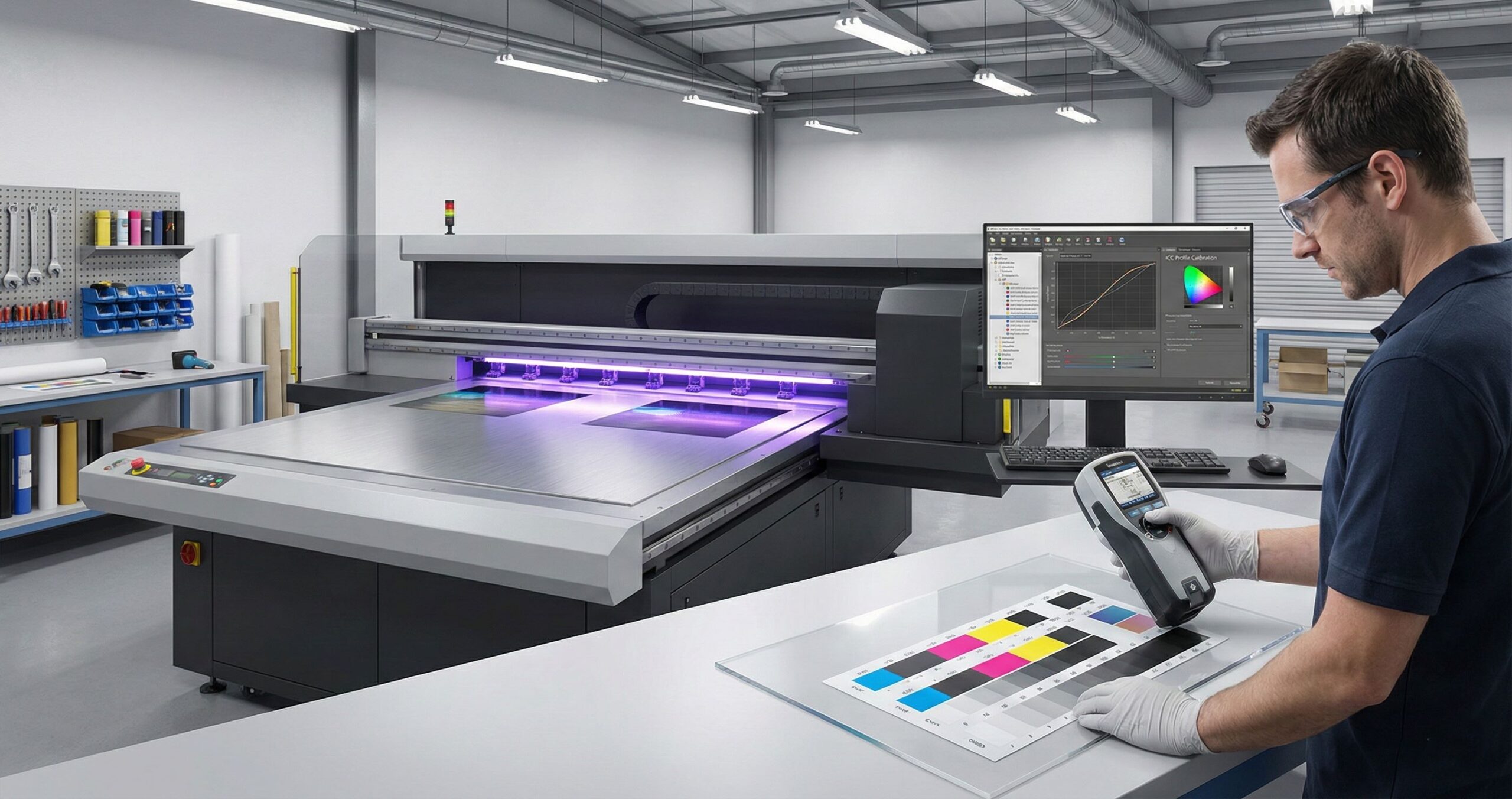
You can’t calibrate a UV printer accurately without the right hardware measuring what actually prints. A spectrophotometer reads exact color data instead of relying on your eyes under shop lighting. RIP software controls how ink droplets land and cure across every substrate type you run. We’ve learned that guessing at settings wastes material faster than buying proper measurement tools. The ICC workflow connects measured data to output adjustments that keep jobs consistent across weeks. No spectrophotometer means no real color calibration because visual matching changes with room brightness.
Why a Spectrophotometer Is Required for UV Printing
Reflective substrates like polished aluminum trick your eyes because they bounce light at shifting angles. We measure Lab values under standardized D50 illumination to remove human judgment from approvals completely. Delta E scores quantify drift so you know when output sits within acceptable brand tolerance. Metal surfaces reflect 40% more light than paper so monitor previews never match finished prints. Glass needs different profiles than acrylic even when both materials look transparent to you. UV cure strength changes how pigments bond so older lamps shift readings without visible clues.
Which Software Controls UV Printer Calibration
RIP software acts as the command center translating design files into precise machine instructions. Linearization curves map actual ink delivery against what the system expects to spray. We configure ink limits to stop oversaturation that puddles on non porous materials during production speeds. Software differs from basic printer drivers because it manages dot placement and cure timing. The ICC workflow syncs measurement data with real time output corrections for locked in accuracy. RIP orchestrates multi pass strategies layering white ink under translucent colors for opacity.
Step by Step UV Printer Calibration Process
How to Perform Mechanical and Printhead Alignment
Bidirectional alignment ensures printhead passes match perfectly whether moving left or right across the bed. Carriage accuracy determines if nozzles fire at identical positions during every single travel direction. We measure printhead offset using test patterns that reveal microsecond timing errors between color channels. Camera based systems on models like the UV Printer 9060 automate positioning checks faster than manual methods. Visual positioning relevance shows up when diagonal lines print jagged instead of smooth and straight. Run alignment grids after any printhead swap or carriage belt tension adjustment for best results.
How to Linearize Ink Output in UV Printing
Ink linearization forms the foundation that ICC profiles depend on so you can’t skip this step. Grayscale balance proves whether cyan and magenta flow at equal rates through their separate channels. We’ve found that channel response drifts when temperatures shift between morning startups and afternoon production heat. Print a 21 step wedge then measure actual density values against what the file requested. Corrections get loaded into lookup tables that remap input percentages to real world output amounts. Without linearization your profiles try correcting problems that change daily instead of staying predictable.
How to Set Density Targets for UV Ink
Ink limit values prevent flooding that causes cure failures and substrate warping on non porous materials. Maximum density targets differ wildly between polished metal and matte plastic substrate surfaces we print. Substrate absorption on porous wood pulls ink deeper so you need heavier loads than glass. Metal reflects more light so it needs less ink to hit the same visual density. We test limits by printing solid patches at 10% increments until puddling or incomplete cure appears. Acrylic sits between metal and wood requiring moderate limits around 240% total ink coverage. Record these numbers per material type because reusing metal settings on plastic ruins jobs fast.
How to Create and Apply ICC Profiles for UV Printers
One substrate equals one ICC profile because surface chemistry changes how ink bonds and cures completely. Substrate specific profiles account for texture, porosity, and reflectance that shift color appearance dramatically between materials. We build profiles by printing test charts with hundreds of color patches then measuring each one. Color consistency depends on never mixing profiles meant for different materials even when they look similar. Apply the correct profile in your RIP before sending jobs or you’ll chase color problems. ICC data links measured values to compensation curves that keep output locked to brand standards. Save profiles with clear names like Metal Brushed Aluminum so operators grab the right one every time without guessing.
How UV Lamp Power and Position Af
MTuTech production notes for UV printer software
For buyers comparing UV printer software options, the strongest ranking signal is not only the definition of the process. The page should also explain machine fit, production limits, material behavior, ink or fixture requirements, and the next page a buyer should read before requesting a quote.
Best machine fit
Use this guide together with RIP Software when the job requires stable UV output, repeatable setup, and production-ready print quality. If the work involves different shapes, materials, or order sizes, compare it with UV Printer before choosing the final printer.
Production checklist
- Confirm the printable area, part height, and fixture or rotary requirements before quoting the job.
- Match ink, primer, and curing settings to the substrate so adhesion and scratch resistance are predictable.
- Standardize artwork preparation, white ink layers, and test prints before moving into batch production.
- Track production cost by ink use, setup time, rejects, and finishing steps instead of looking only at printer price.
Related MTuTech resources
FAQ
Which MTuTech printer should this article connect to? The best next page depends on the material, shape, and production volume. Flat products usually start with UV printer or UV Printer 9060 pages, while bottles, tumblers, and round products should connect to rotary, cylinder, tumbler, or cylindrical printer pages.
What should buyers check before ordering? Buyers should confirm print size, material compatibility, white ink needs, fixture design, curing performance, maintenance expectations, and whether the workflow supports repeatable production rather than one-off samples only.fect Color Accuracy
Lamp intensity controls color accuracy more than most operators realize because cure energy chemically alters pigments. Over curing yellows whites and shifts cyan toward green when excessive UV exposure breaks down photoinitiators. We’ve tracked under curing leaving tacky surfaces that attract dust and appear darker than properly cured samples. UV curing energy changes how light reflects off finished prints so identical ink loads look different. Lamp position matters because uneven energy distribution cures the left side faster than the right. Faded lamps drop intensity by 15% after 2,000 hours without showing visible dimming to your eye. Color shifts happen from cure variance, not ink formulation problems like most troubleshooting guides claim.
Distance between UV lamp arrays and substrate surface directly impacts how evenly energy hits the print. We measure lamp intensity with radiometers to catch degradation before it ruins client jobs completely. Over curing also causes substrate warping on thin plastics from excessive heat buildup during multi pass printing. Under curing shows up as smudging when you touch prints immediately after they exit the machine. Replacing one lamp in a multi lamp array creates color banding because new bulbs output 20% more energy. UV exposure timing needs adjustment when switching between 6mm acrylic and 0.5mm vinyl sheets. Track lamp hours religiously and replace arrays as complete sets to maintain consistent curing performance.
How to Verify UV Printer Calibration Accuracy
Control strips printed daily prove whether your calibration stayed locked or drifted overnight from temperature changes. We measure Delta E tolerance to quantify color deviation in numbers instead of trusting subjective visual checks. Repeatability testing means printing the same file three times and comparing results to catch inconsistencies. Signage work tolerates Delta E values up to 6 because viewing distance hides minor shifts. Industrial marking demands tighter tolerance under 3 for barcode scanners and quality control systems to read properly. Decorative metal printing requires Delta E below 2 since customers inspect finished pieces up close under bright lighting.
Print control strips at job start, midpoint, and end to track drift during long production runs. We’ve seen calibration accuracy slip when room temps climb 10 degrees between morning and afternoon shifts. Repeatability failures show up as color matching perfectly on print one but shifting on print twenty. Compare yesterday’s archived control strip against today’s fresh print using your spectrophotometer for objective proof. Delta E scores above your application’s tolerance mean recalibration before continuing paid work to avoid rejections.
Why Professional Calibration Improves Production Efficiency
Professional calibration delivers measurable ROI through waste reduction that cuts material costs by 30% monthly. We’ve tracked reprint cost savings when jobs pass approval on the first attempt instead of third. Production consistency means operators spend time printing instead of troubleshooting color shifts between morning and afternoon runs. Locked in settings eliminate guesswork so new hires produce saleable output from day one without years of experience. Calibration reduces reject rates from 18% down to under 3% across typical production volumes we monitor.
Stable output lets you quote tighter deadlines because variables stay controlled throughout multi day job runs. Fewer test prints and material scraps mean your expensive substrate inventory stretches further per quarter. Efficiency jumps when machines run predictably instead of stopping for constant manual adjustments and color checks.
Why Choose Our UV Metal Printing Solutions?
Metal substrates demand precision that standard printers can’t deliver because reflective surfaces expose every registration error. Our UV metal printing systems combine camera based visual positioning with locked calibration for repeatable accuracy. We’ve developed workflows specifically for aluminum, stainless steel, and brass that account for thermal expansion during curing. Industrial accuracy matters when printing serial numbers, barcodes, or branding that must pass quality inspections. The Mtutech printer UV Printer 9060 uses visual positioning to auto correct substrate placement before each pass starts. Calibration stability on metal prevents the color shift and registration drift that ruins high value parts. Reflective metal surfaces show flaws invisible on paper so your equipment needs tighter tolerances.
UV metal printing requires different ink limits and cures energy than plastic or wood applications. Our high precision UV printer for metal maintains calibration across temperature swings that warp lesser machines out of spec. Visual positioning technology compensates for metal sheets that sit slightly rotated or off center on the bed. We’ve eliminated the manual trial and error that wastes expensive metal stock during setup runs. Industrial clients need accuracy within 0.1mm for parts assembly and our systems deliver that consistency. Mtutech printer models hold registration across 500 sheet production runs without drift or Uv printing banding issues. Metal printing becomes profitable when your reject rate drops below 2% and deadlines stay predictable.
FAQs
How often should a UV printer be calibrated?
We calibrate based on usage, not dates. High volume shops need weekly checks. Light users can go monthly. Print quality tells you when calibration is due.
Can I use one ICC profile for all substrates?
No, you cannot. Each material absorbs ink differently. Acrylic needs its own profile. So does wood. We create custom profiles for accurate colors on every surface.
Does UV ink type affect calibration results?
Yes, ink type matters greatly. Flexible inks cure slower than rigid inks. Each formula reacts differently under UV light. We adjust calibration settings for your specific ink.
What Delta E value is acceptable for UV printing?
Most commercial work accepts Delta E under 3. Brand packaging needs Delta E under 2. We help you hit the right tolerance for your industry standards.
Can UV printer calibration fix banding issues?
Calibration fixes color banding only. Mechanical banding needs hardware repair. We check print heads and rails first. Then we calibrate for smooth, even output across all prints.
Get Calibration Support
Calibration assistance from our team guarantees your Mtutech printer delivers consistent output from the first production run. We provide technical support that walks you through spectrophotometer readings and profile building for your specific substrates. Professional setup means we help you establish baseline files that stay stable across seasonal temperature changes. Our support acts as output assurance so you never ship work wondering if colors will match. We’ve guided shops through linearization troubleshooting when channel response drifts after ink batch changes. Calibration questions get answered by technicians who run the same equipment daily in real production environments. Reach out when you need assistance dialing in new materials or verifying Delta E tolerance for client approvals. Setup guidance helps you avoid the costly trial and error phase that wastes expensive substrates during learning curves.