

The Complete Guide to UV Printing Technology in 2025
Everything you need to know about UV printers, UV-LED curing technology, applications, costs, and how to start a profitable UV printing business in the USA.
UV printing technology has revolutionized the printing industry, enabling businesses to print vibrant, durable designs on virtually any material. Whether you’re looking to start a custom printing business, expand your existing print shop, or simply understand this cutting-edge technology, this comprehensive guide covers everything you need to know about UV printing in 2025.
The global UV inkjet printer market was valued at USD 1.44 billion in 2024 and is expected to grow to USD 1.54 billion by 2030. This growth represents a massive opportunity for entrepreneurs and businesses looking to capitalize on the demand for customized, high-quality printed products. If you’re ready to explore UV printer solutions, this guide will help you understand the technology and make informed decisions.
What is UV Printing?
UV printing is a digital printing process that uses ultraviolet light to instantly cure (dry) specially formulated inks as they are applied to a surface. Unlike traditional printing methods that rely on evaporation or absorption to dry ink, UV printing uses photochemical reactions triggered by UV light exposure.
When UV light hits the ink, it triggers a process called polymerization, where photoinitiators in the ink absorb the UV energy and cause the ink molecules to bond together and harden instantly. This creates an extremely durable, scratch-resistant finish that adheres strongly to the substrate.
How Does UV Printing Work?
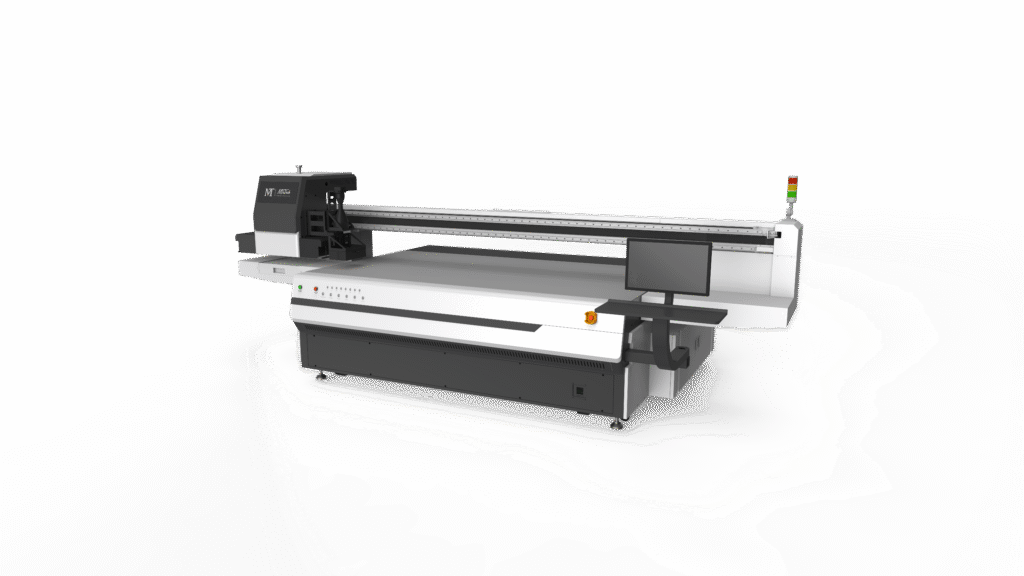
The UV printing process follows these key steps:
- Design Preparation: Create your artwork in software like Adobe Illustrator or CorelDRAW, typically in CMYK color mode at 300 DPI resolution.
- Material Loading: Place your substrate (wood, glass, metal, acrylic, etc.) on the printer’s flatbed or load flexible media into the roll system.
- Height Adjustment: The printer measures substrate thickness and adjusts printhead height for optimal ink placement.
- Printing & Curing: UV ink is sprayed through precision printheads while UV-LED lamps follow immediately behind, curing the ink instantly.
- Finished Product: The print is completely dry and ready for handling immediately—no waiting time required.
UV-LED vs Mercury Lamp Technology
Modern UV printers predominantly use UV-LED curing systems, which have largely replaced older mercury vapor lamp technology. Understanding the difference is crucial when selecting a UV printer for your business.
| Feature | UV-LED | Mercury Lamp |
| Energy Consumption | 70% less energy | High consumption |
| Warm-up Time | Instant on/off | 5-15 minutes |
| Lamp Lifespan | 10,000+ hours | 1,000-2,000 hours |
| Heat Output | Minimal (cold cure) | High heat |
| Heat-Sensitive Materials | Safe to use | Risk of warping |
| Environmental Impact | Mercury-free, eco-friendly | Contains hazardous mercury |
| Maintenance | Low maintenance | Frequent lamp replacement |
Recommendation: For most businesses, UV-LED printers are the clear choice due to lower operating costs, better material compatibility, and environmental benefits. The initial investment is quickly offset by energy savings and reduced maintenance.
Types of UV Printers
Understanding the different types of UV printers helps you choose the right equipment for your specific applications and business needs.
1. UV Flatbed Printers
Flatbed UV printers feature a stationary flat surface where rigid materials are placed for direct printing. They’re the most versatile option for printing on solid objects and substrates up to 4 inches thick.
Best for: Signage, promotional products, phone cases, awards, wood prints, acrylic displays, glass printing
Popular sizes: A3 (desktop), 9060 (mid-size), large format (4×8 feet)
2. UV Roll-to-Roll Printers
Roll-to-roll UV printers handle flexible materials fed continuously through the machine. They’re designed for high-volume production of banners, vehicle wraps, and wallpapers.
Best for: Banners, vinyl graphics, vehicle wraps, wallpaper, backlit displays
Widths: Typically 64 inches to 126 inches
3. UV Hybrid Printers
Hybrid UV printers combine flatbed and roll-to-roll capabilities in one machine, offering maximum versatility. They can print on both rigid materials and flexible roll media, making them ideal for businesses serving diverse markets. Explore hybrid UV printer options to see how they can expand your capabilities.
Best for: Print shops needing both rigid and flexible media capabilities
Advantage: One machine, unlimited applications
4. UV DTF Printers
UV DTF (Direct-to-Film) printers create transfers that can be applied to curved, irregular, or hard-to-print surfaces. The design is printed onto a special adhesive film and then transferred to the final product. Check out our UV DTF printer collection for sticker and transfer applications.
Best for: Stickers, decals, cup wraps, irregular surfaces, promotional items
Advantage: No heat press required, works on any surface
5. Cylindrical/Rotary UV Printers
Rotary UV printers are specifically designed for printing on cylindrical objects like bottles, tumblers, cans, and tubes. They rotate the object while printing, allowing for 360-degree full-wrap designs. Learn more about cylinder UV printers and 360 rotary UV printers for drinkware and bottle printing.
Best for: Custom tumblers, water bottles, wine bottles, cosmetic containers, candles
Advantage: Full 360° printing on round objects
What Materials Can UV Printers Print On?
One of UV printing’s greatest advantages is its remarkable material versatility. Because UV ink cures instantly without being absorbed into the substrate, you can print on almost any surface with proper preparation.
- Wood & MDF: Signs, wall art, furniture panels, cutting boards, coasters
- Glass: Bottles, windows, mirrors, awards, decorative panels
- Metal: Aluminum sheets, stainless steel, nameplates, dog tags
- Acrylic & Plastic: Signs, displays, phone cases, keychains, promotional items
- Leather & Faux Leather: Wallets, bags, belts, book covers, accessories
- Ceramic & Tile: Mugs, tiles, plates, decorative cer
- MTuTech production notes for UV printer buying guide
For buyers comparing UV printer buying guide options, the strongest ranking signal is not only the definition of the process. The page should also explain machine fit, production limits, material behavior, ink or fixture requirements, and the next page a buyer should read before requesting a quote.
Best machine fit
Use this guide together with UV Printer when the job requires stable UV output, repeatable setup, and production-ready print quality. If the work involves different shapes, materials, or order sizes, compare it with UV Printer 9060 before choosing the final printer.
Production checklist
Confirm the printable area, part height, and fixture or rotary requirements before quoting the job.
Match ink, primer, and curing settings to the substrate so adhesion and scratch resistance are predictable.
Standardize artwork preparation, white ink layers, and test prints before moving into batch production.
Track production cost by ink use, setup time, rejects, and finishing steps instead of looking only at printer price.
Related MTuTech resources
UV Printer
UV Printer 9060
Machine Comparison
Contact MTuTech
FAQ
Which MTuTech printer should this article connect to? The best next page depends on the material, shape, and production volume. Flat products usually start with UV printer or UV Printer 9060 pages, while bottles, tumblers, and round products should connect to rotary, cylinder, tumbler, or cylindrical printer pages.
What should buyers check before ordering? Buyers should confirm print size, material compatibility, white ink needs, fixture design, curing performance, maintenance expectations, and whether the workflow supports repeatable production rather than one-off samples only.amics - PVC & Foam Board: Signage, displays, packaging prototypes
- Canvas: Art reproductions, photo prints, wall décor
- Stone & Marble: Memorial plaques, decorative tiles, countertop samples
Key Benefits of UV Printing Technology
Superior Print Quality
Because UV ink cures instantly upon contact, the ink dots don’t spread or bleed into the material. This results in sharper details, more vibrant colors, and photo-realistic output at resolutions up to 1440 DPI or higher.
Exceptional Durability
UV-cured prints are highly resistant to scratching, fading, water, and chemicals. Outdoor signage can last 3-5 years without significant degradation, and indoor prints maintain their vibrancy indefinitely. This durability makes UV printing ideal for products that need to withstand daily use.
Instant Production
Unlike traditional printing methods requiring drying time, UV prints are ready immediately after printing. This eliminates production bottlenecks and allows for same-day turnaround on most projects.
Environmental Advantages
- No VOC emissions during printing
- UV-LED systems use 70% less energy than traditional methods
- Mercury-free technology (UV-LED)
- Reduced waste due to instant curing
- No solvent evaporation or hazardous waste
UV Printer Applications & Business Ideas
UV printing opens up countless business opportunities. Here are the most profitable applications to consider:
Custom Phone Cases & Tech Accessories
With printing costs around $2-3 per case and retail prices of $15-25, phone cases offer 40-60% profit margins. The phone accessory market exceeds $280 billion globally, making this a lucrative niche.
Custom Drinkware & Tumblers
Custom tumblers have exploded in popularity, especially on platforms like Etsy. With a tumbler printer, you can produce tumblers at $5-10 cost and sell them for $20-35, generating significant profits.
Popular items: Stainless steel tumblers, water bottles, wine glasses, beer mugs, sports bottles
Signage & Display Graphics
Local businesses constantly need indoor and outdoor signage. UV printing on materials like acrylic, PVC, and aluminum creates durable, professional signs at competitive prices.
Promotional Products
- Corporate gifts (pens, USB drives, power banks)
- Event giveaways (badges, keychains, magnets)
- Trade show materials (displays, banners)
- Branded merchandise (coasters, bottle openers)
Personalized Gifts
Wedding favors, photo gifts, pet products, and custom awards all command premium prices. Consumers are willing to pay significantly more for personalized items that feel unique and thoughtful.
UV Printer Costs & Investment Guide
Equipment Investment
| Printer Category | Price Range (USD) | Best For |
| Desktop A3/A4 | $3,000 – $8,000 | Startups, testing |
| Mid-Size (9060) | $8,000 – $20,000 | Small businesses |
| Industrial Flatbed | $25,000 – $80,000 | High-volume production |
| Large Format/Hybrid | $50,000 – $150,000+ | Print shops, signage |
Operating Costs
- UV Ink: $80-150 per liter (CMYK+White sets range $400-800)
- Cost per print: $0.10-0.50 depending on coverage and size
- Maintenance: $200-500 annually for cleaning supplies
- Electricity: UV-LED uses approximately 70% less power than traditional printing
ROI Expectations
A well-run UV printing business can achieve ROI within 6-18 months. For example, printing 40 custom tumblers per day at $15 profit each generates $600 daily or $180,000+ annually. UV printing is considered one of the most profitable segments in the print industry due to its low per-unit costs and high-value output.
How to Choose the Right UV Printer
Selecting the right UV printer depends on your specific business needs. Consider these key factors:
- Print Size Requirements: What’s the largest item you’ll print? Choose bed size accordingly.
- Material Types: Will you print mostly flat items, cylindrical objects, or both?
- Production Volume: How many items per day/week do you need to produce?
- Ink Channels: CMYK is standard; add White for dark substrates, Varnish for texture effects.
- Printhead Technology: Epson, Ricoh, and Konica Minolta are industry leaders.
- Software Compatibility: Ensure RIP software works with your design programs.
- Support & Training: Factory support, spare parts availability, and training resources.
Getting Started with UV Printing
UV printing technology represents one of the most exciting opportunities in the print industry today. With its unmatched versatility, superior quality, and growing market demand for customized products, there’s never been a better time to invest in UV printing capabilities.
Whether you’re starting a home-based business selling custom tumblers on Etsy, expanding your sign shop’s capabilities, or adding promotional product printing to your services, UV technology provides the quality and efficiency needed to succeed.
Ready to explore UV printing for your business? Browse our complete range of UV printers to find the perfect machine for your needs. Our team is here to help you choose the right equipment and get started on your UV printing journey.
Frequently Asked Questions
What is the lifespan of UV prints?
UV prints are highly durable, lasting 3-5 years outdoors with direct sunlight exposure and indefinitely indoors. The UV-cured ink is resistant to fading, scratching, and water damage.
Can UV printers print on dark materials?
Yes! UV printers with white ink capability can print vibrant colors on dark or transparent substrates by laying down a white base layer first.
Is UV printing environmentally friendly?
UV printing, especially UV-LED technology, is more environmentally friendly than traditional printing. It produces no VOC emissions, uses less energy, and contains no hazardous materials.
How much space do I need for a UV printer?
Desktop UV printers fit on a standard workbench. Mid-size flatbeds need approximately 6×4 feet of floor space. Large format machines require dedicated production areas of 10×8 feet or more.
Do UV printers require special ventilation?
UV-LED printers produce minimal fumes and generally don’t require special ventilation for home or small business use. However, good air circulation is always recommended in any printing environment.
Commercial Buyer Notes for UV printing technology guide
This topic matters because readers updating older UV printing knowledge with current commercial buying signals. A post can rank for an informational keyword and still support a commercial page when it answers the practical questions a buyer asks before requesting a quote. For MTuTechPrinter.com, this article should guide readers toward the right production path instead of competing with the main product page.
The best audience for this page is new UV printer buyers and production teams comparing technology options in 2026. These visitors are usually not looking for a basic definition only. They want to know whether the workflow fits their products, whether the machine can handle the job repeatedly, and what problems they should avoid before investing in equipment.
Best-fit buyer scenarios
- Flatbed production where buyers care about repeatability, realistic cost per job, and a production process that does not collapse once order volume increases.
- UV DTF transfers where buyers care about repeatability, realistic cost per job, and a production process that does not collapse once order volume increases.
- Hybrid signage work where buyers care about repeatability, realistic cost per job, and a production process that does not collapse once order volume increases.
- Rotary product decoration where buyers care about repeatability, realistic cost per job, and a production process that does not collapse once order volume increases.
Production checks before choosing a printer
- Machine format should be tested on the same materials, blanks, inks, and finishing conditions the shop will use for paid orders.
- Application demand should be tested on the same materials, blanks, inks, and finishing conditions the shop will use for paid orders.
- Operator skill should be tested on the same materials, blanks, inks, and finishing conditions the shop will use for paid orders.
- Maintenance cost should be tested on the same materials, blanks, inks, and finishing conditions the shop will use for paid orders.
How This Article Supports the Main Product Pages
The primary commercial path from this article should lead to UV printer. Readers who are comparing related workflows can also review UV DTF printer, hybrid UV printer, machine comparison. This keeps the blog post useful as an educational asset while passing topical relevance to the commercial pages that should rank for buyer-intent terms.
For search engines, this creates a cleaner hierarchy: the blog post handles long-tail questions, application details, mistakes, workflow checks, and comparison language; the product page remains the main destination for machine specifications, inquiry intent, and conversion. That structure helps reduce keyword overlap and gives Google clearer signals about which page should own the commercial keyword.
Internal linking recommendation
When this article is referenced from future content, use natural anchors such as “UV printing technology guide”, “commercial UV printing technology guide workflow”, and “buyer guide for UV printing technology guide”. Reserve exact commercial anchors for the product page, especially when building external guest posts or high-authority references.
Decision Table for Commercial Use
| Use case | Key check | Why it matters |
|---|---|---|
| flatbed production | machine format | Use this as a buying signal before choosing the final printer workflow. |
| UV DTF transfers | application demand | Use this as a buying signal before choosing the final printer workflow. |
| hybrid signage work | operator skill | Use this as a buying signal before choosing the final printer workflow. |
| rotary product decoration | maintenance cost | Use this as a buying signal before choosing the final printer workflow. |
What Makes This Topic Easier to Rank
The easiest ranking angle is not to repeat broad product-page copy. The stronger approach is to answer specific buyer questions around setup, mistakes, material fit, cost control, workflow, and production risk. Those long-tail topics usually create impressions earlier than broad head terms, especially in the United States where buyers compare several suppliers before contacting a manufacturer.
This article should therefore be used as a support asset: keep the language practical, connect it to real production decisions, and link clearly to the right MTuTech Printer page. Over time, impressions from these long-tail phrases can help the site build topical authority and send more qualified visitors toward the pages that matter commercially.