
MultiLayer UV printing fails before the first drop fires. The real problem lives inside your RIP color separation engine and RasterLink configuration. A wrong RIP memory load setting quietly corrupts your entire digital ink firing queue. Most shops never run a pre-flight validation checklist before sending jobs. That one skip costs more than any reprint.
Bi-directional offset calibration and encoder calibration must match perfectly. Ignore mechanical backlash on your linear rail stability and every layer overlay tolerance shifts. Your ink layer stack loses registration reliability fast. We caught a profile mismatch prevention failure traced back to a stale firmware version dependency on a client flatbed. Fix head height calibration and run a full nozzle check protocol before any multi-white stack job starts.
What Is MultiLayer UV Printing?
MultiLayer UV printing builds results one layer at a time. Each step in the ink layer stack controls something physical. The CMYK layer handles color. The white ink opacity layer blocks light from passing through. Sequential ink deposition decides what sits where in the stack.
Light transmission control and light reflection control depend fully on layer position. A misplaced varnish relief layer kills the gloss surface finish completely. Opacity blocking function fails when the controlled ink sequence breaks. We have seen print quality control collapse just from one wrong ink pass configuration. The color layer function and texture building function each need their own dedicated pass. Layer by layer ink build is what separates this from single-pass printing limitations. B2B production application demands this level of commercial print complexity. Your production capability range grows only when the ink layer stack stays in order.
How MultiLayer UV Printing Works (Step by Step Workflow)
Where the Sequence Breaks Before the Ink Does
MultiLayer UV printing fails at the sequence level, not the ink level. One wrong step in the digital ink firing queue corrupts every layer after it. Here is where each breakdown actually starts:
- Skipping substrate preparation or the IPA wipe ruins inter layer bond strength completely.
- Missing adhesion promoter causes polymer stress cracking under the first CMYK layer.
- Wrong vacuum zoning strength shifts media during sequential ink deposition.
- A bad head height calibration breaks your entire ink layer stack fast.
- Poor encoder calibration leads to carriage drift prevention failure immediately.
- Weak linear rail stability destroys registration reliability across every pass.
- Misconfigured RIP color separation engine creates profile mismatch prevention errors.
- Bad white choke algorithm settings ruin your white ink opacity layer output.
- Skipping nozzle check protocol hides nozzle mapping errors until too late.
- Wrong firing frequency (kHz) setting breaks bi-directional offset calibration silently.
- A failed pre-flight validation checklist skips critical test strip calibration steps.
- Missing inter-pass delay between layers causes pinning cure to fail badly.
- Weak final cure timing leaves the varnish relief layer soft and unstable.
- Heavy multi-white stack without checking white density control causes ink stacking collapse threshold failures.
- Ignoring cure shrinkage rate cracks the layer micron height under stress.
- High ink viscosity without matching pass count configuration creates uneven layer overlay tolerance.
- Wrong maximum build height (0.5–1.5mm) setting triggers gloss differential across panels.
- Skipping layer preview engine checks allows bad color plate generation to print.
- A missing special color plate generation step breaks layer grouping engine output.
- Poor optical positioning system alignment ruins height sensor system readings completely.
- Skipping layer preview verification hides media expansion coefficient errors early.
- We caught an independent white channel misconfiguration that ruined 200 panels in one run.
- A faulty dedicated varnish channel setting caused gloss differential on every board.
- Weak LED curing array power leaves under-cured base layers across the full job.
What Layer Sequences Are Used in B2B Production?
Why Your Layer Order Is a Structural Decision, Not a Style Choice
The layer sequencing logic you pick decides if your print survives. Wrong CMYK layer configuration breaks everything fast. Here is what each job type actually needs:
- Dark substrate printing always needs a white ink layer first.
- White + CMYK sequence locks color on wood substrate and PVC substrate.
- CMYK + White + CMYK sequence adds depth on metal substrate and acrylic substrate.
- CMYK + Varnish sequence protects packaging substrate and PET substrate jobs.
- CMYK + White + Varnish sequence finishes premium retail graphics cleanly.
- Multi-white stack builds support day/night backlit printing properly.
- Spot gloss application needs tight RIP color separation control.
- 3D texture printing handles ADA texture compliance and Braille signage production.
- Poor ink opacity control kills color vibrancy enhancement on dark surfaces.
- Bad substrate compatibility checks break B2B application matching every time.
- Skipping production specification alignment causes sequential ink deposition failures.
- Light diffusion engineering controls how varnish layer performs under backlight.
Quick Layer Sequence Reference by Substrate and Use
| Substrate / Use Case | Layer Sequence | Key Benefit |
| Metal substrate | CMYK + White + CMYK sequence | Color vibrancy enhancement |
| Acrylic substrate | CMYK + White + CMYK sequence | Deep color on clear base |
| Wood substrate | White + CMYK sequence | Ink opacity control |
| PVC substrate | White + CMYK sequence | Strong substrate compatibility |
| Packaging substrate | CMYK + Varnish sequence | Surface protection |
| PET substrate | CMYK + Varnish sequence | Sequential ink deposition hold |
| Premium retail graphics | CMYK + White + Varnish sequence | Clean finish with spot gloss application |
| Day/night backlit printing | Multi-white stack | Light diffusion engineering |
| Braille signage production | 3D texture printing | ADA texture compliance |
| B2B production jobs | RIP color separation + alignment | Production specification alignment |
How Multi-Layer Printing Physically Works Inside a UV Printer
The RIP color separation engine splits your artwork into separate ink passes before printing starts. Each pass follows a digital ink firing queue that tells the printhead exactly when to fire. We’ve watched this process run at precise firing frequency levels measured in kHz, keeping every layer clean and sharp.
Head height calibration controls how far the nozzle sits above the surface. The white choke algorithm shrinks the white layer slightly so color edges stay crisp. Nozzle mapping then guides each droplet to land exactly where the color plate generation planned it.
One Pass vs Multi-Pass Layer Printing: What Changes Mechanically?
Two Systems, Two Different Mechanical Realities
One pass and multi-pass are not speed options. They are mechanically different systems. Wrong choice breaks output structurally.
| Factor | One Pass System | Multi Pass System |
| Throughput per shift | High | Moderate |
| Registration risk | Low | Medium |
| Ink cure timing | Immediate sequencing | Inter-pass delay required |
| Layer overlay tolerance | Tighter risk | More controlled |
| Operational cost per job | Lower | Higher |
| Final cure energy | Fixed | Adjustable per layer |
| Cure shrinkage rate | Compounds fast | Stabilizes between passes |
| Layer micron height | Less consistent | More accurate |
| Mechanical backlash | Higher at speed | Controlled |
| Bi-directional offset | Hard to fix live | Adjustable |
| Linear rail stability | Must be perfect | More forgiving |
| Vacuum zoning strength | Critical | Moderate impact |
| Substrate flatness | Must be confirmed | Managed per pass |
| Firmware version dependency | High impact | Moderate |
When to Use Each and Key Risks
- One pass fits backlit panel production and high build texture printing with flat stable media.
- Multi-pass fits jobs needing tight pinning cure timing and ink stacking collapse threshold control.
- Bad RIP configuration breaks print head firing sequence in both systems fast.
- Wrong ink viscosity raises time gap exposure damage in one-pass jobs.
- Poor encoder calibration shifts carriage speed and ruins media expansion coefficient readings.
- Weak production job matching ignores substrate flatness and raises reprint costs always.
RIP Software Settings for Accurate MultiLayer Printing
Raster Link and Versa Works both handle layer jobs differently based on firmware version dependency. A wrong firmware build breaks the software hardware handshake logic completely. We’ve seen print shops lose full jobs just from skipping a firmware update check.
The Generate Layered Job function inside the layer grouping engine splits plates cleanly when settings match. White density control and special color plate generation must align or you risk a profile mismatch that wrecks opacity. RIP memory load spikes fast when queue duplication runs without proper limits set.
How Substrate Type Affects MultiLayer Print Quality
| Substrate | White Ink Adhesion | Varnish Hold | Cure Sensitivity |
| Acrylic | High | High | Moderate |
| Glass | Moderate | High | High |
| Aluminum Composite | High | Moderate | Low |
| PVC Foam Board | High | Moderate | Low |
| PET | Moderate | High | High |
Registration Accuracy: How Do You Prevent Layer Misalignment?
Causes Misregistration in MultiLayer Printing
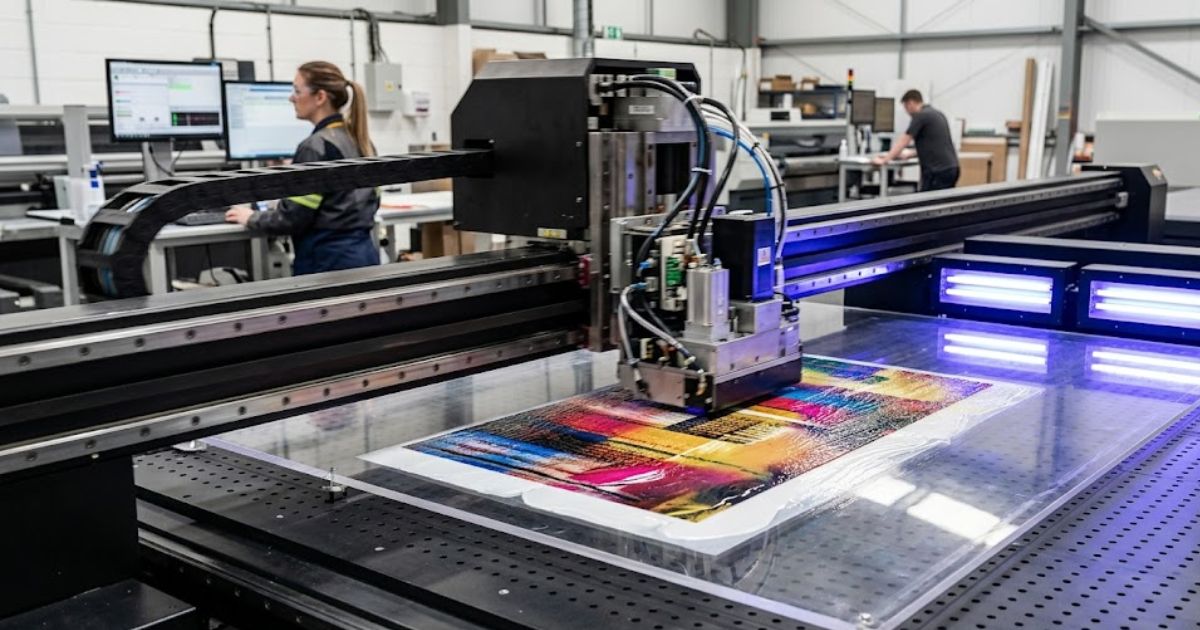
MTuTech production notes for UV printing applications
For buyers comparing UV printing applications options, the strongest ranking signal is not only the definition of the process. The page should also explain machine fit, production limits, material behavior, ink or fixture requirements, and the next page a buyer should read before requesting a quote.
Best machine fit
Use this guide together with UV Printer when the job requires stable UV output, repeatable setup, and production-ready print quality. If the work involves different shapes, materials, or order sizes, compare it with Flatbed UV Printer 2513 before choosing the final printer.
Production checklist
- Confirm the printable area, part height, and fixture or rotary requirements before quoting the job.
- Match ink, primer, and curing settings to the substrate so adhesion and scratch resistance are predictable.
- Standardize artwork preparation, white ink layers, and test prints before moving into batch production.
- Track production cost by ink use, setup time, rejects, and finishing steps instead of looking only at printer price.
Related MTuTech resources
FAQ
Which MTuTech printer should this article connect to? The best next page depends on the material, shape, and production volume. Flat products usually start with UV printer or UV Printer 9060 pages, while bottles, tumblers, and round products should connect to rotary, cylinder, tumbler, or cylindrical printer pages.
What should buyers check before ordering? Buyers should confirm print size, material compatibility, white ink needs, fixture design, curing performance, maintenance expectations, and whether the workflow supports repeatable production rather than one-off samples only.
Mechanical backlash in the print carriage shifts layers by tiny amounts each pass. Heat changes the media expansion coefficient, making the substrate grow between passes. We’ve measured shifts as small as 0.2mm that still ruined a full layer overlay tolerance job completely.
Maintain Alignment Precision That Holds
A tuned optical positioning system catches drift before the next layer fires. Encoder calibration keeps the carriage path honest across every single pass. We always check bi-directional offset values first because a temperature controlled print environment alone won’t fix a mechanical reference error.
Ink Build Strategy: How High Can You Print?
What Determines Maximum Layer Height
Ink viscosity controls how well each layer micron height holds its shape after cure. High viscosity ink stacks cleaner but raises cure shrinkage rate risks with every added pass. We’ve found the maximum safe build sits between 0.5 and 1.5mm before inter layer bond strength starts to weaken noticeably.
When Ink Stacking Fails and Why It Happens
UV polymer chain formation breaks down when layers cure unevenly under the lamp. That uneven cure creates polymer stress cracking along the edges of thick builds. Gloss differential shows up fast after the ink stacking collapse threshold gets crossed on dense texture jobs.
Production Economics of MultiLayer UV Printing
Where Does MultiLayer Printing Increase Margin?
| Application | Margin Potential |
| ADA signage | High |
| Premium packaging | High |
| Backlit retail displays | Medium–High |
| Promotional awards | High |
Commercial Applications with Highest Strategic Value
ADA signage drives consistent demand because Braille compliance is a legal requirement, not a choice. Buyers follow procurement specification alignment rules set by building codes. We’ve seen architectural glass orders come in specifically for light diffusion engineering needs on commercial lobby projects.
Luxury carton packaging uses multilayer UV to trigger brand sensory psychology at the point of touch. Retail POP display buyers request raised textures that compete for shelf attention visually and physically. Industrial control panels need layered ink for button definition, and that keeps repeat orders steady across manufacturing clients.
Workflow Optimization: How to Structure Layered Job Production
How Should You Structure Job Queues
Queue stacking logic breaks down fast without a solid file duplication strategy in place first. We always run a pre-flight validation checklist before any layered job enters the print queue. Skipping that step costs more time than the job itself ever saves.
Smart Practices That Actually Cut Errors Down
The layer preview engine catches plate mismatches before a single drop of ink fires. Run a test strip calibration early and tie your maintenance scheduling directly to multilayer job volume. We follow a strict nozzle check protocol before every high build run because one blocked nozzle shifts the whole layer preview verification result sideways.
Common Failure Points and How to Prevent Them
| Failure | Root Cause | Prevention |
| White halo effect | No choke setting | Apply 0.1–0.3pt choke |
| Ink cracking | Overbuild | Reduce pass count |
| Adhesion failure | Poor substrate prep | IPA wipe + adhesion promoter |
| Banding between layers | Cure timing imbalance | Increase inter pass delay |
Hardware Requirements for Reliable Multi-Layer Output
Printer Specifications That Actually Determine Layer Stability
Linear rail stability decides how clean each pass lands on the substrate. A shaky carriage rail drops your registration reliability fast on high build jobs. We score printers for high build suitability by checking vacuum zoning strength before anything else on the spec sheet.
An independent white channel and a dedicated varnish channel keep ink types from mixing between passes. The LED curing array must cure each layer fully before the next one fires. We always verify the height sensor system range because it directly controls layer stability variables across thick media builds.
Flatbed vs Hybrid vs Roll to Roll for Layered Jobs
| Printer Type | Best For |
| Flatbed | Rigid multilayer boards |
| Hybrid | Mixed substrate workflow |
| Roll to Roll | Backlit films |
Future Development Trends in Multi-Layer UV Technology
AI-driven alignment correction now handles real time layer shifts without any operator input. Closed loop calibration systems read each pass and self adjust before the next layer fires. We’ve watched automated height mapping cut setup time on thick substrate jobs by a wide margin.
Smart RIP diagnostics flag head performance issues before a full job run starts. Machine learning white optimization adjusts opacity settings based on past job data automatically. Predictive head maintenance and adaptive curing intensity paired with eco-friendly UV inks point to where production efficiency is clearly heading next.
Why Choose MTuTech Printer for MultiLayer UV Printing
The Mutech Printer runs on multilayer firmware support that maps directly to every mechanical risk covered above. Its precision rail system removes the carriage drift that causes layer shifts on long production runs. The built in visual positioning system catches alignment errors before they compound across passes.
Height sensor protection prevents head crashes on uneven substrates during high build jobs. The hybrid UV printer design handles both rigid and flexible media without swapping hardware configurations. Industrial stability across the full frame means your layer overlay holds tight from the first pass to the last.
FAQs
How Do You Create 3D Textures With UV Printers?
Multi-pass white stacking builds height one droplet layer at a time. A grayscale depth map controls how tall each zone grows. Varnish relief layer locks the shape after cure. Height calibration keeps every pass level and clean.
What Is the Purpose of the White Ink Layer?
White ink acts as an optical isolation barrier between the substrate and color. It blocks light from bleeding through opacity control. The underflood base it creates boosts color vibrancy enhancement on dark or clear materials significantly.
What Are the Main Applications for Multilayer UV Printing?
Multilayer UV printing works well for ADA signage, luxury packaging, and retail displays. It handles architectural glass, industrial panels, and Braille compliance jobs cleanly. We’ve run all these across commercial production floors in the United States.
What Software Controls Multilayer Printing?
Versa Works and Raster Link both manage layer sequencing through a RIP engine. The firmware integration between software and hardware decides how cleanly each pass fires. A mismatched handshake between the two breaks layer separation immediately.
What Are the Challenges in Multilayer Printing?
Layer misalignment, ink stacking collapse, and profile mismatch cause most production failures. Media expansion and cure shrinkage shift layers between passes on longer runs. We track these variables closely before any high build multilayer job starts.
Get Your MultiLayer UV Setup Reviewed by Mtutech
Our Mtutech printer specialist runs a full MultiLayer UV setup review covering layer sequence audit, RIP software configuration check, firmware version compatibility review, white ink channel validation, and dedicated varnish channel inspection. Every review includes LED curing array calibration, linear rail stability assessment, vacuum zoning strength check, height sensor system verification, and encoder calibration audit. We also cover inter-pass delay validation, layer overlay tolerance review, registration reliability check, ink stacking collapse prevention, and substrate compatibility audit.
Our team handles production job matching review, pass count configuration review, bi-directional offset calibration, profile mismatch prevention, and multilayer firmware support check. Every hybrid UV printer assessment targets white density control verification, job-specific setup alignment, reprint cost reduction, throughput per shift improvement, operational cost per job control, production margin protection, and full B2B production optimization from one single audit.