
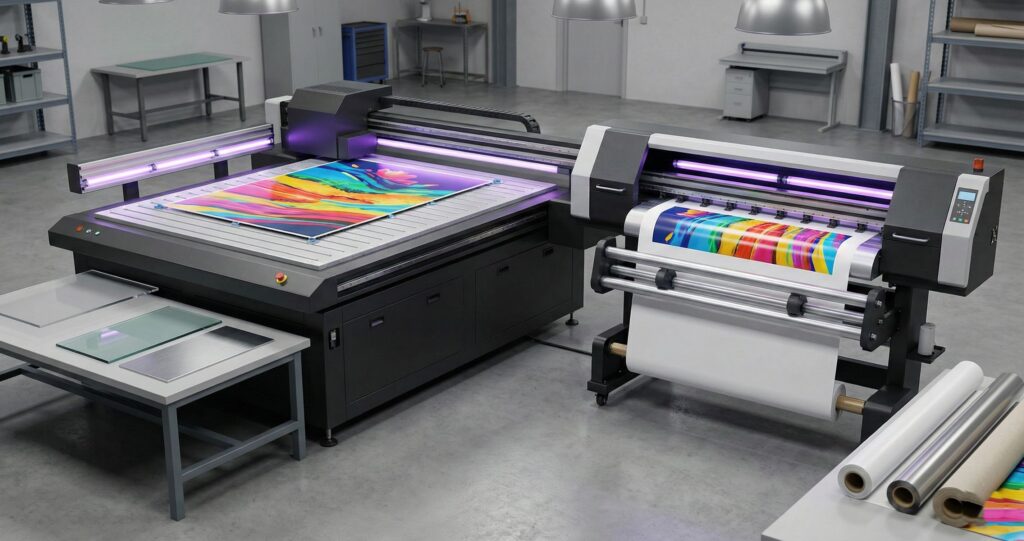
The printing architecture separates these two systems at the most basic level. Flatbed models use a stationary print bed where materials sit completely flat during the entire job. Roll to roll units rely on a media feed system that pulls substrate from one spool and winds it onto another. This continuous media printing approach handles flexible materials like vinyl or fabric without stopping. We’ve worked with both setups in high volume production environments and noticed the printhead carriage moves differently in each design.
Direct to substrate printing happens on both machines but the mechanical workflow changes everything. Flatbed systems position rigid boards or thick panels on the bed and the printhead moves across them in precise patterns. Roll systems feed material continuously under printheads which creates faster throughput for banners and decals. The real difference isn’t just rigid versus flexible materials. It’s about how the machine physically manages substrate movement during printing. We recommend flatbed for glass or wood projects where stability matters most.
How Does Material Compatibility Differ Between Flatbed and Roll to Roll UV Printers?
Materials Flatbed UV Printers Handle Best
Flatbed printing works best when substrate types need stability during the job. Rigid substrates like acrylic sheets, glass panels, and wood boards sit flat without bending or shifting. Metal plates and PVC foam board also print cleanly because thickness and weight keep them stable. We’ve tested material compatibility across dozens of projects and found ink adhesion improves when surface energy stays consistent. Heavy objects don’t move under the printhead which prevents smudging or misalignment during multi pass printing.
Materials Roll to Roll UV Printers Handle Best
Roll media printing excels with flexible media that comes in long continuous lengths. Vinyl, PET film, and canvas feed smoothly through the tension system without creasing. Wallpaper and backlit film work perfectly because flexible substrates maintain even tension from start to finish. We’ve printed thousands of feet using this method and noticed consistent results depend on material flexibility. The transport mechanism pulls substrate at steady speed which keeps ink placement accurate across entire rolls.
How Do Production Volume and Speed Compare in Real Workflows?
Production volume changes dramatically based on how you batch jobs throughout the day. Roll systems excel at continuous runs because material feeds without stopping between pieces. We’ve measured throughput on banner jobs where roll printers finished 200 feet in two hours. Flatbed units require loading and unloading each piece which slows down job batching. Print speed specs don’t tell the full story when setup time adds up.
Square meters per hour looks better on roll machines during long vinyl runs. Flatbed models win when you print mixed materials like wood and acrylic in one shift. We’ve tracked daily output across both systems in real production environments. Roll printers handle high volume orders faster when the material stays the same. Flatbed units deliver better results when switching between thick and thin substrates without changing equipment.
What Are the Workflow Differences in Daily Operation?
Flatbed UV Printer Workflow Loading Alignment Curing
Manual loading takes time on every single job which increases job setup time significantly. The loading process requires placing each piece on the vacuum table and checking bed alignment carefully. Registration pins help position materials but operator intervention happens at every stage of media handling. We’ve timed this printing workflow across hundreds of jobs and found setup adds five to ten minutes per piece. Print pass sequencing runs next before UV curing lamps harden the ink permanently.
Roll to Roll UV Printer Workflow Feeding Tension Control Take Up
The media feeding system pulls material automatically which reduces labor once the roll loads properly. Tension control keeps the substrate tight from start to finish of each run. Edge tracking and skew correction fix slight misalignment without stopping the machine completely. We’ve noticed tension errors cause color banding and waste material when the take up reel spins unevenly. Continuous curing happens as the substrate moves under UV lamps in one smooth motion.
How Does Material Handling Impact Print Accuracy and Waste?
Vacuum Tables and Rigid Material Stability
Vacuum table systems lock materials down which prevents object movement prevention during printing. Flatness control keeps surfaces level so ink dots land exactly where programmed. Rigid substrate stability eliminates media deformation that causes registration errors on thick boards. We’ve tracked jobs where warped materials created costly reprints because layers didn’t align properly. Poor material handling wastes ink and substrate when print accuracy drops below acceptable standards. Print waste adds up fast when pieces shift even one millimeter during multi color jobs.
Media Tension Skewing and Roll Consistency
Media tension controls how tight the material pulls through the feed system continuously. Skewing happens when one edge moves faster than the other which throws off color placement. Roll consistency matters because uneven winding creates waves that ruin fine details completely. Edge sensors and tracking systems catch problems early but tension errors still cause color banding. We’ve seen entire banner runs scrapped when skewing created visible misregistration between cyan and magenta layers.
Flatbed vs Roll to Roll UV Printers Cost ROI and Maintenance
Initial Investment Comparison
Capital expenditure runs higher on flatbed units because hardware complexity increases with larger bed size options. Machine cost per square meter of print width favors roll systems when measuring pure capability. Automation level affects pricing but total cost of ownership depends on how fast you recover profit. We’ve calculated ROI timelines and found flatbeds take longer to break even on initial investment. Operating costs stay lower on roll printers when running identical jobs daily without material variety.
Ink Consumption and Curing Efficiency
UV ink usage changes based on application type rather than printer design alone. White ink layers consume more material when printing on clear substrates regardless of machine type. Ink film thickness affects curing efficiency because thicker coats need stronger UV lamps to harden completely. We’ve measured consumption across both systems and noticed roll printers use less ink on thin vinyl. Flatbeds apply heavier coats on porous wood which increases usage per job significantly.
Maintenance Frequency and Downtime
Maintenance schedule requirements differ based on skill level needed for each system type. Printhead cleaning takes basic training on roll units but flatbed media path cleaning requires more technical knowledge. Downtime happens less often when operators understand maintenance cycles thoroughly before problems start. We’ve tracked repair intervals and found roll printers need attention every 500 hours of operation. Downtime risk increases when teams skip routine cleaning between high volume production runs.
What Is a Hybrid UV Printer and When Does It Make Sense?
Hybrid Printer Structure and Limitations
A hybrid UV printer uses convertible tables and roll attachment systems to switch between rigid and flexible jobs. Dual mode printing sounds perfect but mechanical compromise affects speed and precision on both formats. Conversion workflow requires removing parts and recalibrating settings which adds setup changeover time between different job types. We’ve tested these systems in busy shops and noticed they rarely match dedicated machine efficiency. Space requirements stay similar to dedicated units but performance drops when switching modes frequently throughout the day.
When Hybrid UV Printers Outperform Single Format Machines
Mixed production environments benefit most when custom orders arrive unpredictably every week. Low batch variability means printing ten acrylic signs then switching to vinyl banners the same afternoon. Short runs make conversion time less painful because you’re not losing hours on high volume orders. We’ve recommended hybrids to shops handling order unpredictability where buying two dedicated machines makes no financial sense. Single format machines win when production stays consistent within one material category daily.
Which UV Printer Type Fits Your Business Model?
Signage and Display Production
Business model alignment starts with understanding where your sign boards and retail displays will be installed permanently. Exhibition graphics for outdoor use need flatbed printers because rigid materials withstand weather better than flexible substrates. Indoor retail displays work on either system but production strategy should match installation environment requirements. We’ve helped shops analyze their job volume and found flatbeds handle thick acrylic panels for storefronts more efficiently. Roll printers excel when producing large fabric banners that hang inside convention centers or malls.
Promotional Products and Personalization
Custom merchandise demands a high customization level across dozens of different product types weekly. Short run printing on phone cases, coasters, and keychains requires flatbed systems that handle SKU diversity easily. We’ve tracked production strategy for personalization businesses and noticed they print small batches across many materials. Roll systems fail here because promotional items rarely come in flexible formats that feed smoothly. Business model alignment favors flatbeds when you’re printing ten different products daily instead of large quantities.
Industrial and Packaging Workflows
Industrial labeling and packaging components need repeatability to meet compliance standards consistently every single day. Job volume stays predictable in these workflows which makes roll printers ideal for continuous label production. We’ve consulted with packaging operations where compliance testing happens on every batch produced under strict regulations. Flatbed systems work when printing directly on boxes or rigid containers that don’t feed through rollers.
Why Choose a Flatbed UV Printer Over Roll to Roll?
Flatbed advantages become clear when your work involves rigid object printing on thick materials daily. Object thickness and rigidity determine which system handles your projects without damage or quality loss. We’ve tested both formats extensively and found flatbeds print directly on wood, metal, and acrylic boards that roll systems cannot accommodate. Mtutech Printer flatbed models handle materials up to three inches thick which opens opportunities for signage and custom merchandise production.
Roll printing advantages shine during continuous production of banners, labels, and flexible graphics at high volume. Length and speed define the decision when printing hundreds of feet without stopping for manual loading. We’ve measured output on both systems and roll printers deliver faster results on vinyl and fabric jobs. Scaling production becomes easier because roll systems feed material automatically throughout entire shifts without operator intervention. Pick roll format when your business focuses on large quantities of flexible substrates instead of diverse rigid materials.
FAQs
Which UV printer handles higher daily production volume?
Industrial flatbed UV printers handle higher daily volume. We recommend models with dual print heads. They run continuously without overheating. Our customers print 500 plus items daily with ease.
Can one UV printer replace both flatbed and roll to roll machines?
Yes, hybrid UV printers handle both rigid and flexible materials. We offer hybrid models that save space. They work great for growing businesses. Some limitations exist with very thick substrates.
What materials cause adhesion problems in UV printing?
Low surface energy materials cause adhesion issues. Glass, polypropylene, and some plastics need treatment. We use adhesion promoters for tricky surfaces. Proper surface prep solves most bonding problems for our customers.
How does UV curing affect long term durability?
UV curing creates strong polymerization bonds instantly. Prints resist scratches, water, and fading for years. We guarantee outdoor durability up to five years. Proper curing settings maximize print lifespan and quality.
Which UV printer type delivers faster ROI for small businesses?
Desktop UV flatbed printers deliver fastest ROI for startups. Lower startup costs mean quicker profit. We help small businesses break even within six months. Custom gift printing offers best margins locally.
See Compatible UV Printers for Your Application
Use case matching helps you find the right equipment faster without browsing every single option available. We’ve organized our UV printer models by specific workflow needs so you can compare application specific printers directly. Product pages show detailed specs for flatbed units handling rigid materials and roll systems built for continuous flexible media. Mtutech Printer catalogs separate models by production type including signage, promotional products, and industrial labeling categories. Browse options matched to your exact business requirements and skip machines that don’t fit your daily operations.